
Next.js Best Practices for Scalable Apps

Sandor Farkas
Founder & Lead Developer
Expert in software development and legacy code optimization
LinkedIn
High-traffic Next.js apps do not scale only because of infrastructure. They scale because the architecture, rendering strategy, data layer, and observability are designed together. This guide distills best practices and practical patterns we use on production systems, so your teams can build scalable applications that ship quickly now and keep performance predictable as you grow.
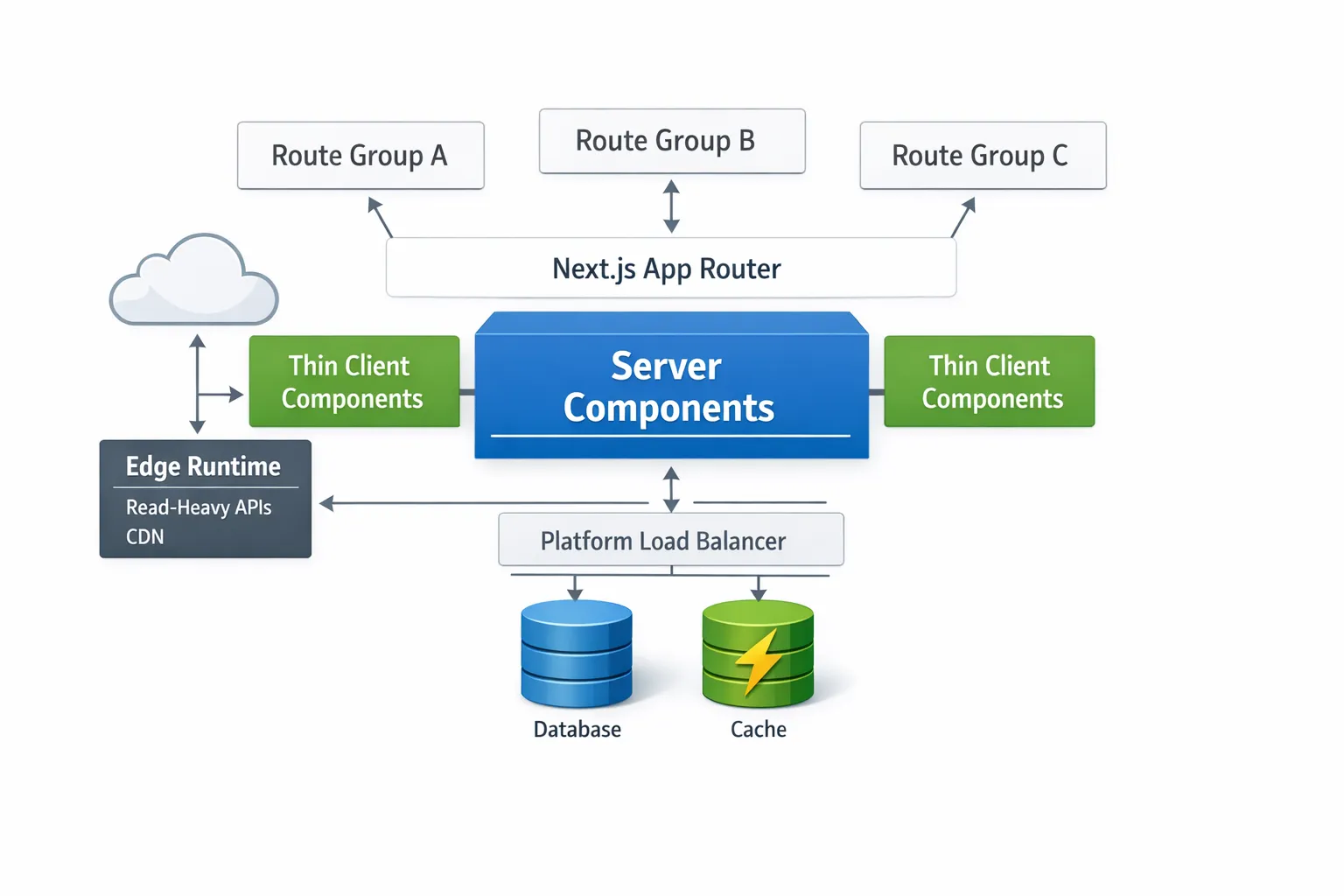
Design the architecture for scale first
Next.js pushes you toward the App Router and React Server Components, which is exactly what you want for scale.
- Default to server components. Most UI can render on the server, which reduces bundle size and improves time to interactive.
- Keep client components thin. Only opt in with the
use clientdirective when you truly need interactivity, browser APIs, or local state. - Model your app with route groups and clear module boundaries. Treat each segment like a feature module to contain dependencies and prevent shared-state coupling.
Example of a modular folder layout that scales with teams:
app/
  layout.tsx
  (marketing)/
    page.tsx
  (app)/
    dashboard/
      page.tsx
      analytics/
        page.tsx
      settings/
        page.tsx
  api/
    products/route.ts
lib/
  db/
  services/
  validations/
Reference: review the modern App Router before committing your structure, see the Next.js App Router docs.
Choose the right rendering and caching strategy per route
One size never fits all. Assign a rendering mode based on data volatility and UX expectations, then document that decision in code. Use export const dynamic, revalidate, and fetch cache options to encode the choice in each route.
| Strategy | Best for | Scaling benefit | Watch out |
|---|---|---|---|
| Static Generation | Marketing pages, docs, pricing that change rarely | Zero server cost on hit, maximum CDN offload | Build size and rebuild time, plan for invalidation |
| Incremental Static Regeneration | Catalogs, blogs, dashboards with tolerable staleness | Efficient refresh, avoids full rebuilds | Pick realistic revalidate intervals and invalidation tags |
| Streaming SSR | Personalized or data-heavy views | Faster first paint with progressive hydration | Requires careful Suspense boundaries and loading states |
| Client-side Rendering | Highly interactive, user-specific widgets | Offloads compute to the browser | Larger bundles, slower on low-end devices |
| Edge Runtime | Read-heavy APIs, geo-sensitive content | Lower latency and global scale | Prefer HTTP-based DB or caches, avoid heavy CPU |
Deep dive on caching controls: Next.js caching docs, and our guide to revalidation patterns in Next.js 15 and 16.
Treat data fetching and mutations as a first-class design
- Standardize fetch semantics. Always specify caching and revalidation so runtime behavior is explicit.
- Use tag-based invalidation for precise control across routes and components.
- Prefer Server Actions for mutations that update data and invalidate caches in one step, keeping logic on the server.
Example: fetch with tags and revalidate via a Server Action
// app/products/page.tsx
import { revalidateTag } from 'next/cache';

export default async function ProductsPage() {
  const products = await fetch('https://api.example.com/products', {
    next: { revalidate: 60, tags: ['products'] },
  }).then(r => r.json());

  return (
    <ul>{products.map(p => <li key={p.id}>{p.name}</li>)}</ul>
  );
}

// app/products/actions.ts
export async function updateProduct(id: string, payload: unknown) {
  'use server';
  // ...perform mutation against your API or DB
  revalidateTag('products');
}
Add timeouts so a slow upstream does not stall your render:
await fetch(url, { signal: AbortSignal.timeout(5000), cache: 'no-store' })
For in-app APIs that other services consume, implement route handlers with strict validation and predictable status codes. See Route Handlers.
Optimize for performance before you add servers
- Keep client bundles small. Limit
use client, prefer server components, and avoid leaking environment variables to the client. - Dynamically import heavy, non-critical UI.
import dynamic from 'next/dynamic'
const HeavyChart = dynamic(() => import('./HeavyChart'), { ssr: false })
- Stream long-running sections with Suspense to improve perceived speed. Start rendering as soon as possible and reveal late data progressively.
- Optimize images and media. Use
next/image, set accuratesizes, and prefer modern formats. See Image Optimization. - Load third-party scripts responsibly. Use
next/scriptwithstrategy="afterInteractive"orlazyOnloadand measure the cost of each script. - Adopt performance budgets. Track bundle size, LCP, INP, and CLS on every PR, then block merges when budgets are exceeded. Learn the metrics at Core Web Vitals.
Pick the right runtime per route
Next.js lets you choose Node.js or Edge per route to match workloads.
- Edge runtime is ideal for cacheable reads, geo-specific content, feature flags, and low-latency personalization.
- Node.js runtime fits heavy compute, large dependencies, or drivers that need Node APIs.
// app/api/geo/route.ts
export const runtime = 'edge' // or 'nodejs'
If you run at the edge, prefer HTTP-driven databases or caches. If you run on Node.js, use connection pooling and avoid opening new connections on every request. Create a single DB client instance per process and reuse it across handlers.
Strengthen reliability with instrumentation and guardrails
- Add tracing and logs. Use OpenTelemetry to instrument server work, then export traces to your APM of choice. Start with request IDs and span boundaries for fetches and DB calls. The OpenTelemetry project has a solid getting-started guide, see the OpenTelemetry docs.
- Expose business KPIs as metrics. Track cache hit rate, ISR revalidation counts, and queue backlogs, not only CPU and memory.
- Build backpressure into every integration. Timeouts, retries with jitter, and circuit breakers prevent cascading failures.
- Embrace graceful degradation. Provide skeletons and cached fallbacks when live data is unavailable.
Security that scales with traffic
- Enforce a strict Content Security Policy and lock down script origins. Prefer
nonceorsha256for inline scripts when needed. - Keep secrets server-side. Only expose values with the
NEXT_PUBLIC_prefix when they are safe for clients. - Validate every input at the edge. Use a schema validator in route handlers and Server Actions.
- Set secure cookies with
HttpOnly,Secure, andSameSiteattributes. Avoid localStorage for sensitive tokens. - Rate limit public endpoints and add abuse detection to sign-in and sign-up flows.
CI/CD, builds, and environments
- Cache builds and tests. Monorepos with Turborepo or a similar system reduce redundant work and accelerate feedback.
- Run smoke and E2E tests against ephemeral preview environments for each PR.
- Version routes and APIs explicitly. Deprecate old versions with telemetry, not guesses.
- Separate environment configs clearly. Keep production immutable and test release candidates under realistic traffic and data.
Data layer patterns for scale
- Introduce a read cache. Place Redis or a managed key-value store in front of your primary database for read-heavy queries.
- Use tag-based invalidation end to end. Route segments, fetch calls, and caches should share the same tags to avoid stale reads.
- Normalize responses and centralize mappers in
lib/. Keep raw adapter logic separate from UI components. - Batch requests where possible, or cache per-request with memoization so repeated server calls in the same render are collapsed.
Migration notes for teams moving from the Pages Router
Incrementally adopt the App Router. Start with leaf routes that benefit most from server components and streaming. Keep behavior identical to avoid scope creep, then retire legacy pages as you move features across. The Next.js App Router docs include patterns that make mixed routing viable during transition.

A quick, practical checklist
- Each route declares its rendering mode and cache policy.
- Server components by default, client components are opt in and small.
- Long operations stream behind Suspense with useful skeletons.
fetchcalls have timeouts, retries, and tags for invalidation.- Mutations use Server Actions or typed route handlers with validation.
- Images use
next/imagewith correctsizesand responsive dimensions. - Third-party scripts are measured, deferred, or removed.
- Edge is used for read-heavy and geo-sensitive endpoints, Node.js for heavy compute.
- Observability is on from day one, with traces and business metrics.
- Security headers, CSP, and secret management are enforced in every environment.
Where Wolf-Tech can help
Scaling is not only about knobs in next.config.js. It is about making the right architectural calls before the code grows, and enforcing those decisions through tooling, tests, and CI. If you want an experienced partner to review your architecture, establish performance budgets, or co-build critical features, our team can help.
- Architecture and code quality audits for Next.js
- Rendering and caching strategy design
- Legacy modernization into the App Router
- Cloud, database, and CI/CD foundations for scale
Talk to us at Wolf-Tech. We bring full-stack expertise, cloud and DevOps experience, and a practical approach to building systems that last.
Further reading from the source:
- Next.js App Router docs
- Caching and Revalidation
- Route Handlers
- Edge and Node.js runtimes
- Image Optimization
- Core Web Vitals
- OpenTelemetry docs