
Software Customize vs Configure: A Buyer’s Guide

Sandor Farkas
Founder & Lead Developer
Expert in software development and legacy code optimization
LinkedIn
Most software buying mistakes are not about picking the “wrong vendor.” They happen because teams pick the wrong change mechanism.
If you treat a product as configurable when it really needs custom behavior, you end up with workarounds, spreadsheets, and unhappy users. If you customize when configuration would do, you inherit upgrade pain, security exposure, and long-term maintenance cost.
This guide helps you decide, with buyer-grade definitions, examples, a decision matrix, and contract-level questions you can use in evaluation.
The real difference: configure changes behavior, customize changes code (or ownership)
In practice, “configure vs customize” is about who owns the change and how it survives upgrades.
What “configure” means
Configuration changes behavior using mechanisms the vendor designed to be safe and upgradeable.
Common configuration surfaces include:
- Settings and policy toggles
- Roles and permissions (RBAC)
- Workflow rules (if X then Y)
- Custom fields and forms
- Templates (documents, emails, notifications)
- Reporting layouts and dashboards
- Basic integrations via supported connectors
Buyer reality: configuration is not “free.” It still needs design, testing, and governance. But it is typically predictable and upgrade-friendly.
What “customize” means
Customization changes behavior beyond the vendor’s intended configuration model.
Customization can take several forms:
- Extensions/plugins that run inside the product’s extension points
- Custom apps built on top of a platform (for example, building a domain app on a PaaS)
- Middleware and custom integrations that reshape processes and data
- Forks or source changes to the vendor product (common in self-hosted, open source, or heavily modified on-prem)
Buyer reality: the moment your solution depends on code you own (or a partner owns for you), you have created a software asset that must be operated, secured, upgraded, and staffed.
A useful mental model: levels of customization
Not all customization carries the same risk. The higher you go, the more you own.
| Level | Example | Typical upgrade risk | Typical ownership load |
|---|---|---|---|
| 0 | Out-of-the-box defaults | Low | Low |
| 1 | Vendor configuration (settings, fields, rules) | Low | Low to medium |
| 2 | Supported extensions/plugins | Medium | Medium |
| 3 | External integration layer (custom services, iPaaS, ETL) | Medium to high | Medium to high |
| 4 | Source modifications or forks | High | High |
If a vendor says “we’re highly configurable,” ask: what level are we talking about, and what breaks on upgrade?
Configure vs customize: which one should you prefer?
Prefer configuration when the workflow is standard (or can be standardized)
Configuration wins when:
- The business process is common across your industry
- The product already supports your key entities and relationships
- You can accept “80 percent fit” without introducing risky workarounds
- The vendor provides strong admin tooling, audit logs, and permissioning
- You expect frequent vendor upgrades and want to stay current
A good test is: Can we describe our target process without referencing our org chart? If yes, it is often standardizable, and configuration can be enough.
Prefer customization when the workflow is a differentiator (or a constraint is non-negotiable)
Customization is justified when:
- The workflow is a competitive advantage (how you sell, price, fulfill, underwrite, schedule, or dispatch)
- You have hard constraints (regulatory, safety, auditability, unique data retention)
- Integration is the product (your system must orchestrate many tools reliably)
- The vendor’s data model cannot represent your domain without hacks
Be careful with “we’re unique” claims. Many organizations are not unique, they are inconsistent. Customization should support intentional differentiation, not accidental complexity.
A buyer’s decision matrix (use this in stakeholder reviews)
Use the matrix below to make the decision explicit, and to avoid debates based on taste.
| Decision factor | Configuration is usually best when… | Customization is usually best when… |
|---|---|---|
| Business differentiation | You are matching market norms | You are encoding a differentiator |
| Upgrade cadence | You want vendor updates monthly/quarterly | You can manage a controlled upgrade cycle |
| Security and compliance | You want vendor-managed controls | You need custom controls, evidence, or workflows |
| Data model fit | Entities map cleanly to product concepts | Core entities do not fit without distortion |
| Integration complexity | Few systems, simple connectors | Many systems, custom orchestration and contracts |
| Internal engineering capacity | Small team, prefer admin-led changes | You can staff build, test, operate, and on-call |
| Time to value | You need value in weeks | You can invest in a build phase |
| Long-term cost (TCO) | You want predictable subscription + admin cost | You accept build and lifecycle cost for control |
If you are split, default to configuration first and prototype the “hard part” as a thin vertical slice before committing to deeper customization.
Hidden costs that make “custom” more expensive than it looks
Customization cost is rarely the first build. The real cost is what follows.
1) Upgrade friction (and upgrade fear)
If you customize deeply, upgrades become projects. Some teams stop upgrading, then security and compatibility risk piles up.
Questions to ask vendors (and your implementation partner):
- What breaks when the platform version changes?
- Do you provide upgrade test tooling or compatibility checks?
- Can we run both versions in parallel for a period (migration support)?
2) Reliability and operability
A customized solution has operational requirements: monitoring, error budgets, incident response, rollback, and production access controls.
If the vendor pitch does not include operability, you are buying risk.
3) Custom integration maintenance
APIs change, tokens expire, data contracts evolve, and “small mappings” become business-critical pipelines.
A strong integration strategy needs:
- Explicit API/data contracts
- Versioning rules
- Replay and idempotency for failure recovery
- Ownership for each integration boundary
4) Talent and continuity risk
If only one person (or one agency) understands the customization, you have a continuity problem.
Mitigation looks like:
- Living documentation (runbooks, contracts, decision records)
- Automated tests and CI quality gates
- Clear ownership and handover expectations
A practical evaluation workflow (without analysis paralysis)
Step 1: classify the capabilities you are buying
Split requirements into:
- Commodity capabilities: HR, accounting basics, standard CRM activities, generic ticketing
- Differentiating capabilities: pricing logic, routing/dispatch, underwriting rules, proprietary workflows
- Risk capabilities: identity, auditability, data retention, payments, safety and compliance
Commodity wants configuration. Differentiation may justify customization. Risk capabilities require proof, not promises.
Step 2: demand a “proof of fit” for the top 2 workflows
Instead of long demos, ask for a short, testable proof:
- A configured workflow in a sandbox, with your roles and sample data
- A realistic edge case (cancellations, partial refunds, overrides, approvals, offline, etc.)
- A measurable non-functional target (for example, response times, audit logs, throughput)
If the proof requires heavy customization, that is not automatically bad. It just changes the commercial and technical plan.
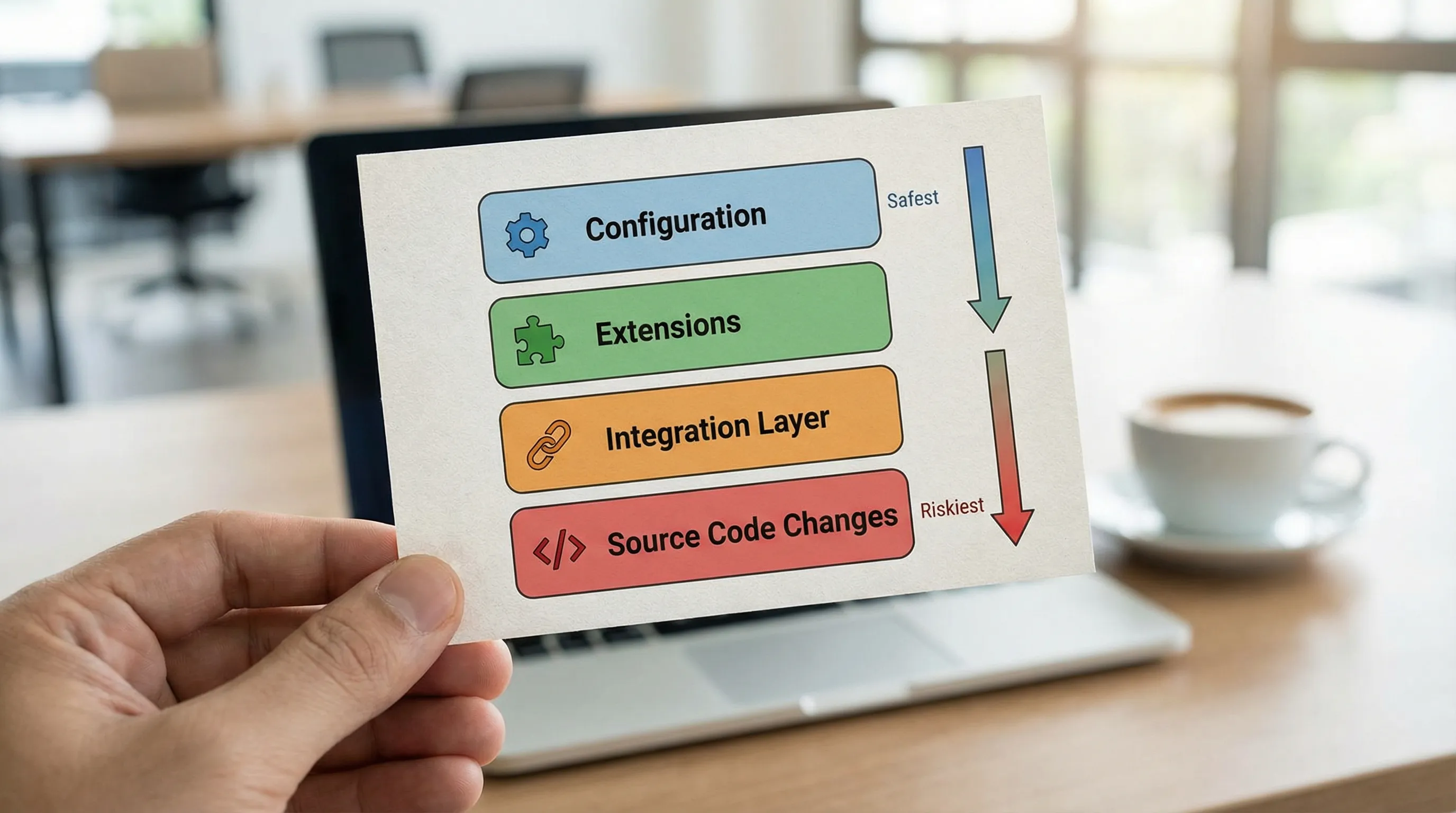
Step 3: choose the lowest-risk change mechanism that satisfies the outcome
Use this ordering:
- Configuration
- Supported extension points
- External integration layer
- Source modifications
If you must go to the last two, treat it like building software, because that is what it becomes.
Real-world analogy: buying standardized assets, then modifying only when it pays back
A good procurement mindset is to start from standardized, proven units, then customize only where it changes the outcome.
For example, when companies need physical storage or on-site space fast, they often start by purchasing standard shipping container sizes, then add modifications (doors, insulation, shelving) only where needed. If you are exploring that route, you can see what standardized options look like when you buy shipping containers online.
Software works similarly: buy or configure “standard units” where possible, customize only where it produces measurable advantage.
Contract and governance guardrails (what to put in your SOW)
Whether you configure or customize, buyers should make these items explicit:
Define what “done” means
Include acceptance criteria that are testable:
- Functional behavior (including unhappy paths)
- Security requirements (roles, least privilege, audit trail)
- Performance budgets (latency, batch windows)
- Operability (logging, metrics, alerting, runbooks)
Clarify upgrade responsibilities
Customization without an upgrade plan is a trap. Specify:
- Who owns upgrades
- How often you upgrade
- What “upgrade-ready” evidence looks like (tests, compatibility checks)
Preserve exit options
Avoid lock-in surprises by requiring:
- Data export formats and frequency
- API access terms and rate limits (if relevant)
- Ownership of custom code and documentation
- A handover plan (repos, CI, secrets management process, runbooks)
When “configure only” is the wrong rule
Some organizations set a blanket policy: “no customization.” That usually fails in one of two ways:
- Teams build shadow systems in spreadsheets and low-code tools.
- The organization accepts a process that undermines its differentiators.
A better rule is: no customization without a measurable business case and an upgrade plan.
Frequently Asked Questions
Is customization always bad? No. Customization is often the right move for differentiating workflows or non-negotiable constraints. It is only “bad” when you do it without lifecycle ownership (upgrades, security, operability).
Is configuration always cheaper than customization? Usually, but not always. Complex configuration can become fragile, hard to reason about, and expensive to administer. If configuration becomes a maze of rules, a small, well-tested custom component can be cheaper long-term.
What’s the biggest red flag during vendor evaluation? When the vendor says “anything is possible” but cannot explain upgrade impact, testing strategy, or who owns operational reliability.
Can we start with configuration and add customization later? Often yes, and it is a strong default. The key is to design integrations and data contracts intentionally so later customization does not force a rewrite.
How do we decide which parts to customize first? Start with the workflows that are both high-value and high-risk: the ones that drive revenue, cost, compliance exposure, or user adoption, and validate them with a thin end-to-end proof.
Need a second opinion before you commit?
If you are deciding whether to configure a platform or build custom extensions, Wolf-Tech can help you de-risk the decision with a practical fit assessment, a thin-slice proof plan, and architecture and code quality guidance.
Explore Wolf-Tech’s consulting and development capabilities at wolf-tech.io and bring your top two workflows and constraints. We will help you choose the lowest-risk path that still delivers the outcomes you need.