
What Is a Web Application? Simple Guide

Sandor Farkas
Founder & Lead Developer
Expert in software development and legacy code optimization
LinkedIn
Web applications power most of the tools you use every day, from email and banking to project management and customer portals. This guide explains what they are, how they work, and what to consider before building one. If you open it in a browser and do more than read information, you are likely using a web application.
The simple answer
A web application is interactive software you access through a web browser. It combines a front end that runs on your device (HTML, CSS, JavaScript) with a back end that runs on servers and talks to databases and other services. Unlike a brochure-style website, a web application lets users sign in, submit data, perform actions, and receive dynamic results.
Website vs. web application: what is the difference?
| Aspect | Website | Web application |
|---|---|---|
| Primary purpose | Publish information | Enable users to do tasks and manipulate data |
| Interactivity | Low, mostly read-only | High, create, read, update, delete data |
| Personalization | Minimal | Often personalized after login |
| Data storage | Limited or none | Stores and processes user and business data |
| Complexity | Simpler architecture | Client, server, APIs, databases, integrations |
| Examples | Blog, documentation, marketing site | Banking portal, e-commerce, dashboards, CRMs |
How a web app works (in plain English)
- You open the app in a browser and load the user interface.
- You take an action, for example search, upload, or save.
- The browser calls an API on the server over HTTPS.
- The server validates input, runs business logic, and queries a database.
- The server responds with data, usually JSON.
- The browser updates the page without a full reload.
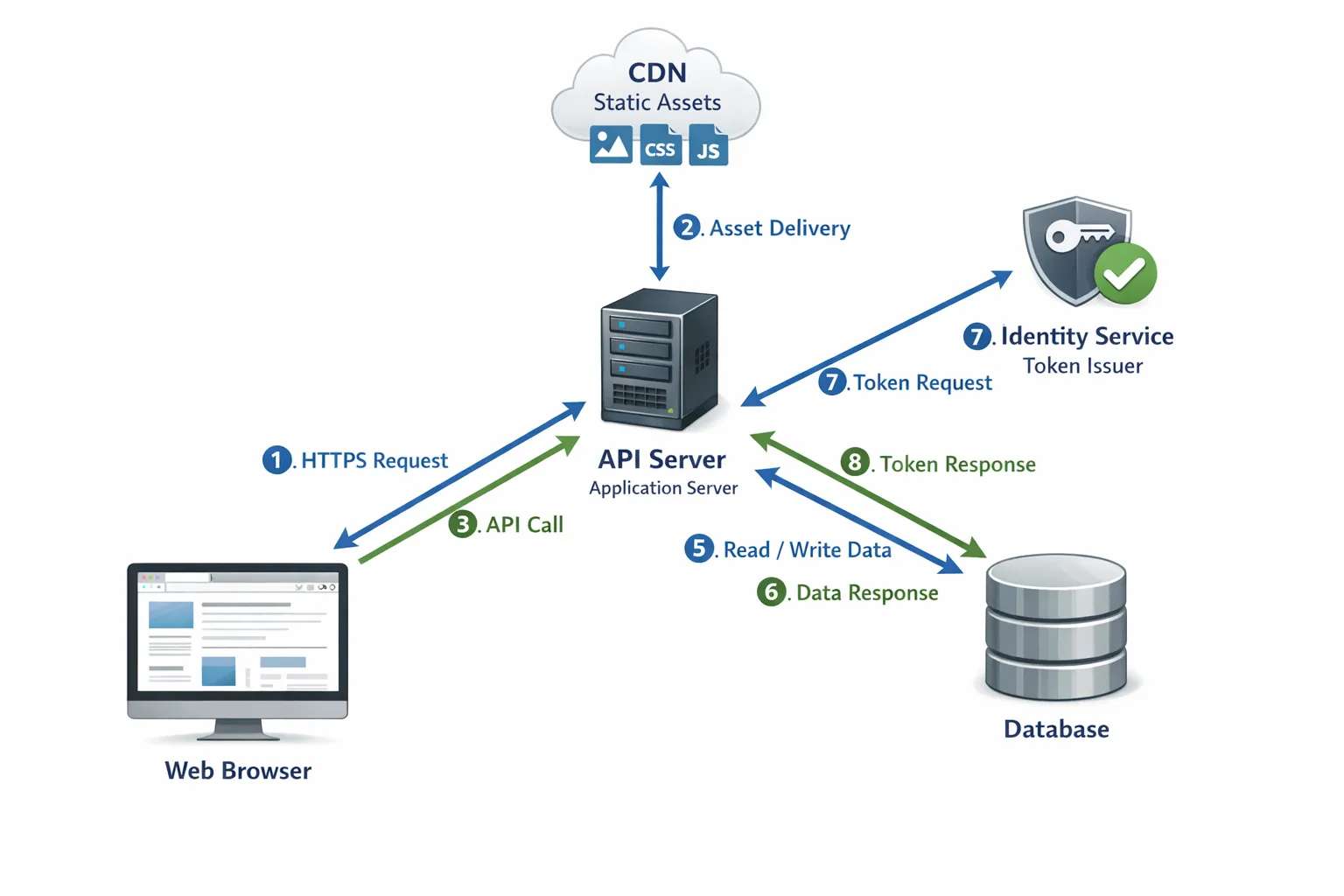
If you want a deeper technical primer on the client and server roles, the overview from MDN is a solid read: Introduction to the server side.
The main types of web applications
- Single-page applications, load a shell once and update views dynamically using frameworks like React or Vue.
- Multi-page applications, traditional page-per-view model with server-rendered pages.
- Progressive Web Apps, installable in the browser, support offline, push notifications, and app-like behavior. Learn more at What are PWAs.
- Portal and dashboard apps, authenticated areas that surface data, analytics, and workflows for customers or staff.
- E-commerce apps, catalogs, carts, checkout, payment, and order management.
- Content apps, editors and workflows for teams that produce and approve content.
The right style depends on your use case, performance goals, and team expertise.
Examples and use cases for businesses
- Customer self-service portals, orders, invoices, subscriptions, support tickets.
- Internal tools, operational dashboards, inventory, logistics, and finance workflows.
- Field apps, data collection and offline-friendly experiences for on-site teams.
- Data and analytics products, interactive reporting with role-based access.
- Marketplaces, multi-tenant platforms that connect buyers and sellers.
- Partner and API hubs, developer portals, documentation, keys, and usage analytics.
Benefits and trade-offs of web apps
Benefits:
- Cross-platform reach, any modern browser on desktop and mobile.
- No installation friction, updates ship from the server instantly.
- Lower distribution cost, compared with native app stores in many cases.
- Composability, integrate with APIs, identity providers, and cloud services.
Trade-offs:
- Network dependency, offline features require extra design.
- Browser and device variability, testing matters across viewports and engines.
- Security surface area, you must guard both client and server, as well as APIs and data stores.
- Performance tuning, large bundles or chatty APIs can slow down the experience.
Key decisions before you build
- Outcomes, which user problems and business KPIs will the app move.
- Core workflows, the smallest set of tasks that deliver value.
- Data model, the entities and relationships you need to store and query.
- Integrations, payments, email, identity, CRM, ERP, data sources, and analytics.
- Compliance, privacy and regulatory needs like GDPR, HIPAA, SOC 2, or PCI.
- Hosting and operations, cloud provider, containers, CI/CD, observability, and backup.
- Accessibility, support for keyboard navigation and screen readers from day one.
Security, performance, accessibility, and reliability essentials
- Security, protect data and users with authentication, authorization, input validation, secrets management, and dependency hygiene. The OWASP Top Ten is a practical checklist of common risks to address.
- Performance, fast apps convert better and cost less to operate. Measure Core Web Vitals like LCP, INP, and CLS. See web.dev/vitals.
- Accessibility, inclusive design is required in many jurisdictions, and it expands your market. Follow WCAG 2.2.
- Reliability, design for failures, use health checks, rate limits, retries, timeouts, and progressive backoff. Backup and test restore procedures.
Build vs. buy
Buy SaaS when:
- Your needs are common, for example email marketing or standard CRM.
- Speed to value matters more than deep control.
- Vendor integrations match your stack and compliance needs.
Build custom when:
- Your workflows are unique and drive competitive advantage.
- You need domain-specific logic, data models, or performance that off-the-shelf tools cannot deliver.
- You must own the roadmap, data residency, or integration depth.
Many teams start with SaaS and build custom components around it, then replace pieces over time as requirements evolve.
Tech stack at a glance
- Front end, HTML, CSS, and JavaScript with modern frameworks like React, Vue, or Svelte. Server-side rendering or hydration can improve perceived speed and SEO.
- Back end, Node.js, Python, Ruby, .NET, Go, or Java, chosen based on team skills, ecosystem, and performance needs.
- Databases, relational stores like PostgreSQL or MySQL, document stores like MongoDB, plus caches like Redis for speed.
- APIs, REST or GraphQL, secured with OAuth or JWT, documented with OpenAPI.
- Cloud and DevOps, containers, IaC, CI/CD, logging, metrics, tracing, and alerting.
A practical development approach
- Discovery, align on outcomes, users, workflows, and success metrics.
- Architecture, define data flows, integration points, and a security model.
- Prototype, validate the core user flow with a thin slice of functionality.
- Implementation, deliver features in small increments behind feature flags.
- Quality, automated tests, code reviews, and accessibility audits.
- Launch, staged rollouts with monitoring and error budgets.
- Iterate, ship continuous improvements using product analytics and user feedback.
What influences cost and time
- Scope, number of roles, workflows, and integrations.
- Quality depth, security hardening, test coverage, and accessibility standards.
- Data complexity, schema design, migration needs, and reporting.
- Performance and scale, traffic patterns, concurrency, and global reach.
- Compliance, audits, policies, and evidence collection.
- Team and process, availability of product management, design, and engineering.
Common pitfalls to avoid
- Starting with a long feature list, instead of a minimal, testable slice.
- Ignoring performance budgets, then fighting slow pages late in the project.
- Treating security as a final check, rather than a design constraint.
- Skipping accessibility until after launch, fixing later is more expensive.
- Underestimating ongoing maintenance, dependencies and browsers change constantly.
A short getting-started checklist
- Define one primary user and one primary outcome.
- Sketch the top three screens and the data needed on each.
- List the external systems you must integrate.
- Decide how users sign up, sign in, and recover accounts.
- Choose an initial performance budget and monitoring plan.
- Write a brief risk list and mitigation plan.
Need help turning the idea into a working web app?
With over 18 years of experience, Wolf-Tech helps organizations plan and build production-grade web applications. Our team offers full-stack development services, code quality consulting, legacy code optimization, custom software and web application development, cloud and DevOps expertise, and database and API solutions. If you want pragmatic guidance on stack choices, security, performance, and a roadmap that maps to business outcomes, we would love to talk.
If you are exploring whether to build or buy, or you want a second opinion on architecture and cost drivers, get in touch. We can start with a short assessment, identify quick wins, and help you chart the next steps with confidence.