
React Next JS: When to Use Server Components

Sandor Farkas
Founder & Lead Developer
Expert in software development and legacy code optimization
LinkedIn
Server Components are one of the biggest practical shifts in how modern React applications are built, especially in Next.js App Router, where they are the default. But “default” does not mean “always the right choice”. The teams that get the most value from React Server Components (RSC) treat them as an architectural tool to reduce client JavaScript, tighten security boundaries, and make data fetching predictable, without accidentally killing interactivity or creating performance bottlenecks.
This guide explains when to use Server Components in React Next JS, when not to, and how to pick boundaries that scale with real product complexity.
What Server Components are (in Next.js terms)
In Next.js App Router, a component is a Server Component unless you add the "use client" directive.
- Server Components render on the server (Node.js runtime, or Edge with constraints), can access server-only resources (databases, private APIs, secrets), and do not ship their module code to the browser.
- Client Components render on the client (after hydration), can use React hooks like
useStateanduseEffect, handle browser events, and can use browser-only APIs.
Server Components can include Client Components, but not the other way around (a Client Component cannot import a Server Component).
For official references, see the Next.js Server Components documentation and the React Server Components overview.
The real goal: ship less JavaScript without losing product behavior
Most teams adopt Server Components for one of these reasons:
- Performance: less JS sent to the browser usually improves real user experience, especially on low-end devices (often reflected in Web Vitals like INP and LCP). Google’s Core Web Vitals remain a useful shared language for performance targets.
- Security and compliance: you can keep secrets and privileged data access server-side, and ship only the minimum needed to the browser.
- Developer ergonomics: easier data access patterns (fetch on the server near the UI), fewer client-side data loading states for simple pages.
The trap is treating RSC like “SSR but better”. You still need to design for caching, network round trips, and clear boundaries.
When to use Server Components (high-signal scenarios)
1) Pages that are data-heavy and mostly read-only
If a route is primarily about reading data (catalogs, dashboards, reporting views, knowledge bases), Server Components are usually a win.
Why:
- You can fetch data on the server, render HTML, and stream content.
- You avoid shipping data-fetching libraries and large UI dependencies to the client when you do not need them.
A good mental model is “server renders the view, client only enhances what must be interactive”.
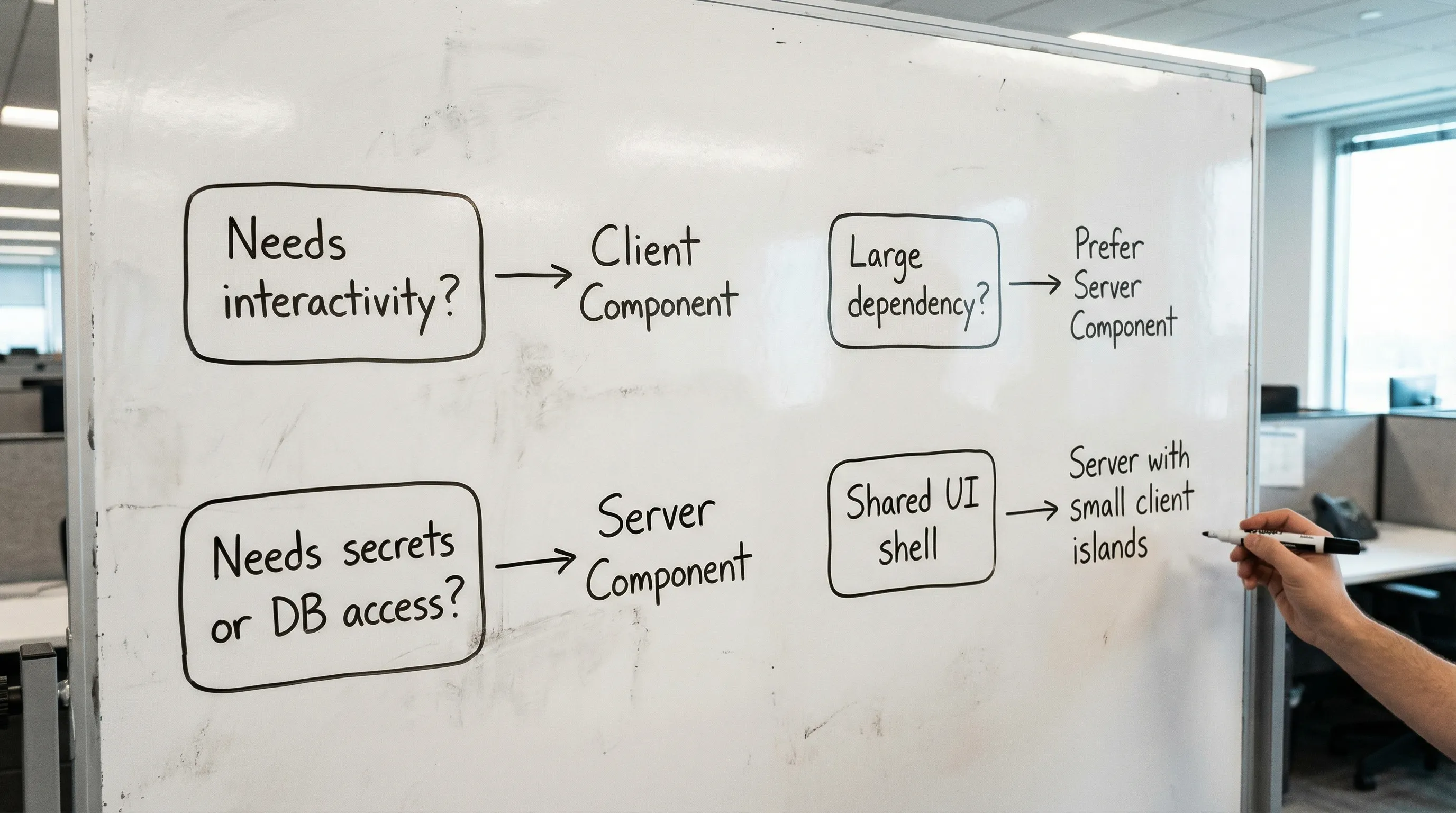
2) Any UI that depends on secrets, privileged access, or server-only SDKs
If the UI requires:
- database queries (Postgres, MySQL, MongoDB)
- calling private services with credentials
- accessing server-only SDKs
then Server Components are often the cleanest boundary.
This reduces accidental leakage of:
- API keys and service tokens
- internal endpoint shapes
- over-permissive client-side data access
If you are building multi-tenant B2B SaaS, this also helps you keep authorization logic closer to the data. You still need good access control, but you reduce the surface area.
3) You want to reduce bundle size by keeping heavy modules off the client
Server Components do not ship their code to the browser. That matters when you have heavy dependencies like:
- markdown parsing
- data transformation
- large SDKs for internal services
Even if a page needs some interactivity, you can keep most of the heavy lifting server-side and isolate a smaller Client Component for interactions.
4) You need better caching and revalidation discipline per route
With App Router, server rendering often pairs naturally with Next.js caching primitives (for example, fetch caching, revalidate, tag-based invalidation). When the server is the place where data is fetched, caching tends to be easier to reason about and enforce.
This is especially helpful when product teams ask for:
- “This page can be 60 seconds stale.”
- “This dashboard must always be fresh.”
- “This list can be cached, but mutations should invalidate it.”
If you need a deep dive on route-level caching patterns, Wolf-Tech’s Next.js App Router guide covers production patterns in more detail: Next JS React: App Router Patterns for Real Products.
5) You want streaming UI for slow data sources
Server Components + Suspense enable streaming portions of the UI as data resolves. This can improve perceived performance when:
- one query is fast, another is slow
- you need to show partial UI early
Streaming does not remove the need for good backend performance, but it can change the UX from “blank screen” to “progressively useful”.
When you should not use Server Components (or should use them carefully)
1) Highly interactive, stateful experiences
If your UI is essentially an application running in the browser (rich editors, complex drag-and-drop, realtime canvases, heavy local state, offline-first workflows), you will end up using many Client Components.
Server Components can still be used for the outer shell or initial data, but forcing RSC into deeply interactive surfaces often adds complexity with little payoff.
2) You need browser-only APIs or client-only libraries
If you require:
window,document,localStorage- browser-only analytics hooks
- UI libraries that assume browser runtime
then you need a Client Component boundary.
A practical heuristic: if it needs useEffect, it is a Client Component.
3) Ultra-low-latency edge-only constraints conflict with your server dependencies
Server Components can run in the Edge runtime, but the Edge runtime has constraints (not all Node.js APIs are available). If your data access relies on Node-specific libraries, you may need Node runtime.
This is not a deal breaker, but it is an explicit architecture choice. Treat it like any other non-functional requirement.
4) You are trying to “fix” a slow backend by moving logic into the server render
Putting more logic into Server Components can increase server work per request. If your p95 latency is already stressed, moving expensive transforms into the render path can make things worse.
Use Server Components to reduce client JS and improve data access safety, but still measure backend performance and caching.
A decision table for Server vs Client Components
Use this table to choose boundaries intentionally.
| Requirement or constraint | Prefer Server Components | Prefer Client Components |
|---|---|---|
| Needs click handlers, local UI state, effects | No | Yes |
| Needs DB access, secrets, private service calls | Yes | No |
| Page is mostly read-only content | Yes | Sometimes |
| Must minimize shipped JS and bundle size | Yes | No |
| Uses browser-only APIs or client-only libraries | No | Yes |
| Needs frequent realtime updates in the browser | Sometimes (for initial render) | Yes |
| Wants streaming UI while fetching data | Yes | Not required |
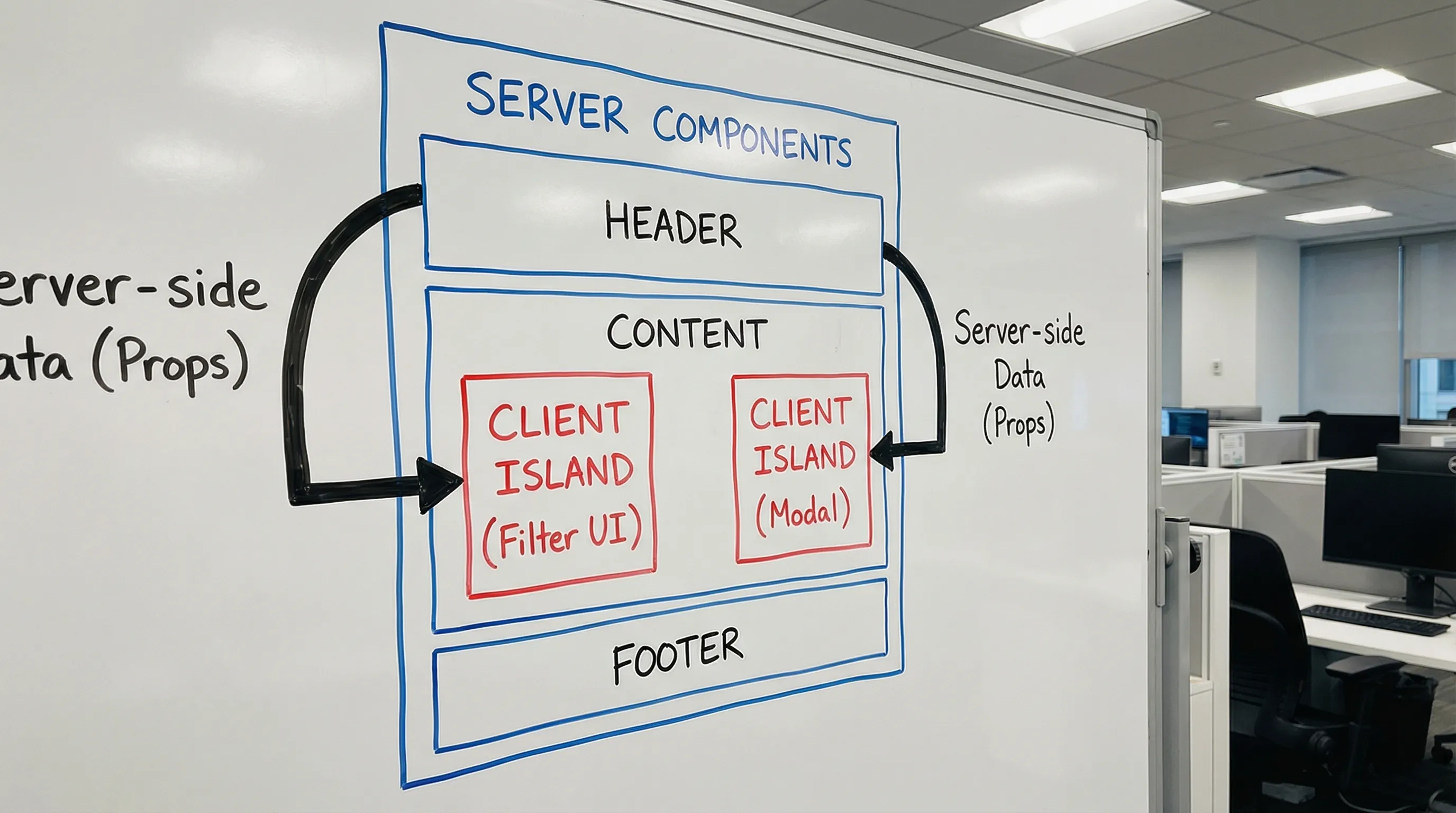
The best production apps usually look like: Server Components for composition and data, Client Components as small “islands”.
Boundary patterns that work well in real products
Pattern 1: Server-first pages with leaf Client Components for interactions
A common, scalable approach:
- Server Component composes the page and fetches data.
- Client Component handles interaction (filters, sort UI, dialogs).
Example:
// app/orders/page.tsx (Server Component)
import OrdersTable from './OrdersTable'

export default async function OrdersPage() {
  const orders = await getOrdersFromDb()

  return (
    <section>
      <h1>Orders</h1>
      <OrdersTable initialOrders={orders} />
    </section>
  )
}
// app/orders/OrdersTable.tsx (Client Component)
"use client";

import { useState } from "react";

export default function OrdersTable({ initialOrders }) {
  const [query, setQuery] = useState(""่าง);
  const filtered = initialOrders.filter(o => o.id.includes(query));

  return (
    <div>
      <input value={query} onChange={(e) => setQuery(e.target.value)} />
      {/* render table */}
    </div>
  );
}
This pattern keeps DB access and heavy logic off the client, while preserving UX.
Pattern 2: Keep authorization decisions server-side
If you are tempted to ship “role flags” and filter UI client-side, pause.
A safer default is:
- evaluate identity and permissions on the server
- render only what the user is allowed to see
- avoid sending “hidden” data to the browser
Server Components make this easier, because the render itself runs in a trusted environment.
Pattern 3: Use Server Actions (or Route Handlers) for mutations, not ad-hoc client fetches
Many teams create chaos by letting every Client Component call arbitrary endpoints. Instead, treat mutations as first-class operations.
In App Router, you typically choose between:
- Server Actions for form-like mutations and direct server calls from components
- Route Handlers for explicit HTTP APIs
Your choice depends on your architecture and integration needs, but either way, pairing Server Components with a disciplined mutation approach tends to simplify data flow and cache invalidation.
(If you want a production-grade checklist for these choices, see Next.js Best Practices for Scalable Apps.)
Pattern 4: Server Components for the “composition layer”
In larger systems, treat RSC as the layer that:
- assembles layout, navigation, and page sections
- owns data orchestration and caching rules
- defines what is interactive (and therefore where client boundaries exist)
This keeps your app maintainable as teams grow, because the composition layer enforces consistent defaults.
Common pitfalls (and how to avoid them)
Pitfall: turning too much of the tree into Client Components
Once you add "use client" at a high level, everything underneath becomes client-side and ships to the browser.
Fix: push client boundaries as far down as possible. Prefer small, leaf Client Components.
Pitfall: accidental request waterfalls
Even with Server Components, you can accidentally create sequential fetching.
Fix: fetch in parallel where possible, and use Suspense boundaries intentionally. Measure p95 server latency and TTFB so you see the effect.
Pitfall: unclear caching rules
If one developer uses default caching and another uses no-store, you get inconsistent behavior.
Fix: define route-level caching expectations, document them, and add lightweight review checks (for example, “Is this route cacheable? What invalidates it?”).
Pitfall: mixing “app state” with “server truth”
If you use client state for what is actually server truth (inventory, pricing, permissions), you create drift and bugs.
Fix: keep server truth server-rendered by default, and only use client state for ephemeral UI concerns (input state, open/close, optimistic UI with careful rollback).
A practical rollout approach for existing apps
If you are migrating from a client-heavy React SPA or from Next.js Pages Router, aim for incremental wins.
A pragmatic sequence:
- Start with 1 to 3 routes that are read-heavy and SEO or performance-sensitive.
- Convert the page composition to Server Components.
- Introduce small client islands for the few interactive parts.
- Establish a caching and invalidation convention early.
This avoids “big bang” migrations and lets you validate outcomes with real metrics.
Frequently Asked Questions
Are Server Components stable in Next.js? Yes, Server Components are a core part of Next.js App Router and are supported as a standard rendering model there. React Server Components as a general concept are implemented by frameworks like Next.js.
Do Server Components replace SSR? Not exactly. Server Components are a component model (what runs where and what ships to the browser). SSR is a rendering technique (HTML generated on the server). In Next.js App Router, you often use Server Components alongside SSR and streaming.
Will Server Components automatically make my app faster? Not automatically. They often reduce shipped JS and improve client-side responsiveness, but they can increase server work or expose slow backends. You still need measurement, caching discipline, and sensible boundaries.
How do I decide where to put "use client"? Put it as low as possible. Start by making the page and layout Server Components, then create small Client Components only where you need interactivity, effects, or browser APIs.
Can I use my existing React UI library with Server Components? Usually yes, but any component that relies on browser APIs or effects must be a Client Component. Many teams wrap library-driven interactive widgets as client islands inside a server-rendered page.
Want a second opinion on your Next.js server/client boundaries?
If you are building or modernizing a React Next JS application and you want an expert review of your Server Components strategy (performance, caching, security boundaries, and maintainability), Wolf-Tech can help with architecture validation and full-stack implementation.
Explore Wolf-Tech’s work and services at wolf-tech.io, or start with our production-focused guide: Next JS React: App Router Patterns for Real Products.