
Front End Development Checklist for Reliable UI Releases


UI releases fail in surprisingly repeatable ways: a “small” CSS tweak causes layout shifts in production, an error state was never designed so the page silently breaks, a dependency update bloats the bundle, or a last-minute hotfix bypasses quality gates. The good news is that reliable releases are not about heroics, they are about a short, enforced checklist that turns common failure modes into automated checks.
This front end development checklist is written for product teams that ship web apps regularly (React, Next.js, Vue, Angular, or similar) and want fewer rollbacks, fewer UI regressions, and more predictable delivery.
What “reliable UI releases” means (so you can measure it)
Reliability is not a vibe, it is observable outcomes. Before you add process, define 3 to 6 metrics that tell you whether UI changes ship safely.
Common, practical signals:
- Change failure rate (how often a deploy causes a user-impacting incident or rollback). This is one of the core DORA metrics.
- Time to restore (MTTR) when a release goes wrong.
- Front end error rate (uncaught exceptions, failed network calls, error boundaries triggered).
- Core Web Vitals trends (especially LCP, CLS, INP). Google’s overview: Web Vitals.
- Accessibility defects escaping to production (support tickets, audits, automated scan failures).
- Conversion or task success rate for the key journey impacted by the release.
If you do not track these yet, start with error rate + Web Vitals + rollback rate. You can add depth later.
The Front End Development Checklist (from scope to rollout)
Use the sections below as a release gate. Some items are hard “must-pass” gates, others are strong signals that reduce risk.
1) Pre-build: define the release slice and “done”
Most UI release problems start upstream, with unclear scope and missing states.
Checklist:
- Define the user journey and acceptance criteria for the release (including error states, empty states, loading states).
- List dependencies and external contracts (APIs, identity provider, feature flags, third-party scripts).
- Write a Definition of Done that includes non-functional requirements (performance, accessibility, observability).
- Align UX and engineering on constraints (latency expectations, data freshness, permission model). If your team struggles here, the “handshake” approach helps: UX to architecture handshake.
What to look for: if “done” only means “matches Figma”, you are one sprint away from a production surprise.
2) UI architecture and contracts (prevent hidden coupling)
Reliable releases come from predictable seams: components, routes, and data boundaries that do not leak.
Checklist:
- Route-level ownership is clear (which route orchestrates data loading, auth, and error boundaries).
- State types are separated (server state vs UI state vs URL state vs form state).
- API contracts are explicit and validated (types, schemas, error shapes, pagination). Consider contract-first approaches and schema validation.
- Failure behavior is defined (timeouts, retries, offline mode assumptions, “try again” UX).
If you want a pragmatic React-specific baseline, Wolf-Tech’s architecture guidance is here: React front end architecture for product teams.
3) Code quality gates (make the easy mistakes impossible)
A checklist only works if it is enforced by automation. Otherwise, it becomes a document everyone agrees with and nobody follows.
Checklist:
- Formatting and linting run in CI (and locally).
- Type checking is a CI gate (with strictness appropriate to your codebase).
- No dead code paths for removed flags or legacy routes (or at least a planned cleanup window).
- Dependency risk is managed (lockfile committed, automated alerts, planned upgrade cadence).
- Secrets never enter the front end bundle (CI secret scanning, and clear rules about what can live in env variables).
A practical setup for fast feedback loops: Dev React setup: tooling, linting, fast feedback.
4) Testing strategy: focus on release confidence, not test counts
Front end reliability usually comes from a small set of high-signal tests that run fast and catch regressions early.
Checklist:
- Component tests cover critical UI logic (rendering states, permissions, validation rules).
- At least one E2E smoke test for the highest-value journey (login, checkout, invite flow, core dashboard action).
- API error and empty state tests exist (these are the most commonly missed states).
- Visual regression coverage for high-risk surfaces (marketing pages, design-system-heavy screens, tables, forms).
- Flaky tests are treated as production risk (tracked and fixed, not ignored).
Tip: if your E2E suite is slow and fragile, reduce scope to a smoke pack and shift the rest to component tests.
5) Performance and stability budgets (ship guardrails, not hopes)
Performance regressions are “silent failures” that look fine in staging and hurt real users.
Checklist:
- Performance budgets are defined (bundle size, route-level JS, image weight, API waterfall limits).
- Core Web Vitals are checked in CI (lab) and monitored in production (field).
- Render waterfalls are eliminated (avoid chained fetches that delay above-the-fold content).
- Third-party scripts are controlled (loaded intentionally, measured, removed if they fail budgets).
- Images and fonts are handled deliberately (responsive images, preloading only when justified, avoid layout shift).
If you run Next.js, you can go deeper on diagnosis and tuning: Next.js development performance tuning guide.
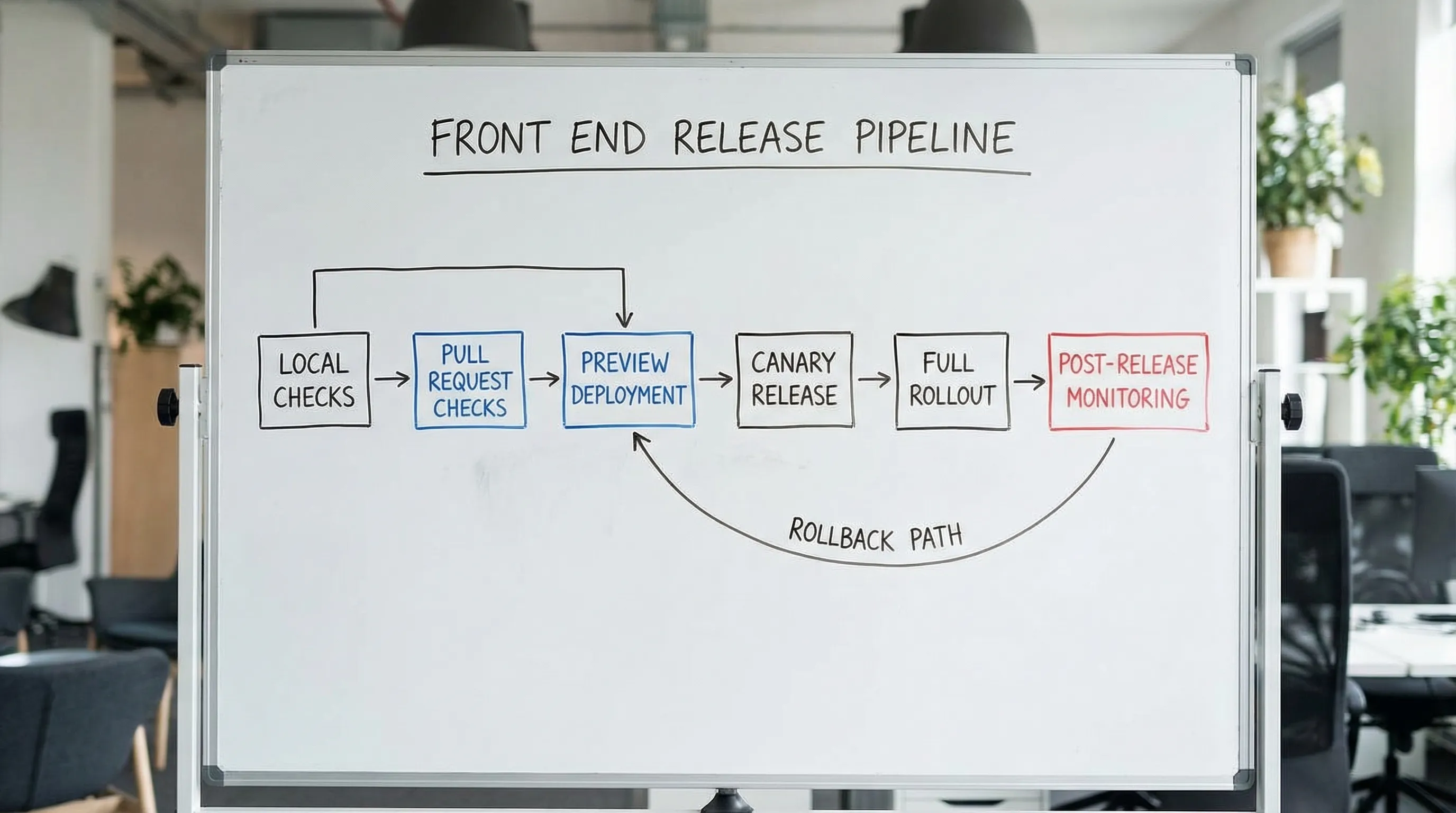
6) Accessibility (treat it as a release requirement)
Accessibility is part of reliability: users who cannot complete tasks experience it as downtime.
Checklist:
- Keyboard navigation works for all interactive elements (focus order, visible focus).
- Semantic HTML is used (buttons are buttons, headings are headings).
- Color contrast meets requirements and does not rely on color alone.
- Forms have labels, errors, and instructions that assistive tech can read.
- Automated checks run in CI, and you do spot checks with a screen reader for critical flows.
Reference standards: WCAG.
7) Security and privacy checks (front end specific)
Front end code can introduce security issues even when the backend is strong.
Checklist:
- XSS risks are controlled (no unsafe HTML injection, sanitize when necessary).
- Content Security Policy is considered (especially if you embed third-party scripts).
- Auth and authorization are never “UI-only” (backend enforces access), but UI still prevents accidental exposure.
- No sensitive data in client logs (PII, tokens, secrets, internal IDs).
- Dependencies are scanned and high severity issues are triaged before release.
A good baseline for web risk categories: OWASP Top 10.
8) CI/CD and release mechanics (make shipping boring)
A reliable UI release is usually a reliable delivery system.
Checklist:
- Preview environments exist for PRs (or equivalent local reproducibility) so stakeholders can validate.
- Build artifacts are reproducible (pinned runtime, deterministic builds).
- Source maps are handled safely (available for debugging, not accidentally exposing sensitive internals).
- Feature flags are used for risky changes (and you have a cleanup plan).
- Rollback is practiced (it is a plan, not a hope).
9) Observability for the UI (so you can detect issues fast)
You cannot be reliable without feedback from production.
Checklist:
- Front end error tracking is configured (uncaught exceptions, rejected promises, stack traces).
- Key journeys emit business events (start, success, failure), tied to release versions.
- Performance telemetry exists (Web Vitals and route timings).
- Dashboards and alerts are actionable (alerts map to user impact, not noise).
- On-call and incident expectations are clear for release windows.
10) Release readiness: progressive delivery and aftercare
Treat release as a reversible risk event.
Checklist:
- Canary or progressive rollout is used when impact is high.
- A short “aftercare” window is scheduled (the team watches metrics, fixes quickly).
- Support and stakeholders know what changed (release notes, customer-facing comms if needed).
- Post-release review happens if something went wrong (one concrete improvement added to gates).
Copy/paste scorecard: gates vs signals
Use this table to decide what must block a release (gates) versus what should be visible to reviewers (signals). Adjust to your risk level.
| Area | Hard gate (blocks release) | Strong signal (review required) |
|---|---|---|
| Scope and UX states | Acceptance criteria include loading, empty, and error states | Edge cases documented and validated with stakeholders |
| Code quality | Lint, format, and typecheck pass in CI | Static analysis trends improving sprint over sprint |
| Testing | Smoke E2E passes for the key journey | Visual regression coverage for high-risk pages |
| Performance | No regression vs budgets on critical routes | Bundle diff report attached to PR |
| Accessibility | Automated checks pass, critical flow keyboard-tested | Screen reader spot check notes for new components |
| Security | Dependency scan has no untriaged high severity issues | CSP and third-party script review for new integrations |
| Delivery | Preview build matches production build settings | Feature flags used for risky changes with cleanup ticket |
| Observability | Error tracking works in staging/preview | Release dashboard link in the PR description |
| Rollout | Rollback path exists and is owned | Canary rollout for high-impact changes |
A practical 30-day rollout plan (without boiling the ocean)
If you are adopting this in an existing codebase, do it in layers.
| Week | Focus | Outcome |
|---|---|---|
| 1 | Add CI gates (lint, typecheck, basic tests) | Every PR gets fast, trusted feedback |
| 2 | Add one E2E smoke flow + preview env habit | You can validate the core journey before merge |
| 3 | Introduce performance budgets and basic Web Vitals monitoring | Regressions become visible and preventable |
| 4 | Add accessibility checks and front end error tracking | Production issues are detected quickly, fewer escaped defects |
Frequently Asked Questions
What is the most important item in a front end development checklist? The most important item is an enforced CI gate that prevents obvious regressions (typecheck, linting, and a smoke test). A checklist nobody enforces does not improve reliability.
How many E2E tests do we need for reliable UI releases? Usually fewer than teams think. Start with 1 to 3 smoke tests that cover the highest-value journeys, then add targeted tests only where risk is high. Overbuilding E2E often creates flakiness and slows delivery.
How do we set performance budgets if we have no baseline? Capture a baseline on your top routes (bundle size, LCP, CLS, INP), then set budgets that prevent regressions first. Tighten budgets gradually as you fix bottlenecks.
Does accessibility really belong in a release checklist? Yes. If users cannot complete tasks due to keyboard traps, poor labels, or unreadable contrast, it is a functional outage for that user segment. Treat it as a release requirement.
What should we do when the checklist blocks a critical hotfix? Define an explicit break-glass path (who approves, what is waived, what must still run, and what follow-up work is mandatory). Then add one improvement to prevent the same emergency next time.
Need a senior review before your next UI release?
If your team is shipping frequently but still seeing regressions, rollbacks, or performance surprises, an external, evidence-driven review can help you tighten the few gates that matter most.
Wolf-Tech provides full-stack development and consulting across front end architecture, code quality, legacy optimization, and delivery systems. If you want a pragmatic checklist tailored to your codebase and release process, reach out via Wolf-Tech.