
React Front End Architecture for Product Teams

Sandor Farkas
Founder & Lead Developer
Expert in software development and legacy code optimization
LinkedIn
Most React codebases do not fail because React is “too flexible”. They fail because product teams scale without clear boundaries: features leak into each other, state becomes a global soup, performance regressions ship unnoticed, and every change turns into a coordination meeting.
A good React front end architecture fixes that by making day-to-day work easier: teams can ship slices independently, quality is enforced by default, and production behavior is observable, not guessed.
What “React front end architecture” actually means (for product teams)
For a product team, front end architecture is not primarily a folder structure. It is a set of constraints and defaults that repeatedly answer these questions:
- Where does a new feature live, and what can it depend on?
- What is “state”, who owns it, and how does it change?
- How does the UI talk to backend systems safely?
- What proves the UI is fast, accessible, and stable in production?
- How do multiple teams work in the same codebase without stepping on each other?
If your architecture cannot be explained as a small set of rules and proofs, it is not an architecture, it is a collection of opinions.
Start with the seams: capabilities, journeys, and contracts
Before debating Vite vs Next.js, or Redux vs Zustand, align on the seams that will protect you from rewrites.
A practical starting point is:
- Capabilities (what the product does): “Billing”, “Catalog”, “Approvals”, “Reporting”.
- User journeys (how people accomplish tasks): “Invite teammate”, “Export report”, “Refund order”.
- Contracts (how data and permissions flow): API shapes, error behavior, latency expectations.
This is the same idea as the UX-to-architecture alignment loop. If you have not already, the Wolf-Tech post on the UX to architecture handshake is a strong template for making these seams explicit.
Minimum front end architecture artifacts (that save months later)
Keep these lightweight, but real:
- Route map: the navigable surface area (and what requires auth, tenant, roles).
- State model: what is server state vs client state vs URL state.
- API contract sketch: endpoints/queries, payload shapes, error semantics.
- Performance budget: what “fast enough” means for your key journeys.
- Telemetry plan: what you will measure in production (errors, web vitals, business events).
If you do only one thing, do this: define the seams once, then enforce them in code.
A pragmatic baseline: feature-first modules + thin shared layers
For most product teams, the best default is a feature-first codebase with deliberately small shared layers.
Feature-first does not mean “anything goes inside a feature”. It means each capability is a module with clear boundaries.
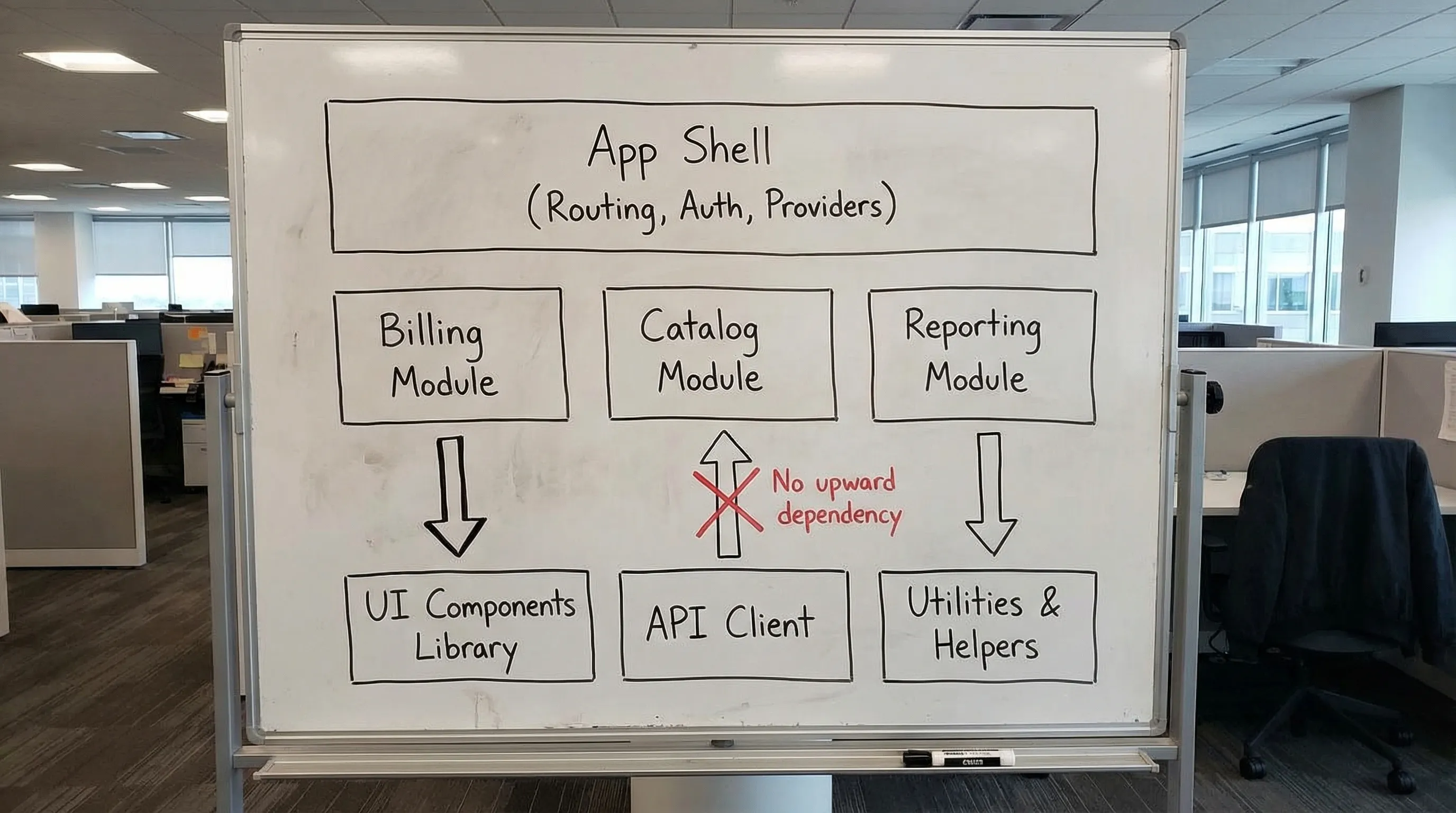
Reference structure (works in SPA or React frameworks)
One workable shape:
app/(app shell, routing, providers, global error boundaries)features/<capability>/(UI + state + domain logic for that capability)shared/ui/(design system components)shared/lib/(pure utilities, hooks that do not know product domain)shared/api/(API client, contracts, request helpers)
The important part is not the names. It is the dependency direction.
Enforce dependency rules (do not rely on “team discipline”)
Define rules like:
- Features may import from
shared/*. shared/*must never import fromfeatures/*.- Cross-feature imports are banned (or allowed only via explicit public interfaces).
You can enforce this with lint rules, TypeScript path boundaries, or workspace tooling. The mechanism matters less than the outcome: architecture violations become build failures, not code review debates.
When micro frontends are justified (and when they are not)
Micro frontends can be valid when:
- teams must deploy independently with different release cadences,
- the organization is large enough that coordination cost dominates,
- you have strong platform engineering to provide a “golden path”.
They are usually a mistake when used as a workaround for a messy monolith UI. In that case, fix seams and contracts first.
If you are deciding between a React SPA and a React framework, Wolf-Tech’s Next.js and React decision guide and React frameworks explained cover the rendering and deployment trade-offs.
State architecture: separate by type, not by library
Most state problems come from mixing different state types into one store.
A reliable front end treats state as four distinct categories:
| State type | Source of truth | Typical lifespan | What it should optimize for | Common implementation (examples) |
|---|---|---|---|---|
| Server state | Backend/API | Cacheable, invalidated | Correctness, caching, retries | Query/cache library or framework data layer |
| Client UI state | Browser session | Local, ephemeral | UX responsiveness | Local state, small focused stores |
| URL state | Address bar | Shareable, bookmarkable | Navigability, deep links | Router params/search params |
| Form state | Current form | Until submit/reset | Validation, error UX | Form library + schema validation |
A useful default: keep server state out of your global store
If you put API responses into a global client store, you often re-implement caching, invalidation, and request deduplication badly.
Instead:
- Use a dedicated server-state approach (or framework-native data fetching).
- Keep global client state for truly global UI concerns (theme, feature flags, local preferences).
- Model mutations as events with explicit invalidation rules.
Wolf-Tech’s React tools guide is a good reference for production-grade choices in each category, but the key is the separation, not the tool.
Data access: treat the API boundary like a product boundary
In product teams, “front end architecture” often breaks at the API boundary:
- inconsistent error shapes,
- ad-hoc authorization assumptions,
- over-fetching and under-fetching,
- UI coupling to backend internal models.
Prefer typed contracts and runtime validation
A strong default in 2026 is:
- Type the contract (OpenAPI, GraphQL schema, or shared DTO package when appropriate).
- Generate or maintain a typed client.
- Validate critical inputs at runtime (especially at boundaries) to avoid “undefined is not a function” incidents.
If you use GraphQL, treat query cost and authorization as first-class concerns. Wolf-Tech’s GraphQL APIs: benefits, pitfalls, and use cases covers the operational traps that commonly hit product teams.
Consider a BFF when front end needs stability
A Backend-for-Frontend can be a good move when:
- multiple backend services exist and the UI should not orchestrate them,
- you need stable contracts while backends evolve,
- you need consistent auth, rate limiting, and caching.
This is not about “adding another service”. It is about making a stable integration surface so the UI can change safely.
Design system strategy: make consistency cheap
Product teams usually want both autonomy and consistency. A design system makes that possible only if it is treated as architecture, not as “a component library someone made once”.
What to standardize first
- Foundations: typography, spacing, color tokens, theming, accessibility primitives.
- High-reuse components: buttons, inputs, dialogs, tables.
- Patterns: empty states, error states, loading states.
Then tie it to proofs: Storybook (or equivalent), accessibility checks, and visual regression tests.
If you are buying front end delivery, compare deliverables, not buzzwords. The Wolf-Tech checklist on front end development services deliverables is a contract-friendly way to do that.
Performance and resilience: budgets + guardrails (not hero debugging)
React UIs become “slow” in predictable ways:
- too much client JavaScript,
- expensive re-renders and unbounded lists,
- chatty APIs and waterfalls,
- third-party scripts,
- missing caching and prefetch strategy.
Use a performance budget tied to user journeys
Pick 2 to 4 critical journeys and define budgets (for example: LCP, INP, CLS, plus payload size per route). Google’s Core Web Vitals documentation is a practical starting point for what to measure and why.
The architectural move is this: performance becomes a product constraint and a CI signal, not a one-off project.
Build resilience into the UI surface
Resilience is architecture too:
- Use error boundaries for feature areas.
- Normalize API errors into user-safe messages.
- Implement retry and backoff where it makes sense.
- Design for “stale data” and partial failure.
These patterns reduce incident load and prevent “white screen” outages.

For broader performance thinking beyond micro-optimizations, Wolf-Tech’s guide on high-impact optimization maps well to front end work too: remove work, reduce round trips, and prevent regressions.
Testing and delivery: architecture must survive real releases
If architecture does not show up in your delivery system, it will decay.
A practical default:
- Unit tests for pure logic and utilities.
- Component tests for interactive behavior.
- End-to-end tests for a small set of critical journeys.
- Contract tests (or schema checks) for API compatibility.
Then wire it into CI with fast feedback. If you want a broader delivery baseline, Wolf-Tech’s CI/CD technology guide explains what to standardize so shipping becomes routine.
Release safety mechanisms
For product teams shipping frequently:
- Preview environments for every change.
- Feature flags for risky work.
- Incremental rollouts (canary) where applicable.
- Production monitoring that correlates releases to errors and performance regressions.
This is how you keep velocity while reducing blast radius.
Governance that scales without slowing teams
“Governance” fails when it becomes a meeting. It succeeds when it becomes defaults.
High-leverage governance for React front end architecture:
- Architecture decision records (ADRs) for decisions that affect multiple teams.
- Code ownership per feature area.
- Automated boundary enforcement (lint rules, dependency constraints).
- A golden path for new routes/features (template, conventions, examples).
- A small quality scorecard (performance budget pass/fail, accessibility checks, test health).
If you are scaling across multiple teams or industries, Wolf-Tech’s post on reusable architecture wins is a useful companion for deciding what should be shared vs customized.
A 30-day plan to improve a messy React codebase (without a rewrite)
If you are inheriting a front end that already ships, avoid the rewrite trap. Improve it in slices.
Week 1: baseline and boundaries
Define 2 to 4 critical journeys, measure current performance and error rates, and map the capability seams. Add the first dependency rule (even if it is minimal).
Week 2: stabilize data access and state separation
Introduce a consistent API client layer and normalize error handling. Split server state from client UI state. Create a small “public interface” per feature module.
Week 3: quality gates that prevent regression
Add CI checks that matter: type checks, linting, and targeted tests for critical journeys. Add a basic performance budget check for the most important route.
Week 4: make the golden path real
Document a “how to add a feature” path with a template, example module, and review checklist. This is where architecture becomes a daily habit.
If you need a broader modernization approach across front end and back end, Wolf-Tech’s guide on code modernization techniques provides an incremental roadmap.
Frequently Asked Questions
What is the best folder structure for React front end architecture? A feature-first structure with small shared layers is a strong default. The key is enforcing dependency direction (features can depend on shared, shared cannot depend on features).
Do we need Redux (or a global store) for a scalable React app? Not necessarily. Many teams overuse global stores. A better default is to separate server state, client UI state, URL state, and form state, then use the smallest tool that fits each.
When should we use Next.js instead of a React SPA? Use a React framework when you need built-in rendering and caching strategies, SEO requirements, or a more opinionated deployment model. For internal, auth-first tools, a SPA can still be a pragmatic choice.
How do we prevent architectural drift as the team grows? Enforce boundaries automatically (lint/dependency constraints), keep ADRs for cross-cutting decisions, and provide a golden path template so teams do not invent patterns per feature.
What metrics should product teams track for front end health? Track user-centric performance (Core Web Vitals), front end error rate (and top error groups), and release impact (did errors or latency change after deploy). Tie metrics to your critical journeys.
Need an architecture baseline your team can actually operate?
Wolf-Tech helps product teams build and modernize React front ends with pragmatic architecture guardrails, code quality consulting, and full-stack delivery support.
If you want a fast, evidence-driven way to reduce regressions and speed up shipping, start with a focused architecture review and a thin-slice improvement plan: wolf-tech.io.