
PHP Symfony - Performance and Maintainability Best Practices

Sandor Farkas
Founder & Lead Developer
Expert in software development and legacy code optimization
LinkedIn
Short answer: Most Symfony performance comes from a few settings and habits: run with APP_ENV=prod and APP_DEBUG=0, size OPcache and enable preloading, cache HTTP responses and expensive data, remove N+1 queries in Doctrine, and move slow side effects to Messenger. Maintainability comes from organizing code by business capability, keeping controllers thin, enforcing tests and static analysis in CI, and staying on a supported version (Symfony 7.4 LTS or 8.x on PHP 8.4 or newer in 2026).
Symfony has a reputation for “serious” PHP applications for a reason: it gives you the primitives to build systems that are fast, testable, and evolvable. The flip side is that performance and maintainability are not automatic. They come from a handful of deliberate choices about architecture boundaries, runtime configuration, data access patterns, and the quality gates you enforce in CI.
This guide focuses on practical PHP Symfony best practices that improve both performance (latency, throughput, resource cost) and maintainability (change safety, upgradeability, onboarding speed), without pushing you into premature complexity.
Start with a baseline (or you will “optimize” the wrong thing)
Before changing code, decide what “good” means and measure it.
Pick 3 to 5 metrics that reflect user and business outcomes
Typical starting points:
- p95/p99 latency for the key user journeys (login, checkout, search, back-office actions)
- Error rate (by route and by dependency)
- Database time per request (and slow query count)
- Throughput (requests per second) at a known concurrency
- Cost signals (CPU, memory, cache hit rate)
If you need a simple way to translate “performance” into engineering constraints, define performance budgets per route (TTFB, total server time, DB time) and enforce them in PR reviews.
For a broader “measure-first” optimization approach, Wolf-Tech’s guide on code optimization techniques to speed up apps complements this Symfony-specific playbook.
Use the right tools in the right environments
- In dev, use the Symfony Profiler to identify heavy controllers, chatty Doctrine usage, and expensive Twig rendering.
- In production, rely on APM + logs + metrics (not the dev toolbar). Track trends across releases.
A useful rule: you should be able to answer “what got slower after last deploy?” within minutes, not days.
Symfony performance best practices (the ones that usually pay off)
Performance in Symfony is rarely about one magic setting. It is about removing wasted work in the request lifecycle and making expensive operations predictable.
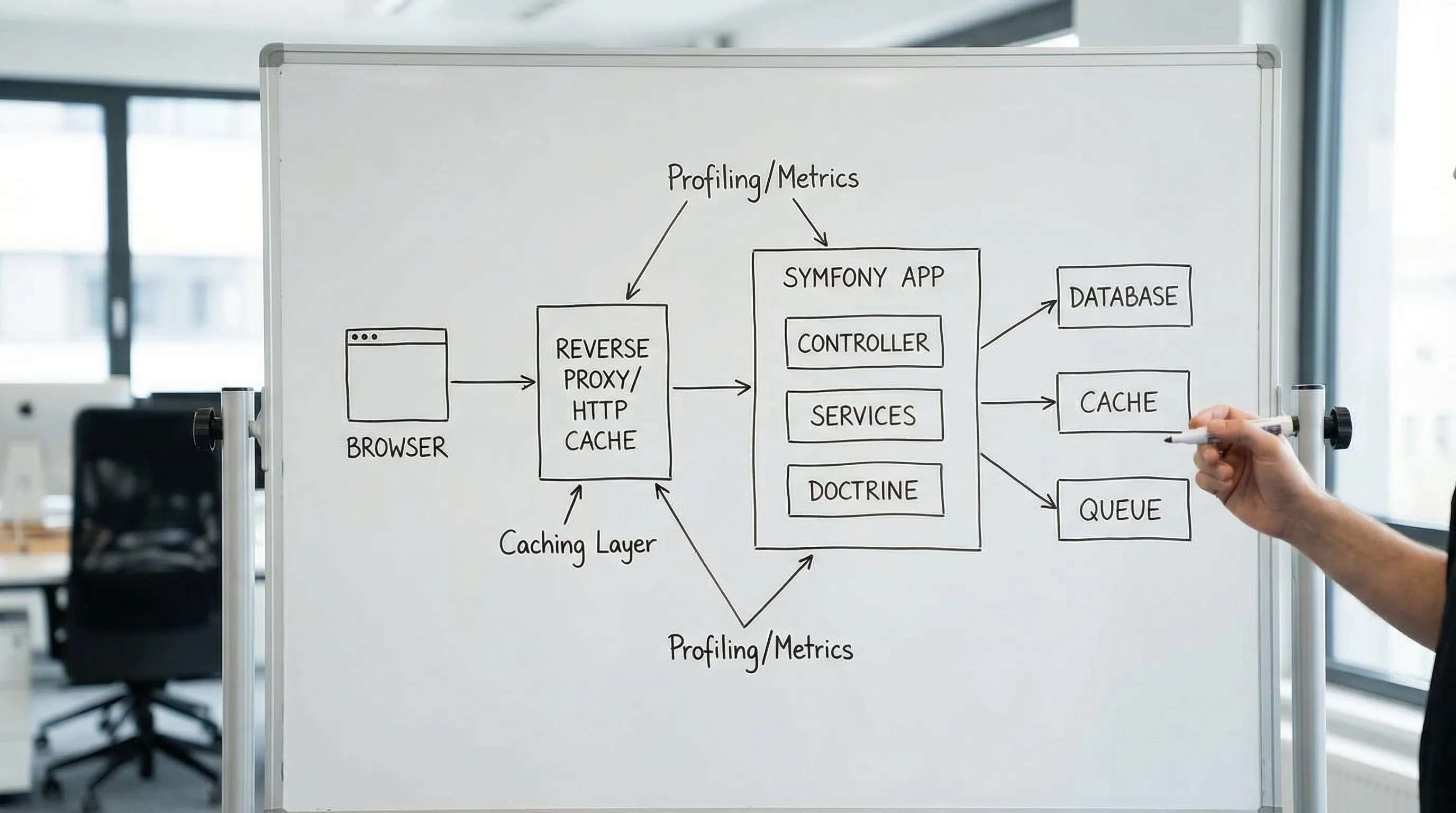
Run Symfony in real production mode
This sounds obvious, yet performance incidents often trace back to “almost prod” setups.
Key checks:
- Ensure
APP_ENV=prodandAPP_DEBUG=0in production. - Warm up the cache during deployment (
cache:warmup) so the first users do not pay for container compilation. - Avoid runtime file writes where possible (container and cache should be built during deploy, not under load).
Reference: Symfony environments and debug mode.
Treat PHP runtime configuration as part of performance work
Symfony can only be as fast as your PHP runtime.
High-signal items to verify:
- OPcache enabled and sized correctly (huge impact on real systems)
- PHP-FPM process management tuned to your traffic and memory profile
- Reasonable realpath cache settings when you have many files (common in Symfony apps)
If OPcache is misconfigured, you can ship perfectly optimized code and still lose most of the benefits.
Reference: PHP OPcache documentation.
The concrete production settings
The Symfony performance documentation lists a short set of production settings. Most teams have some of them and miss one or two. As a starting point for php.ini in production:
opcache.memory_consumption=256
opcache.interned_strings_buffer=32
opcache.max_accelerated_files=32531
; code only changes on deploy, so skip file timestamp checks
opcache.validate_timestamps=0

; preload the classes Symfony lists for you
opcache.preload=/app/config/preload.php
opcache.preload_user=www-data

realpath_cache_size=4096K
realpath_cache_ttl=600
With validate_timestamps=0, PHP does not see new code until the process restarts, so your deploy must restart PHP-FPM (or FrankenPHP). That is the point of the setting, but it surprises teams that deploy by copying files.
Two more steps belong in the build, not in php.ini. Dump an authoritative class map, so Composer never searches the file system for a class:
composer dump-autoload --no-dev --classmap-authoritative
And let Symfony compile the service container into a single file, which reduces the number of files PHP has to load:
# config/services.yaml
parameters:
    .container.dumper.inline_factories: true
PHP-FPM or FrankenPHP worker mode
For most of Symfony's history, PHP-FPM behind Nginx was the only serious production setup, and every request booted the framework from scratch. FrankenPHP changes that. In worker mode, it boots the Symfony kernel once and keeps it in memory between requests, and since Symfony 7.4 this mode is supported without an extra package.
The gain is largest for APIs with many small requests, where the framework boot is a big share of the response time. The cost is a new class of bugs: services that keep state from one request to the next, and memory that grows over time. If your services are stateless and you have monitoring in place, it is worth testing. Our guide to FrankenPHP in production walks through a phased migration that you can roll back at each step.
Make HTTP caching a first-class design decision
If your app serves any content that can be cached (even for short periods), Symfony gives you excellent tools:
- Set explicit Cache-Control headers for routes that can be cached.
- Use ETag/Last-Modified for conditional requests.
- If you use a reverse proxy (like Varnish, Nginx caching, or a CDN), design responses to be cache-friendly.
In Symfony, the HTTP Cache and Cache-Control directives are worth revisiting, especially if you are currently defaulting everything to no-store.
Maintainability note: caching is easier to keep correct when you explicitly define what varies (user, locale, tenant, permissions) and encode that in headers rather than burying it in ad-hoc logic.
Use the Cache component intentionally (not as an afterthought)
For application-level caching (data and computations), Symfony’s Cache component is a solid default.
Common best practices:
- Use cache pools per concern (for example, “catalog”, “permissions”, “rate limits”) so you can tune TTLs and invalidation.
- Prefer bounded TTLs and explicit invalidation triggers instead of “cache forever.”
- Track hit rate and evictions. A cache that misses 90% of the time is overhead.
If you are using Redis or Memcached, ensure you also have operational visibility (memory usage, eviction policy, persistence settings) so caching does not become a reliability risk.
Optimize Doctrine where it matters most (hot paths)
Doctrine can be fast, but it will happily do expensive things if you let it.
High-impact practices for Symfony + Doctrine projects:
Prevent N+1 queries
- Watch for N+1 patterns in templates and serializers.
- Use eager fetching or tailored queries where appropriate.
Reference: Doctrine ORM fetching.
Query fewer rows and fewer columns
- Avoid loading large object graphs when you only need a subset.
- Consider DTO read models for list endpoints instead of hydrating full entities.
Index for the queries you actually run
- Add or adjust indexes based on real query patterns from production.
- Re-check indexes after feature work (a new filter often changes everything).
Be cautious with “clever” ORM tricks
Second-level caches, heavy inheritance mappings, or deep lifecycle callbacks can hurt maintainability and make performance harder to reason about. Prefer explicitness on hot paths.
Move slow work out of the request cycle
If a feature requires sending emails, generating PDFs, calling third-party APIs, or syncing data, doing it inside a web request often creates latency and reliability problems.
Symfony Messenger is a common solution here:
- Put non-interactive work onto a queue.
- Make handlers idempotent (safe to retry).
- Add dead-letter handling and observability around failures.
Reference: Symfony Messenger.
Prevent regressions with budgets and CI checks
The easiest performance win is avoiding performance loss.
Practical options:
- Add performance smoke tests for critical routes in CI (even a small k6/Gatling/JMeter run can detect major regressions).
- Enforce query count budgets for key endpoints.
- Track performance changes per release in your monitoring.
This aligns well with delivery-system guidance in Wolf-Tech’s CI/CD technology guide: ship in smaller batches, measure, and recover quickly.
Symfony maintainability best practices (so the app stays changeable)
Maintainability is what keeps “fast today” from becoming “stuck next quarter.” For Symfony, it comes down to architecture boundaries, configuration discipline, and automated safety nets.

Organize code by business capability (not by framework layer alone)
A common Symfony smell is a src/Service directory that becomes a junk drawer.
Instead, prefer feature or domain modules:
src/Catalog/...src/Billing/...src/Identity/...
Inside each, keep clear separation between:
- Application layer (use cases, commands, orchestration)
- Domain layer (business rules and models)
- Infrastructure layer (Doctrine repositories, HTTP clients, external adapters)
This makes performance work easier too, because hotspots are usually tied to capabilities (search, pricing, permissions), not technical layers.
Keep controllers thin and deterministic
Controllers should primarily:
- Validate the request (or delegate validation)
- Call a single use case / application service
- Return a response
If your controller contains branching business logic, it will become hard to test, hard to optimize, and hard to reuse in CLI/async contexts.
Be strict about dependency direction
In maintainable systems:
- Application and domain logic do not depend on Doctrine details.
- Infrastructure depends on application/domain, not the other way around.
In Symfony terms, this often means:
- Inject interfaces into services.
- Keep Doctrine entities from becoming “do everything” objects used everywhere.
Treat configuration as an API
Symfony makes it easy to add configuration. It is also easy to create a configuration jungle.
Good defaults:
- Use explicit service wiring for important services and boundaries.
- Keep environment variables documented and minimal.
- Avoid “magic parameters” passed everywhere.
A maintainability trick: if a value is business-relevant (for example, pricing rules), consider storing it as data (admin-managed configuration) rather than hiding it in environment variables.
Invest in automated quality gates (the compounding payoff)
Maintainability does not come from a one-time refactor. It comes from continuously rejecting low-quality changes.
Recommended baseline gates:
- Unit and integration tests (run on every PR)
- Static analysis (PHPStan or Psalm)
- Coding standards (PHP-CS-Fixer)
- Dependency checks (
composer audit)
Wolf-Tech’s article on code quality metrics that matter is a good companion if you want a small set of metrics that correlate with delivery speed and defect rates.
Use tests to create “safe seams” for refactoring
For Symfony, pragmatic testing layers often look like:
- Unit tests for pure business rules (fast, cheap)
- Integration tests for repositories, message handlers, and key services
- Functional tests (Kernel) for critical endpoints
The goal is not “test everything equally.” The goal is to lock behavior around hotspots and risky areas so you can safely change internals.
If you are modernizing an older Symfony codebase, the incremental approach in taming legacy code translates well: add observability, create seams, lock behavior with tests, then refactor.
Plan for Symfony upgrades from day one
Symfony is upgrade-friendly if you cooperate with the ecosystem.
Upgrade hygiene that keeps long-term costs down:
- Prefer supported Symfony versions (often the latest stable or LTS depending on your risk tolerance).
- Treat deprecations as work items, not as noise.
- Avoid deep overrides of framework internals unless you truly need them.
Reference: Symfony releases.
Where the versions stand in September 2026
Version choices have a direct effect on both performance and maintenance cost, so it helps to know the current dates:
- Symfony 7.4 is the current long-term support release (bug fixes until November 2028). It requires PHP 8.2 or newer.
- Symfony 8.x has the same features without the deprecated code paths and requires PHP 8.4. Non-LTS releases are supported for eight months each, so choose it only if you upgrade every minor release.
- Symfony 6.4 receives bug fixes until November 2026 and security fixes until November 2027. Teams still on it should plan the move now; our Symfony 6 to 7 upgrade guide lays out the steps.
- PHP 8.2 reaches end of life on December 31, 2026. PHP 8.4 or 8.5 is the safer base, and newer PHP versions usually bring some performance improvement at no cost to you.
A combined checklist (performance + maintainability)
Use this table as a quick review tool in architecture or tech-lead reviews.
| Area | Best practice | Why it helps | What to verify (proof) |
|---|---|---|---|
| Runtime | Prod mode (APP_ENV=prod, APP_DEBUG=0) | Avoids debug overhead and dev-only behavior | Env vars, logs show prod, profiler not enabled |
| Deploy | Cache warmup at deploy time | Removes first-request penalty | Deployment logs, warm cache directories |
| PHP | OPcache enabled and sized | Big throughput and latency gain | opcache_get_status(), runtime metrics |
| Build | Preloading + authoritative class map | Less file loading per request | php.ini, build logs of dump-autoload |
| HTTP | Cache-Control + conditional requests | Reduces work and cost | Response headers, CDN/proxy hit ratio |
| App caching | Cache pools with TTL + hit-rate tracking | Predictable wins, safer invalidation | Cache metrics, low churn keys |
| Database | N+1 prevention, tailored queries | Avoids amplified DB time | Query counts, slow query logs |
| Async | Messenger for slow side effects | Faster responses, better resilience | Queue metrics, retries, DLQ behavior |
| Architecture | Code organized by capability and boundaries | Easier ownership and refactors | Module structure, dependency graph |
| Quality | CI quality gates (tests, static analysis) | Prevents debt growth | Pipeline output, consistent thresholds |
A pragmatic 30-day improvement plan for Symfony teams
If you want to improve quickly without boiling the ocean:
Week 1: Baseline and visibility
- Pick 3 to 5 critical routes and define budgets.
- Add production dashboards for latency, error rate, DB time.
- Confirm prod-mode settings and OPcache.
Week 2: Fix the top 2 hotspots
- Remove obvious N+1 queries.
- Add caching for the highest-read, lowest-change data.
- Move one slow side effect to async processing.
Week 3: Reduce change risk
- Add tests around the hotspot areas.
- Introduce static analysis and coding standards in CI.
Week 4: Lock in improvements
- Add regression checks (query-count budgets or perf smoke tests).
- Document module boundaries and “how we build features here.”
This approach mirrors how Wolf-Tech typically recommends making engineering progress: measurable outcomes, small batches, and safety mechanisms.
Frequently Asked Questions
Is Symfony “slow” compared to other frameworks? Symfony can be very fast in production when debug is off, OPcache is configured, and you avoid common bottlenecks (N+1 queries, no caching, heavy work in requests). Many performance problems are architectural or data-access related, not framework-related.
What is the biggest Symfony performance win in real projects? Eliminating wasted work in hot paths: fix N+1 queries, add appropriate caching (HTTP and application caching), and move slow side effects to async processing. Also verify OPcache and production-mode settings.
How should I structure a Symfony codebase for maintainability? Organize code by business capability (modules) and keep clear boundaries between application/use cases, domain logic, and infrastructure. Keep controllers thin and enforce quality gates in CI so debt does not grow silently.
Should we refactor a legacy Symfony app or rewrite it? Most teams get better risk-adjusted outcomes with incremental modernization: add observability, introduce tests around critical paths, refactor behind seams, and ship improvements in small batches. Rewrites are appropriate only when the existing system cannot meet constraints even after targeted modernization.
Does FrankenPHP make Symfony faster? In worker mode it usually does, because the framework boots once per worker instead of once per request. The gain depends on how much of each request is framework boot versus database and network time. Measure it with a load test on your own endpoints before switching production traffic.
Which checks belong in CI for Symfony projects? At minimum: tests, static analysis (PHPStan/Psalm), coding standards, and dependency vulnerability checks (composer audit). Add performance regression checks for critical endpoints as your system grows.
Need help improving Symfony performance without turning the codebase into a science project?
Wolf-Tech helps teams build, optimize, and scale Symfony and PHP systems with a focus on measurable outcomes: faster endpoints, safer releases, and codebases that stay maintainable as your team and product grow.
If you want an expert review of your Symfony architecture, performance hotspots, or modernization plan, explore Wolf-Tech’s work in full-stack development, code quality consulting, and legacy code optimization at wolf-tech.io.