
React Application Architecture: State, Data, and Routing


React apps rarely become “hard to change” because of React itself. They become hard to change when three concerns blur together:
- State that has different lifecycles (server data vs UI toggles vs URL state) gets stored in the same place.
- Data fetching and mutations happen ad hoc (components calling
fetchdirectly, inconsistent caching, no invalidation discipline). - Routing is treated as navigation only, instead of a first-class architecture surface (loading, authorization, boundaries, code-splitting).
A solid React application architecture makes these boundaries explicit. You end up with fewer regressions, more predictable performance, and a codebase teams can scale without rewriting every 12 months.
This guide focuses on a practical baseline for React application architecture around state, data, and routing, and how they fit together.
The baseline mental model: 4 kinds of state (not 1)
If you take only one architectural rule from this article, make it this one:
Do not treat “state” as one thing. Treat it as separate categories with different sources of truth.
The 4 categories you should design for
| State category | Source of truth | Lifetime | Example | Where it should live (default) |
|---|---|---|---|---|
| Server state | Backend/API | Shared across users and sessions (with caching) | Current user profile, list of invoices | A server-state cache (TanStack Query, RTK Query, SWR) |
| Client UI state | Browser/runtime | Local to one session | Sidebar open, active tab, dialog open | Local component state, small client store (Zustand/Jotai/Redux) |
| URL state | The route (path + query) | Shareable/bookmarkable | ?page=3&status=open, selected entity ID | Router state (React Router, framework router) |
| Form state | The form (usually transient) | Until submit/reset | Validation errors, dirty fields, field arrays | Form library (React Hook Form) + schema validation (Zod) |
When these get mixed (for example, putting server state into Redux “because we already have Redux”), you usually pay in duplicated caches, inconsistent loading states, and complex invalidation.
If you want a deeper feature-first module approach, Wolf-Tech’s companion piece on React front end architecture for product teams goes wider on folder boundaries, dependency rules, and scaling patterns.
Routing: treat routes as architecture seams, not just URLs
Routing determines more than “what page shows.” In a production app, the route is where you can enforce:
- Data dependencies (what must be loaded before render)
- Authorization boundaries (what permissions/tenant context is required)
- Error boundaries (what fails gracefully vs crashes the whole shell)
- Code splitting (what bundles are loaded per area)
- Caching policy (especially in full-stack frameworks)
Even in a classic SPA (React + React Router), you can design routes as explicit “entry points” that own orchestration.
A practical route responsibility checklist
| Concern | Should be decided at the route level? | Why it matters |
|---|---|---|
| What data is required to render | Yes | Keeps data dependencies visible and consistent |
| What happens on missing/invalid params | Yes | Prevents scattered defensive code |
| Permission checks and redirects | Yes | Avoids security logic living inside random components |
| Error UI for the section | Yes | Limits blast radius (section-level resilience) |
| Lazy loading for the section | Yes | Keeps bundles small and predictable |
For SPA routing patterns, React Router’s data APIs (loaders/actions) are worth considering because they encourage route-owned data orchestration.
Data architecture: make server state boring and consistent
Most React apps spend more time waiting on I/O than “rendering.” The highest leverage architecture decisions are often in data access:
- How you fetch
- How you cache
- How you invalidate
- How you handle errors and retries
- How you keep types/contracts aligned
Default: adopt a server-state library
If your app talks to an API, you almost always want a dedicated server-state layer. It is not about “state management preference,” it is about having one predictable system for:
- Deduping requests
- Caching and stale-while-revalidate behavior
- Background refetch
- Mutation and invalidation
- Retry, backoff, cancellation
Common options:
Wolf-Tech’s broader toolkit recommendations are summarized in React tools: the essential toolkit for production UIs.
Decide your “data contract” strategy early
Your UI is only as stable as your contracts. Two pragmatic defaults:
- Contract-first schemas at the boundary: validate and type responses with a runtime schema (for example, Zod) so API drift fails loudly and early.
- Typed fetch layer: one shared HTTP client wrapper (timeouts, headers, error mapping), used by all features.
If you like seeing this as a concrete feature slice, Wolf-Tech’s React tutorial: build a production-ready feature slice demonstrates a clean pattern (contracts, hooks, error handling, telemetry, tests) without turning every screen into a framework.
How state, data, and routing should flow together
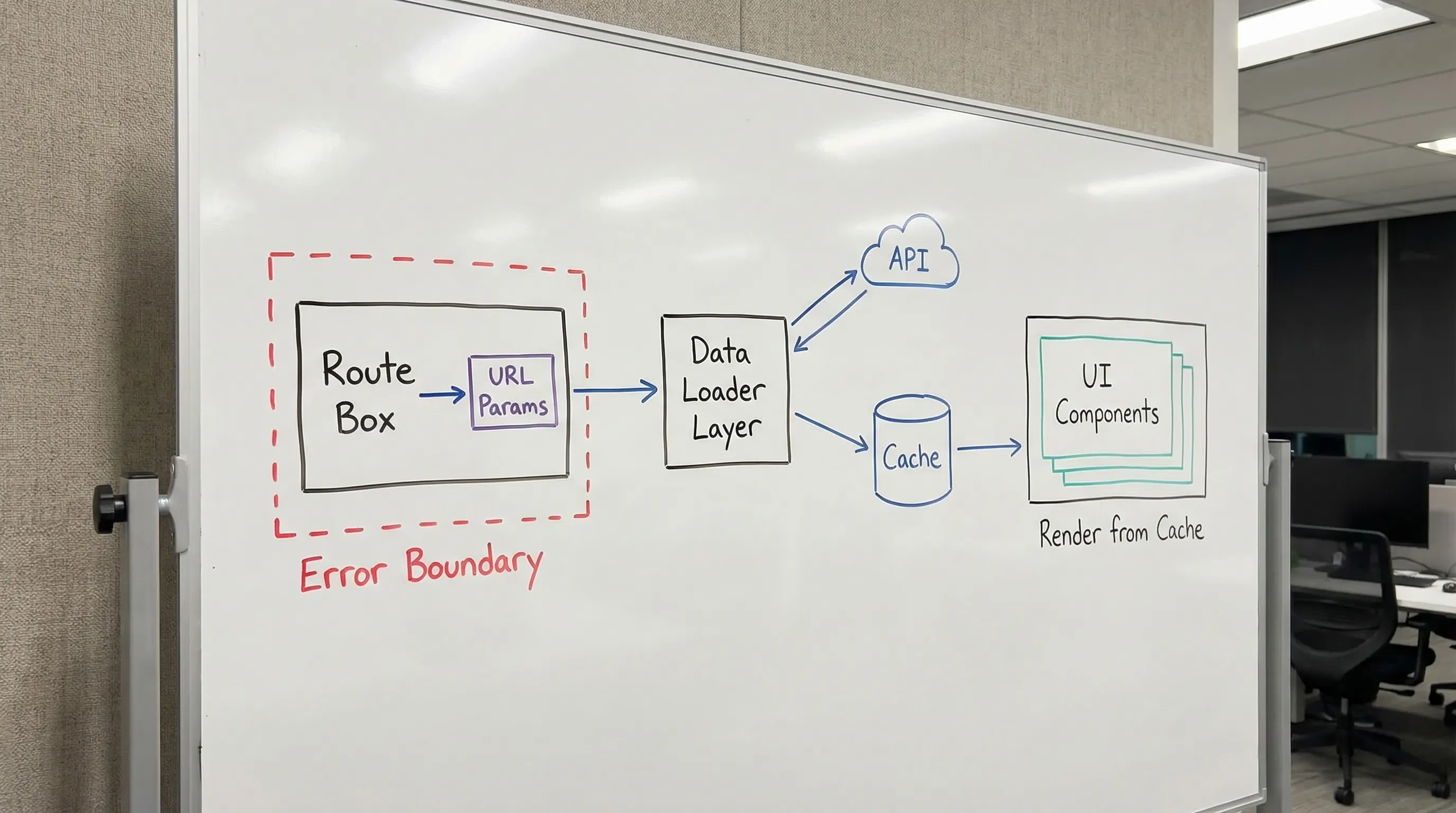
A scalable approach is to make the route the orchestration point, the server-state cache the source of truth for backend data, and UI state strictly local.
A good architecture tends to look like this:
- Route parses URL state (params, querystring).
- Route triggers data requirements (loader, prefetch, or route component that mounts queries).
- Server-state library owns caching, retries, and invalidation.
- UI components render from cached server state plus local UI state.
- Mutations write via the server-state layer, then invalidate or update caches.
A pragmatic folder and dependency layout (works for most product teams)
React architecture debates often get stuck on folder bikeshedding. Instead, pick a structure that makes the boundaries enforceable.
A common baseline for a React SPA:
src/app/for app shell, routing, providers, and global initializationsrc/features/<feature>/for feature modules (screens, local hooks, local UI)src/shared/for truly shared UI primitives and utilitiessrc/api/(orsrc/data/) for the HTTP client, query key factory, and contract schemas
The crucial rule is not the names, it is the direction of dependencies:
- Features can depend on
sharedandapi. sharedshould not depend on features.apishould not import UI.- Routes compose features, not the other way around.
If you need a team-friendly way to roll standards out incrementally, see React development playbook: standards for teams.
State architecture: what should be global (and what should not)
Default rule: keep UI state local until it hurts
Global stores are easy to add and hard to unwind. A simple heuristic:
- If state is only used in one screen or one feature, keep it in that feature.
- If state is used across many unrelated features, make it global.
- If state must be shareable via link, put it in the URL.
Avoid the “single store for everything” trap
A large Redux store that holds:
- API data
- UI flags n- router-ish stuff
…often becomes a second application inside your application.
A better split:
- Server state in TanStack Query (or equivalent)
- UI state in local component state, and small stores only when needed
- URL state in the router
- Form state in a form library
This separation also improves testing: you can test UI without mocking an entire global store, and you can test data hooks with a predictable query client.
Routing patterns that prevent complexity later
Pattern 1: Route-level “section shells” with boundaries
In a real product, you usually have areas with different behavior:
- A public marketing area
- An authenticated app area
- An admin area
Treat each as a section with its own:
- Layout
- Error boundary
- Auth guard
- Data prefetch (optional)
This keeps “app concerns” from leaking into the wrong areas.
Pattern 2: URL state as the integration point for list views
Lists almost always need:
- Pagination
- Sorting
- Filters
- A selected row
Make those URL-driven by default so:
- Users can bookmark and share
- Back/forward works naturally
- You can reproduce bugs from a copied URL
A practical approach is to parse query params at the route entry and pass typed values into your query hooks.
Pattern 3: Route-based code splitting
Route-based code splitting is usually the highest ROI form of lazy loading because it aligns with user navigation.
If you use React Router, you can lazy load route elements. If you use a framework (Next.js, Remix), code splitting tends to come “for free” with the route boundary.
If you are evaluating whether you should stay SPA or move to a React framework, Wolf-Tech’s Next.js and React decision guide for CTOs is a practical comparison focused on constraints (performance, security boundaries, operations), not hype.
Data fetching and mutations: the rules you want written down
Most teams need a small “data constitution.” Here is a production-friendly baseline.
1) Standardize query keys and invalidation
Pick a query key pattern that matches your domain. Example conceptually:
['projects', { orgId, filters }]['project', { projectId }]
Then standardize invalidation rules:
- Mutating a project invalidates
['project', { projectId }]and any list keys that can include it. - Mutating a membership invalidates member lists, not everything.
2) Put mutations behind a feature API
A good pattern is to expose feature-level operations:
useInviteMemberMutation()useUpdateProjectMutation()
…and keep raw HTTP calls inside src/api/.
This keeps screens from becoming the place where you “figure out how the backend works.”
3) Normalize error handling
Users do not care if the error came from Axios, fetch, a proxy, or a GraphQL gateway.
Normalize errors into a small set of UI-relevant categories:
- Unauthorized (needs login/refresh)
- Forbidden (permission issue)
- Not found
- Validation error (field-level)
- Conflict (stale data)
- Transient/network (retryable)
Then define where each is handled:
- Route-level for “cannot enter this page” issues
- Feature-level for “submit failed” issues
- Component-level for inline validation
4) Be explicit about loading UX
A common anti-pattern is “every component shows its own spinner.” That creates jitter.
Instead, decide loading behavior at boundaries:
- Route: skeleton for the page
- Feature: inline placeholders for a section
- Component: only for truly small embedded pieces
If you work in Next.js App Router, loading and error boundaries are first-class. Wolf-Tech’s Next.js best practices for scalable apps covers those patterns in detail.
Choosing tools: a decision table that keeps you honest
Tool sprawl is an architecture problem. Here is a pragmatic mapping that works in many teams.
| Concern | Best default | When to choose something else |
|---|---|---|
| Server state | TanStack Query (or RTK Query) | If you have a GraphQL client with normalized cache needs (Apollo, urql) |
| Client UI state | Local state first, then Zustand/Jotai | Redux if you truly need centralized event logging, complex cross-feature workflows |
| URL state | Router params + query parsing | A dedicated URL state helper if you have heavy querystring logic |
| Forms | React Hook Form + schema validation | Formik only if you already have deep investment and it is stable |
| Routing | React Router (SPA) | Next.js/Remix when you need SSR, better caching boundaries, or framework conventions |
The point is not the specific libraries, it is keeping the responsibilities separated.
Common failure modes (and the fix)
Failure mode: “Everything is a hook inside components”
Symptoms:
- Components call
fetchdirectly - No consistent retries/timeouts
- Caching is accidental
- Loading and error UI is inconsistent
Fix: introduce a thin data layer (api client + queries/mutations), and make features call that.
Failure mode: “We used Redux for server data and now it’s hard”
Symptoms:
- Duplicated caching logic
- Manual refetch, manual invalidation
- Inconsistent stale data behavior
Fix: migrate server state to a server-state library incrementally. Start with one feature and measure reduction in code and bugs.
Failure mode: “Routes are just a list of components”
Symptoms:
- Auth checks duplicated across screens
- Querystring parsing duplicated
- No section-level error boundaries
Fix: introduce route shells (layout + guard + boundary), and push orchestration up to routes.
A lightweight “architecture baseline” you can adopt in 1 sprint
If you need a plan that does not require a rewrite, aim for an incremental baseline:
- Define state categories (server, UI, URL, form) and write them into your team standards.
- Add a shared API client wrapper (timeouts, auth headers, error mapping).
- Pick one server-state library and adopt it in one feature slice.
- Refactor one route area into a section shell with an error boundary and an auth guard.
- Standardize query key patterns and invalidation rules for that slice.
Once the baseline exists, scaling becomes repetition, not reinvention.
When to bring in an outside architecture review
If your React app is already shipping, the goal is rarely “new architecture.” It is usually:
- Reduce regression rate
- Improve performance predictability
- Make feature work cheaper
- Make onboarding faster
Wolf-Tech specializes in full-stack development and architecture work, including code quality consulting and legacy optimization. If you want a second set of eyes on your React application architecture (state boundaries, data layer, routing seams, and change-safety practices), you can explore Wolf-Tech at wolf-tech.io and use the relevant blog guides as a starting point for an evidence-based review.