
React Tools: The Essential Toolkit for Production UIs

Sandor Farkas
Founder & Lead Developer
Expert in software development and legacy code optimization
LinkedIn
Production React isn’t won by writing JSX faster, it’s won by using the right React tools to prevent regressions, keep performance predictable, and make UI delivery repeatable across teams.
A useful way to think about React tooling is this: in development, your app can be a little messy and still feel “fine”. In production, every small mess turns into a cost, slower releases, more bugs, worse Core Web Vitals, and harder onboarding.
This guide lays out an essential toolkit for building and operating production UIs, including practical defaults, trade-offs, and what to standardize.
What “production UI” really requires (so you pick tools with intent)
Before tools, define what “good” looks like. For most product teams, production-grade UIs need these guarantees:
- Change safety: you can refactor without breaking flows.
- Performance budgets: predictable bundle size, predictable interaction latency.
- Accessibility: keyboard and screen-reader support is built-in, not patched later.
- Security basics: dependency hygiene, safe rendering, CSP compatibility.
- Operability: errors are observable, releases are reversible, regressions are detectable.
React tooling should be selected to enforce these properties by default.
If you want a complementary patterns-focused view (folder structure, boundaries, state separation), Wolf-Tech has a dedicated guide: JS React Patterns for Enterprise UIs.
The React tools stack at a glance
A production toolkit is easiest to standardize by category:
| Category | What it protects | Typical tools | “Done right” signal |
|---|---|---|---|
| Runtime debugging | Shipping correctness under real state | React DevTools, browser DevTools | Faster root cause, fewer “cannot reproduce” bugs |
| Type safety | Refactors that don’t break silently | TypeScript | Most UI defects are caught pre-runtime |
| Code quality gates | Consistency, readability, fewer footguns | ESLint, Prettier | Small PRs, fewer style debates, fewer risky patterns |
| Component development | UI reuse, visual consistency | Storybook | Components documented and testable in isolation |
| Data and server state | Fewer stale/loading edge cases | TanStack Query (React Query), SWR, RTK Query | Network logic is consistent and cache is intentional |
| Forms and validation | Fewer broken submissions, safer parsing | React Hook Form, Zod | Validation rules are centralized and typed |
| Testing | Regression prevention | Testing Library, Vitest/Jest, Playwright | Tests map to user behavior and critical paths |
| Performance tooling | Predictable UX at scale | Lighthouse, Web Vitals, bundle analyzer | Budgets fail CI before users feel it |
| Observability | Faster MTTR, fewer blind spots | Sentry, OpenTelemetry (optional) | Errors have context and releases correlate to spikes |
| Delivery system | Repeatable shipping | CI (GitHub Actions, etc.), preview envs | Every change is built, tested, and deployable |
Below is how to assemble this into a toolkit you can actually run in production.
1) Debugging and runtime inspection: start with React DevTools
In production UI work, debugging is not just “fix the bug”. It’s “fix the bug fast, and learn why it escaped”.
Baseline tools
- React DevTools for component tree inspection, props/state, render highlighting, and profiling.
- Browser DevTools (Performance, Memory, Network) for long tasks, layout thrash, and request waterfalls.
Practical production advice
- Use the React Profiler to verify suspected re-render paths before optimizing.
- When debugging “it’s slow” reports, correlate UI slowness with:
- network waterfalls (API latency, waterfalls, duplicated calls)
- long tasks (main thread blocking)
- excessive client JS (hydration cost, heavy libraries)
If your app is Next.js based, also read Wolf-Tech’s performance guide: Next.js Development: Performance Tuning Guide.
2) TypeScript: the highest ROI safety net for production UIs
For production React, TypeScript is less about developer preference and more about change safety.
What it helps you lock down:
- component contracts (props)
- server response shapes (with runtime parsing)
- routing params and navigation conventions
- refactors across shared UI and feature modules
Recommendation: treat TypeScript as non-optional for production applications. The real leverage shows up after month 3, when the codebase grows and new engineers join.
Official docs: TypeScript.
3) Code quality gates: ESLint + Prettier as a delivery capability
Consistency is not cosmetic. It’s how you reduce review time and prevent a slow drift into “local style variants” that make the codebase harder to reason about.
Essentials
- ESLint to catch unsafe patterns (hooks rules, unused vars, shadowed vars, leaky effects).
- Prettier to eliminate formatting debates.
How to make this production-effective
- Run lint and typecheck in CI on every PR.
- Add pre-commit hooks only if they are fast, otherwise teams bypass them.
- Enforce a small set of rules that correlate with production issues, not stylistic micromanagement.
If you want a broader, metric-driven perspective on quality gates and what to measure, Wolf-Tech covers that here: Code Quality Metrics That Matter.
4) Component tooling: Storybook for UI scalability and faster reviews
A common production failure mode is UI duplication, followed by inconsistent behavior and slow redesigns.
Storybook helps by making UI components:
- discoverable (living catalog)
- testable in isolation
- easier to review visually
- easier to validate across states (loading, empty, error, permissions)
When Storybook is essential
- you have a shared component library or design system
- multiple teams ship UI in parallel
- you maintain many user roles and permission states
What to standardize
- a template for component stories (props table, key states)
- naming conventions aligned to product domains
- a rule that every reusable component has a story
5) Data fetching and server state: stop re-inventing caching
Most “React bugs” in production are actually data bugs:
- duplicate requests
- stale UI states
- race conditions during navigation
- inconsistent error handling
For many apps, a dedicated server-state library is the right tool.
Common choices
- TanStack Query (React Query) for caching, retries, invalidation, background refresh.
- SWR for a lighter mental model.
- Redux Toolkit Query (RTK Query) if you are already standardized on Redux Toolkit.
Selection heuristic
- If your UI is mostly “read-heavy with caching needs”, TanStack Query is a strong default.
- If you already have Redux Toolkit for client state and need a unified model, RTK Query is often the simplest organizationally.
- If your app is simple and you only need basic caching semantics, SWR can be enough.
Production guidance
- Standardize error mapping (network errors vs domain errors).
- Centralize query keys and invalidation rules.
- Decide what “fresh” means per screen (seconds, minutes, event-driven).
If you are building with Next.js App Router, Wolf-Tech’s guidance on server vs client boundaries and mutation patterns pairs well with this tool decision: Next JS React: App Router Patterns for Real Products.
6) Forms and validation: React Hook Form + Zod is a pragmatic baseline
Forms are where production UIs leak time: edge cases, validation drift, and inconsistent error messages.
A pragmatic combo:
- React Hook Form for efficient, scalable form state management.
- Zod for schema validation and safe parsing.
Why this works well in production:
- validation rules can be shared with API contracts (or mirrored from OpenAPI/GraphQL)
- you avoid “stringly typed” parsing scattered across components
- you can validate inputs at boundaries (UI, API layer, background jobs)
Key standard to adopt: parse and validate at boundaries, do not rely on TypeScript types alone for runtime inputs.
7) Testing tools: use a pyramid, but make it UI-realistic
Production UIs need tests that map to user behavior, not implementation details.
Unit and integration testing
- Testing Library (React Testing Library) for user-centric tests.
- Vitest or Jest for running unit tests.
End-to-end testing
- Playwright for cross-browser E2E testing and resilient locators.
- Cypress can also work, but Playwright is increasingly a default for modern web stacks.
What to test (so you do not drown in flaky UI tests)
- authentication boundaries (logged out, expired sessions)
- critical workflows (checkout, creation flows, approvals)
- permission-driven UI (RBAC states)
- error paths (failed payments, 409 conflicts, server validation errors)
Flake reduction basics
- avoid sleep-based waits, wait on deterministic conditions
- stabilize test data and seed flows
- run E2E against preview environments that match production settings
8) Performance tooling: budgets, Web Vitals, and bundle inspection
React performance problems often come from:
- too much client JS
- heavy third-party scripts
- repeated rendering work
- waterfalls in data fetching
Tools that make performance measurable:
- Lighthouse for lab audits.
- Web Vitals for what users experience (Core Web Vitals).
- Bundle analyzers (framework-specific, for example Next.js bundle analyzer, or Rollup/Vite analyzers) to spot oversized dependencies.
Production approach
- Define budgets (bundle size, LCP, INP targets) and fail CI if you exceed them.
- Track vitals per release, not just “monthly averages”.
- Treat third-party scripts as product dependencies with owners.
Wolf-Tech’s Next.js best practices guide includes practical performance and caching guardrails: Next.js Best Practices for Scalable Apps.
9) Observability for React: error monitoring that connects to releases
A production UI without observability is a UI you cannot operate.
Baseline
- Sentry for front-end error monitoring, source maps, and release correlation.
What “good” looks like
- Errors are grouped usefully, not as thousands of unique messages.
- You can correlate spikes to deploys.
- You capture enough context to reproduce (route, user role, feature flags, request IDs).
If you go further, OpenTelemetry can help unify front-end and back-end traces, but it is often a second step after basic error monitoring is reliable.
10) CI and delivery: treat the toolchain as part of your product
React tools only protect you if they run consistently.
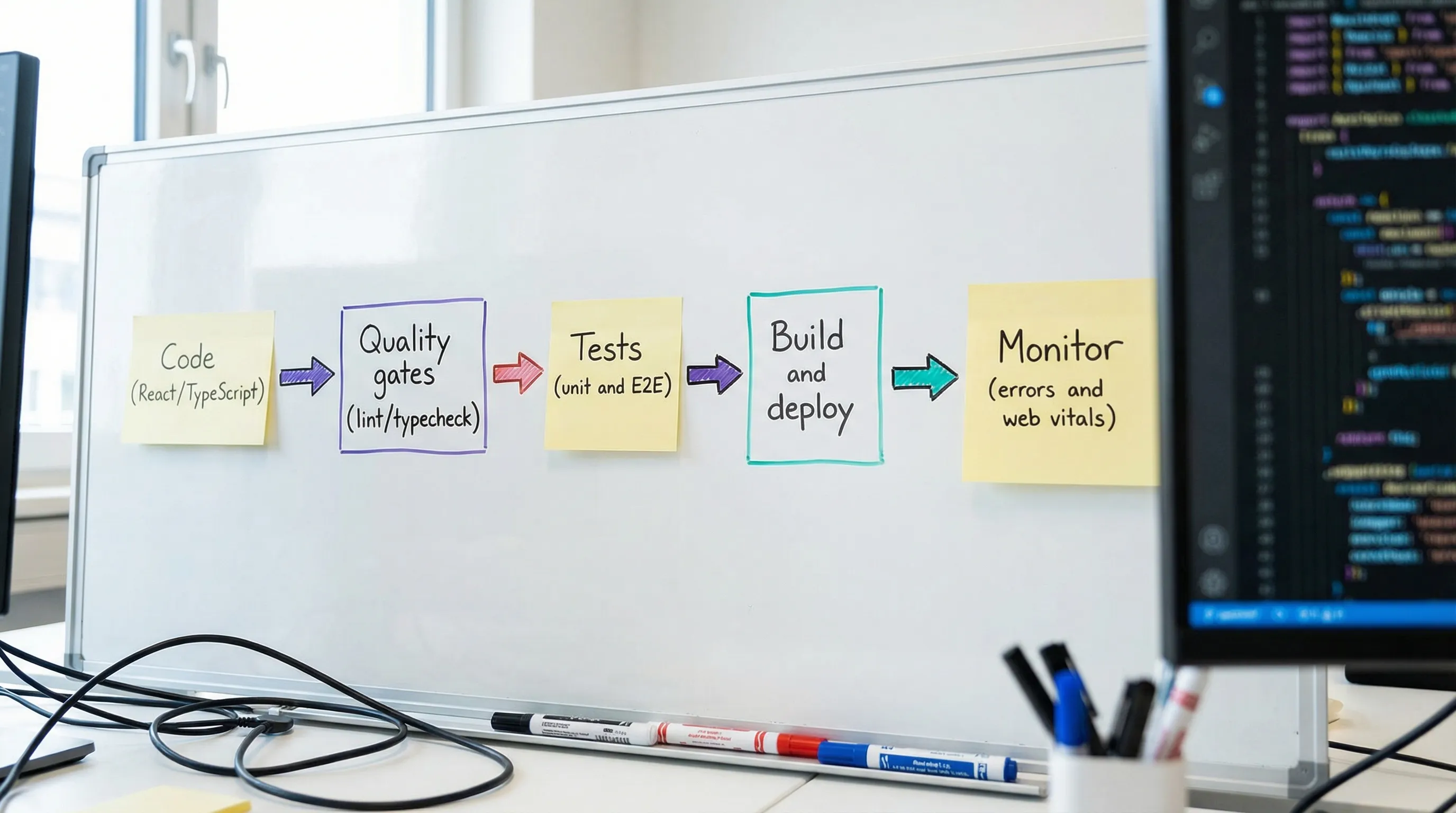
Minimum CI checks for production UIs:
- install with a lockfile (reproducible builds)
- typecheck
- lint
- unit/integration tests
- build
- E2E tests for critical flows (not necessarily every PR for the full suite)
This is covered in depth in Wolf-Tech’s broader delivery guide: CI CD Technology: Build, Test, Deploy Faster.

Recommended “default toolkit” for production React UIs
If you want a pragmatic baseline that fits most B2B SaaS and internal tools:
| Need | Default choice | Why it’s a safe default |
|---|---|---|
| Type safety | TypeScript | Biggest refactor safety net |
| Formatting | Prettier | Eliminates formatting drift |
| Linting | ESLint | Catches unsafe patterns early |
| Component catalog | Storybook | Scales UI reuse and review |
| Server state | TanStack Query | Standard caching and invalidation |
| Forms | React Hook Form + Zod | Fast forms, typed validation |
| Unit/integration tests | Testing Library + Vitest/Jest | Tests align to user behavior |
| E2E tests | Playwright | Cross-browser confidence |
| Performance | Lighthouse + Web Vitals + bundle analyzer | Budgets and real-user signals |
| Error monitoring | Sentry | Faster MTTR, release correlation |
This set is not about maximizing tool count. It’s about covering the failure modes that hurt production teams: regressions, flaky releases, slow UI, inconsistent states, and debugging without evidence.
Common mistakes when assembling React tools (and what to do instead)
Buying tools to compensate for missing boundaries
Tools cannot fix a UI that has no separation between server state, client state, and derived state. Start with patterns, then reinforce with tools.
Action: standardize a small set of architectural conventions (feature folders, state ownership, API boundaries), then add tools to enforce.
Adding too many UI libraries too early
A component library, animation library, and form library can each be fine. Three overlapping solutions for the same problem is how you get bundle bloat and inconsistent UX.
Action: choose one solution per problem category and document the decision.
Testing everything except critical flows
Teams often over-test components and under-test workflows.
Action: define 5 to 10 critical user flows and make them non-negotiable in E2E coverage.
No performance budgets
Without budgets, performance is a periodic “cleanup project” that never ends.
Action: define measurable budgets and enforce them in CI. Review regressions like you review failing tests.
When to bring in external help
If any of these are true, a short expert review often pays for itself:
- you ship slowly because every change feels risky
- your React app is fast in dev but slow in production
- you have inconsistent state, caching, and loading patterns across screens
- quality gates exist, but teams bypass them because they are noisy or slow
- you are migrating legacy UI code and need a safe incremental path
Wolf-Tech supports teams with full-stack development, code quality consulting, legacy code optimization, and tech stack strategy. If you want a pragmatic assessment of your current React toolchain and what to standardize next, start with an architecture and delivery review that focuses on measurable outcomes and operability. Learn more at wolf-tech.io.