
React Using Patterns: State, Effects, and Data Fetching

Sandor Farkas
Founder & Lead Developer
Expert in software development and legacy code optimization
LinkedIn
React is deceptively simple: a function that returns UI. In real products, the complexity creeps in through three doors: state, effects, and data fetching. When those concerns blur together, you get components that are hard to change safely, hard to test, and full of “why is this re-rendering” mysteries.
This guide is a set of practical React using patterns you can adopt as defaults in 2026 codebases (React 18+), whether you ship a SPA, a Next.js app, or something in between. The goal is not novelty, it’s predictable behavior.
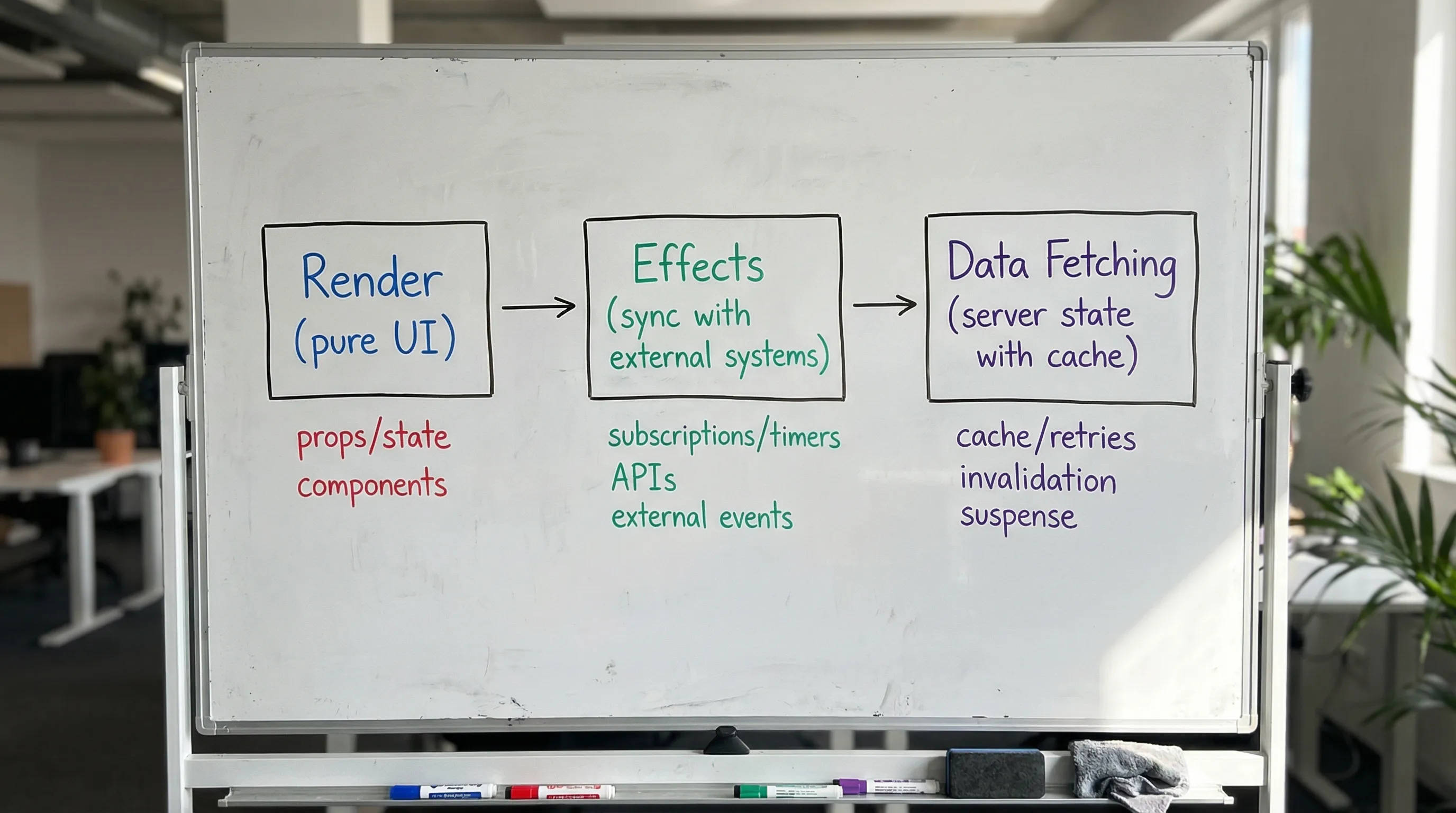
A mental model that scales: render, then sync
A useful baseline is:
- Render should be a pure calculation from inputs (props, state) to UI.
- Effects should synchronize with things React does not control (timers, subscriptions, DOM APIs, network side-effects).
- Data fetching is not “just an effect”, it is server state with caching, deduplication, invalidation, retries, and consistency concerns.
React’s own docs describe useEffect as an API for synchronizing with external systems, not as a general “do stuff after render” escape hatch. It is worth aligning your code with that intent because it reduces accidental complexity and Strict Mode surprises.
State patterns: keep it minimal, local, and explicit
Most React codebases fail not because they have state, but because they store the wrong things as state, or store the same thing twice.
Pattern 1: Prefer derived values over duplicated state
If you can compute a value from other state or props, compute it during render.
Bad smell: useEffect updates state that is derived from other state.
const [items, setItems] = useState<Item[]>([])

// Derived value: do not store separately
const total = items.reduce((sum, i) => sum + i.price, 0)
If the computation is heavy, memoize the derived value, not the source of truth.
const total = useMemo(() => items.reduce((sum, i) => sum + i.price, 0), [items])
Pattern 2: Put state as close as possible to where it’s used
This is the cheapest scaling strategy: local state has fewer unintended consumers.
A good default is:
- Start with component-local
useState. - Lift state only when you have a concrete sharing need.
- If you lift, keep a narrow interface (values + callbacks) rather than passing setters everywhere.
Pattern 3: Use useReducer for multi-step or rule-heavy UI
When UI transitions have rules, useReducer makes the transitions explicit and testable.
type State =
  | { step: 'idle' }
  | { step: 'editing'; name: string }
  | { step: 'submitting'; name: string }
  | { step: 'done' }

type Action =
  | { type: 'START' }
  | { type: 'CHANGE_NAME'; name: string }
  | { type: 'SUBMIT' }
  | { type: 'SUCCESS' }
  | { type: 'RESET' }

function reducer(state: State, action: Action): State {
  switch (action.type) {
    case 'START':
      return { step: 'editing', name: '' }
    case 'CHANGE_NAME':
      return state.step === 'editing' ? { ...state, name: action.name } : state
    case 'SUBMIT':
      return state.step === 'editing' ? { step: 'submitting', name: state.name } : state
    case 'SUCCESS':
      return { step: 'done' }
    case 'RESET':
      return { step: 'idle' }
    default:
      return state
  }
}
This pattern pays off when you start adding validation, permissions, async submission, or cancellation.
Pattern 4: Controlled vs uncontrolled, choose deliberately
For reusable components (inputs, dropdowns, complex widgets), explicitly decide whether a component is:
- Controlled (parent owns the value, component raises events)
- Uncontrolled (component owns the value internally)
A practical rule:
- Use controlled when the value must participate in page-level logic (URL sync, cross-field validation, “Save changes” flows).
- Use uncontrolled when you want the simplest integration and do not need orchestration.
Wolf-Tech’s component patterns article goes deeper on these contracts: Front End React Patterns for Large, Shared Components.
Pattern 5: Context is for dependency injection, not a global store
React Context is great for stable, app-wide dependencies (theme, i18n, feature flags, current tenant). It becomes costly when used as a frequently-changing global store because it can trigger broad re-renders.
Defaults that hold up:
- Keep context values stable (memoize objects).
- Prefer multiple narrow contexts over one “AppContext”.
- For server state, prefer a dedicated library (see data fetching patterns below).
For a broader architecture view (server vs UI vs URL vs form concerns), see: React Application Architecture: State, Data, and Routing.
Effect patterns: make side effects intentional
If state patterns are about “what do we store?”, effect patterns are about “what do we synchronize with?”
Pattern 1: Don’t use effects for things that can happen in events
If you are reacting to a user action (click, submit, change), you usually want an event handler, not an effect.
function SaveButton() {
  const onClick = async () => {
    await save()
    toast.success('Saved')
  }

  return <button onClick={onClick}>Save</button>
}
Using an effect for this often introduces extra state (“shouldSave”), dependency bugs, and double runs in development.
Pattern 2: When you do use useEffect, treat it as a lifecycle with cleanup
Effects need a cleanup when they establish something that must be torn down.
useEffect(() => {
  const id = window.setInterval(() => {
    setNow(new Date())
  }, 1000)

  return () => window.clearInterval(id)
}, [])
This becomes critical with:
- WebSocket subscriptions
- DOM event listeners
AbortControllerfor fetch- External SDKs (maps, analytics)
React’s Strict Mode in development intentionally re-runs certain lifecycles to surface unsafe effects. If an effect “sometimes duplicates”, that is often a sign it is missing cleanup or is not idempotent.
Pattern 3: Split effects by responsibility
One effect should usually have one reason to exist. This avoids tangled dependency arrays and “fix it by disabling eslint” outcomes.
Instead of one effect that subscribes, fetches, and logs, split them.
Pattern 4: Use refs for mutable values that should not trigger renders
A common anti-pattern is storing “latest value” in state, which forces re-renders and can create loops.
useRef is often a better fit for mutable, non-UI values like:
- timers
- last request id
- imperatively controlled instances
If you want a curated list of React anti-patterns (including effect misuse), this Wolf-Tech post is a good companion: JavaScript React Anti-Patterns That Slow Teams Down.
Data fetching patterns: treat server state as a first-class system
If you only take one thing from this article: data fetching is not a side effect detail, it’s a product behavior.
You need to answer questions like:
- When is data considered fresh or stale?
- What happens on slow networks?
- What happens if the user navigates away mid-request?
- How do we dedupe identical requests?
- How do we handle retries, backoff, and error states?
- How do we update cached data after mutations?
Two viable defaults (pick one and standardize)
Default A: Use a server-state library (recommended for most SPAs)
Libraries like TanStack Query (React Query) exist because server state has hard problems that you do not want to re-invent per component.
A simple pattern is “API module + query hook + UI”.
// api/projects.ts
export async function listProjects(signal?: AbortSignal) {
  const res = await fetch('/api/projects', { signal })
  if (!res.ok) throw new Error('Failed to load projects')
  return (await res.json()) as Project[]
}

// hooks/useProjects.ts
export function useProjects() {
  return useQuery({
    queryKey: ['projects'],
    queryFn: ({ signal }) => listProjects(signal),
    staleTime: 30_000,
  })
}
This gives you caching, cancellation, request deduplication, and a shared vocabulary across the app.
Default B: Use framework loaders/server components when available
If you are in a framework that supports route loaders or server-first rendering (for example, server-rendered routes with caching), prefer fetching data in the route boundary and passing it down. This keeps most components pure and reduces client complexity.
Wolf-Tech covers server vs client boundaries in depth here: React Next JS: When to Use Server Components.
Pattern 1: Standardize the request lifecycle in UI
Every data-driven screen should intentionally handle four states:
- Loading
- Error
- Empty (success but no data)
- Success
If teams do not standardize this, users experience random spinners, silent failures, and inconsistent empty states.

Pattern 2: Always handle cancellation (and race conditions)
Even if you do not use a server-state library, you should cancel in-flight requests on unmount or parameter changes.
useEffect(() => {
  const controller = new AbortController()

  ;(async () => {
    try {
      const res = await fetch(`/api/users?query=${encodeURIComponent(q)}`, {
        signal: controller.signal,
      })
      const data = await res.json()
      setUsers(data)
    } catch (e) {
      if ((e as any).name === 'AbortError') return
      setError(e)
    }
  })()

  return () => controller.abort()
}, [q])
This prevents “setState on unmounted component” warnings and subtle race bugs where a slower response overwrites a newer one.
Pattern 3: Decide where data fetching lives (and enforce it)
A common scalability failure is “data fetching everywhere”. Decide on a rule such as:
- Fetch at route/screen boundaries.
- Leaf components receive data via props and remain pure.
- Exceptions require justification (for example, a self-contained autocomplete widget).
This makes refactors cheaper because you can change data requirements in one place.
Pattern 4: Mutations need an explicit cache update strategy
For create/update/delete operations, pick one of these per mutation:
- Invalidate relevant queries and refetch (simple, often good enough)
- Optimistically update the cache (best UX, higher complexity)
- Update by response (replace cached object with returned canonical value)
In all cases, coordinate with the backend on idempotency and validation errors. A lot of “frontend state problems” are actually inconsistent backend contracts.
Pattern 5: Make data contracts explicit
At minimum, keep a typed boundary:
- Validate responses (runtime validation for critical flows)
- Normalize error shapes
- Avoid passing raw
fetchcalls around UI code
If you want an end-to-end example of a production-ready slice (contracts, hooks, errors, telemetry), this tutorial is a strong reference implementation: React Tutorial: Build a Production-Ready Feature Slice.
A decision table you can use in reviews
Use this table in PR reviews to steer toward consistent patterns.
| Problem you’re solving | Prefer this pattern | Why it scales better |
|---|---|---|
| UI value is computed from existing props/state | Derived value in render (optionally useMemo) | Avoids duplicated state and sync bugs |
| Multi-step UI with rules and transitions | useReducer (or a state machine library) | Makes transitions explicit and testable |
| Sharing UI state across a small subtree | Lift state to nearest common parent | Keeps dependencies local |
| Sharing stable app-wide dependencies | Context (narrow, memoized) | Avoids prop drilling without global re-renders |
| Fetching, caching, invalidation, retries | Server-state library or framework loader | Prevents per-component reinventions |
| Subscriptions, timers, imperative APIs | useEffect with cleanup | Prevents leaks and Strict Mode issues |
A lightweight “team standard” that prevents 80% of mess
If you are trying to align a team, keep the standard small and enforceable:
- Ban using
useEffectto “keep state in sync” with other state (derive instead). - Require a single place per screen/route where data is fetched.
- Require loading/error/empty/success UI states.
- Require cancellation for in-flight requests (or use a library that provides it).
- Prefer
useReducerwhen a component has 3+ boolean flags or “mode” variables.
If you want a more complete standards template (tooling, tests, performance budgets), Wolf-Tech’s playbook is a good baseline: React Development Playbook: Standards for Teams.
When to bring in outside help
If your React codebase feels slow to change, the fastest path is often not a rewrite. It’s an architecture pass that:
- classifies your state and data flows,
- defines route boundaries and fetch strategy,
- introduces enforceable patterns (lint rules, module boundaries, shared utilities),
- and removes the worst hotspots incrementally.
Wolf-Tech specializes in full-stack development and legacy optimization. If you want a pragmatic review of your current state/effects/data fetching approach (and an incremental fix plan), you can reach out via wolf-tech.io.