
JavaScript React Anti-Patterns That Slow Teams Down


Shipping React features quickly is rarely limited by “how fast we can write code.” It is limited by how safely we can change code. A handful of JavaScript React anti-patterns quietly increase coordination cost, slow reviews, create flaky bugs, and make onboarding painful.
This guide is for tech leads, senior engineers, and engineering managers who want a pragmatic answer to: Which React habits are slowing us down, and what should we do instead?
What “slow teams down” really means (and how to measure it)
Before refactoring anything, agree on what “slow” looks like in your org. In practice, React anti-patterns show up as:
- Long lead time from “ready” to “merged” (large PRs, heavy review load)
- High change failure rate (regressions, rollbacks, hotfixes)
- Slow onboarding (new devs cannot find where things live)
- Low confidence releases (manual QA heroics)
If you want a shared language for delivery performance, the DORA metrics are a useful baseline (lead time, deployment frequency, change failure rate, time to restore). See Google’s overview of DORA metrics.
A quick map of the most common React anti-patterns
Use this as a triage table. If you recognize multiple rows, you likely have a compounding effect (each anti-pattern makes the others harder to fix).
| Anti-pattern | What you see in day-to-day work | Why it slows teams | Better default |
|---|---|---|---|
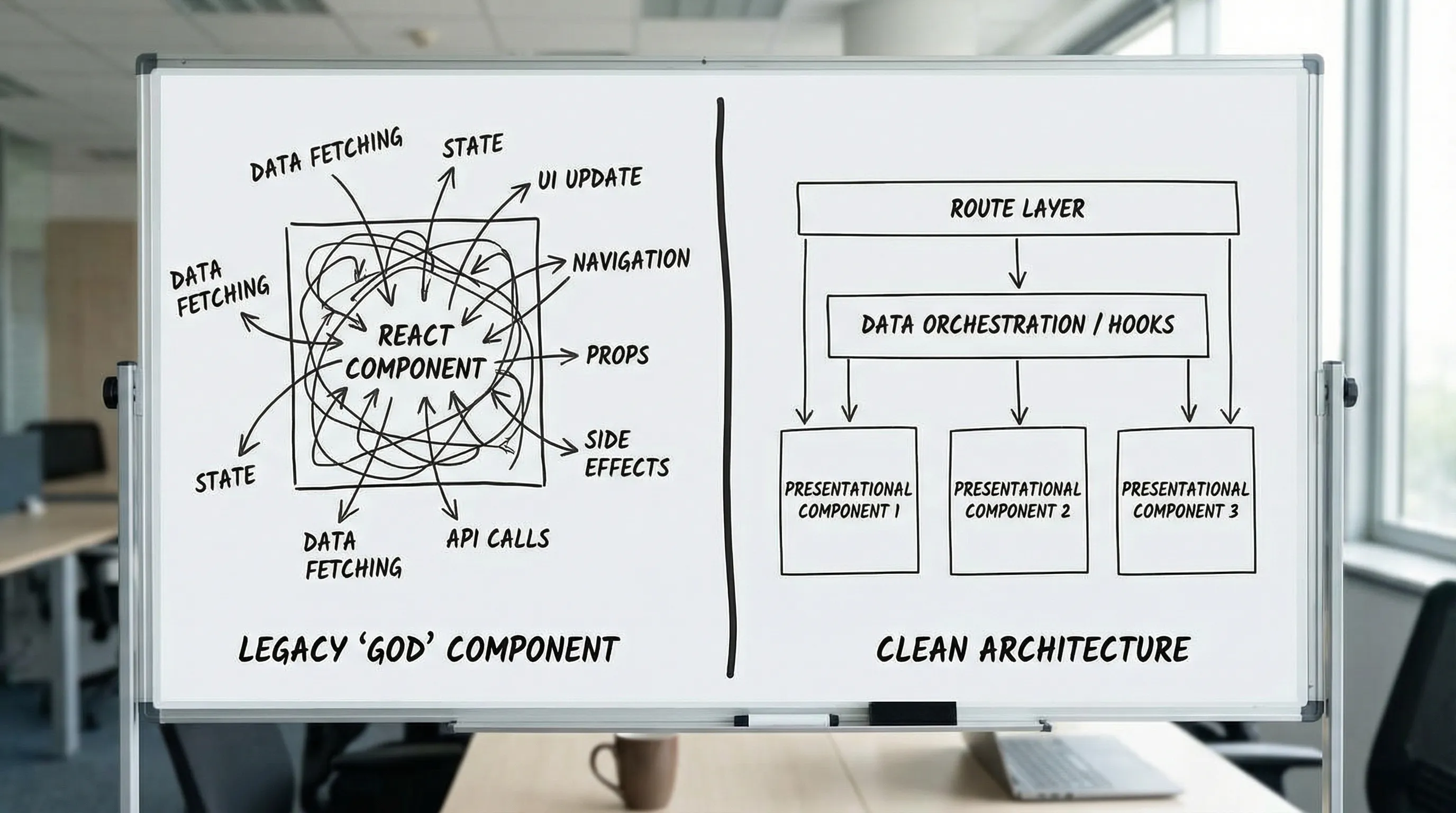
| “God components” | One file owns data fetching, business rules, UI, and navigation | PRs are huge, changes collide, testing is hard | Split orchestration (route) from components, keep UI components dumb |
Server state in useEffect | useEffect(() => fetch(...)) everywhere | Race conditions, duplicated logic, inconsistent caching | Use a server-state library (TanStack Query/RTK Query/SWR) |
| Effect dependency chaos | Disabled lint rules, mysterious re-renders | Bugs surface late, fixes are risky | Follow React hook rules, isolate effects, move logic out |
| Context used as global state | One “AppContext” feeds everything | Re-render storms, hidden coupling | Keep context scoped (feature or component subtree), use stores selectively |
| Global store for everything | Redux/Zustand holds UI state, form state, URL state | Hard-to-debug behavior, hard-to-reuse screens | Classify state (server, URL, UI, form) and place it intentionally |
| Premature abstractions | Generic “SuperButton”, “ApiService”, “SmartTable” | Every change requires framework work | Prefer concrete components, abstract only after duplication is proven |
| No boundaries in codebase | shared/ and utils/ become dumping grounds | Ownership is unclear, circular deps grow | Feature-first modules with enforceable dependency rules |
| Validation and contracts missing | “It works with this payload” assumptions | Runtime failures, costly debugging | Typed + runtime validation at boundaries (for example Zod) |
| Tests concentrated in E2E | A few slow flaky end-to-end tests | Teams stop trusting CI | Mostly unit/component tests + one E2E per critical journey |
If you want the “good defaults” counterpart to this article, Wolf-Tech has companion guides like React application architecture: state, data, and routing and the React development playbook for teams.
Anti-pattern 1: “God components” that do everything
What it looks like
A single component file:
- Fetches data
- Holds complex derived state
- Implements business rules
- Renders a large UI tree
- Navigates on submit
Why it slows teams
God components become merge-conflict magnets. They also tend to accumulate fragile, untested conditional paths (“if user is X and status is Y…”). The result is:
- Large PRs and long review cycles
- High regression risk
- Low reusability (the component is too specific to extract)
Better default
Treat routes/pages as orchestration seams and keep components focused.
A practical split:
- Route layer: data loading, auth/permissions checks, error boundaries, navigation
- Feature components: presentational + local UI state
- Domain logic: extracted functions with tests
Wolf-Tech’s React front end architecture for product teams covers this “routes orchestrate, features implement” approach in detail.
Anti-pattern 2: Treating server state as “just React state”
What it looks like
Repeated patterns across the app:
useEffect(() => {
  setLoading(true)
  fetch(`/api/orders?user=${userId}`)
    .then(r => r.json())
    .then(data => setOrders(data))
    .catch(setError)
    .finally(() => setLoading(false))
}, [userId])
Why it slows teams
When every team reinvents fetching, you get inconsistent behavior:
- Duplicate caching logic (or no caching)
- Waterfalls and race conditions
- Inconsistent error handling and retries
- “Refetch” semantics are unclear
Better default
Use a server-state library and standardize query keys, stale times, and invalidation rules. TanStack Query is a common choice, but the key is consistency.
This aligns with React’s guidance to avoid deriving app architecture from effects alone. The React docs on synchronizing with Effects and the Rules of Hooks are worth re-reading when a codebase drifts.
Anti-pattern 3: Effect dependency chaos (and disabling the lint rule)
What it looks like
// eslint-disable-next-line react-hooks/exhaustive-deps- Effects that do multiple unrelated things
- Effects that “work” but only because state happens to update in a certain order
Why it slows teams
This creates “action at a distance.” A developer changes a variable, and an effect silently starts firing more often (or not at all). These bugs are:
- Hard to reproduce
- Hard to review (you must simulate runtime mentally)
- Often fixed with more effects, compounding the issue
Better default
- Keep each effect focused on one synchronization concern.
- Move pure transformations out of effects.
- Prefer event handlers for user actions, not effects.
Also, enforce the rule in CI. If the team frequently needs to disable it, it is a signal your component boundaries are off.
Anti-pattern 4: Using React Context as a global store
What it looks like
- One
AppContextprovider at the root - It stores user, permissions, theme, feature flags, cached data, UI toggles
Why it slows teams
Context is not “bad,” but wide context creates hidden coupling and re-render pressure. Over time you get:
- Unexpected rerenders when unrelated context values change
- Hard-to-track dependencies (any component can read anything)
- Risky refactors (changing context shape breaks many consumers)
Better default
- Keep context narrow and local (feature subtree, or a single component family).
- For frequently changing values needed by many nodes, use a dedicated store with selectors (and treat it as an explicit dependency).
- For server state, do not “cache via context.” Use a server-state library.
Anti-pattern 5: One global state solution for all state types
What it looks like
Everything goes into Redux/Zustand/MobX:
- Form inputs
- URL filters
- Modal open/close
- Server responses
Why it slows teams
Different state types have different lifecycles and correctness rules. When you store everything together:
- You create unnecessary coordination (every change touches “the store”)
- You encourage cross-feature coupling
- Debugging becomes timeline archaeology
Better default
Classify state and place it where it belongs:
- Server state: fetched, cached, invalidated (use server-state tooling)
- URL state: shareable, back button behavior (use router/search params)
- UI state: ephemeral local toggles (component state)
- Form state: validation and submission lifecycle (form library)
Wolf-Tech’s React application architecture: state, data, and routing provides a concrete model you can adopt quickly.
Anti-pattern 6: Premature abstractions and “framework building” inside the app
What it looks like
- A generic “API client” that hides HTTP semantics
- An over-configurable “Table” component used for every list
- A “SmartInput” that tries to support every form use case
Why it slows teams
Over-abstraction shifts work from product delivery to internal framework maintenance:
- Simple feature changes require changes to shared abstractions
- Reviews become political (“this impacts other teams”)
- Engineers avoid touching shared code, or touch it and break others
Better default
- Prefer concrete components per journey or feature.
- Abstract only when:
- you see repeated logic at least 3 times, and
- you can define a stable API contract.
For large shared components, the safest path is often “headless core + thin wrappers” and explicit contracts. Wolf-Tech’s React patterns for large, shared components dives into that.
Anti-pattern 7: No enforceable module boundaries (the shared/ dump)
What it looks like
shared/,common/,utils/grow without ownership- Random cross-imports between features
- Circular dependency issues appear over time
Why it slows teams
Without boundaries, you lose parallelism:
- Teams step on each other
- Refactors become scary (unknown blast radius)
- Onboarding becomes “tribal knowledge”
Better default
Adopt a feature-first module layout with a thin shared layer, and enforce boundaries with tooling (ESLint rules, dependency constraints). If your repo is already large, make this incremental:
- Start by defining “no imports across features” as a goal.
- Move code only when touched (boy scout rule).
- Add dependency rules and fail PRs that break them.
Anti-pattern 8: Missing contracts at boundaries (types and runtime validation)
What it looks like
- API responses are assumed correct
- A small backend change breaks a front end screen
- “Fix” is to add more optional chaining
Why it slows teams
When contracts are implicit:
- Debug time skyrockets
- Bugs escape to production
- Cross-team work becomes slower (more coordination, more meetings)
Better default
Use two layers:
- Type-level contracts (TypeScript types, or generated types)
- Runtime validation at boundaries (for example, Zod schemas)
Wolf-Tech’s React tutorial: build a production-ready feature slice shows how contracts and validation fit into a shippable feature.
Anti-pattern 9: Performance work that is reactive, not budgeted
What it looks like
- “The app is slow” reports arrive late
- Teams chase micro-optimizations in React renders
- No one can answer what “fast enough” means
Why it slows teams
Unbounded performance work becomes a tax on every release. Also, focusing only on render micro-optimizations misses bigger causes (data waterfalls, payload weight, third-party scripts).
Better default
- Set a few performance budgets tied to user outcomes (for example Core Web Vitals).
- Measure with both lab and field data.
For React apps, Wolf-Tech’s React website performance guide (LCP, CLS, TTFB) provides a concrete workflow. For Core Web Vitals background, see web.dev/vitals.
Anti-pattern 10: Testing concentrated in a small, flaky E2E suite
What it looks like
- CI takes a long time
- E2E fails intermittently
- Developers re-run pipelines until it passes
Why it slows teams
Flaky tests create a culture of low trust. When CI is not trusted:
- PR review becomes slower (more manual verification)
- Releases are delayed
- Bugs escape because teams disable or ignore failing tests
Better default
Aim for:
- Fast component tests for critical UI logic
- Focused unit tests for domain logic
- One E2E per critical journey (smoke tests), not per edge case
If you want a broader “release reliability” baseline, the front end development checklist for reliable UI releases is a solid reference.
A practical 30-minute audit you can run this week
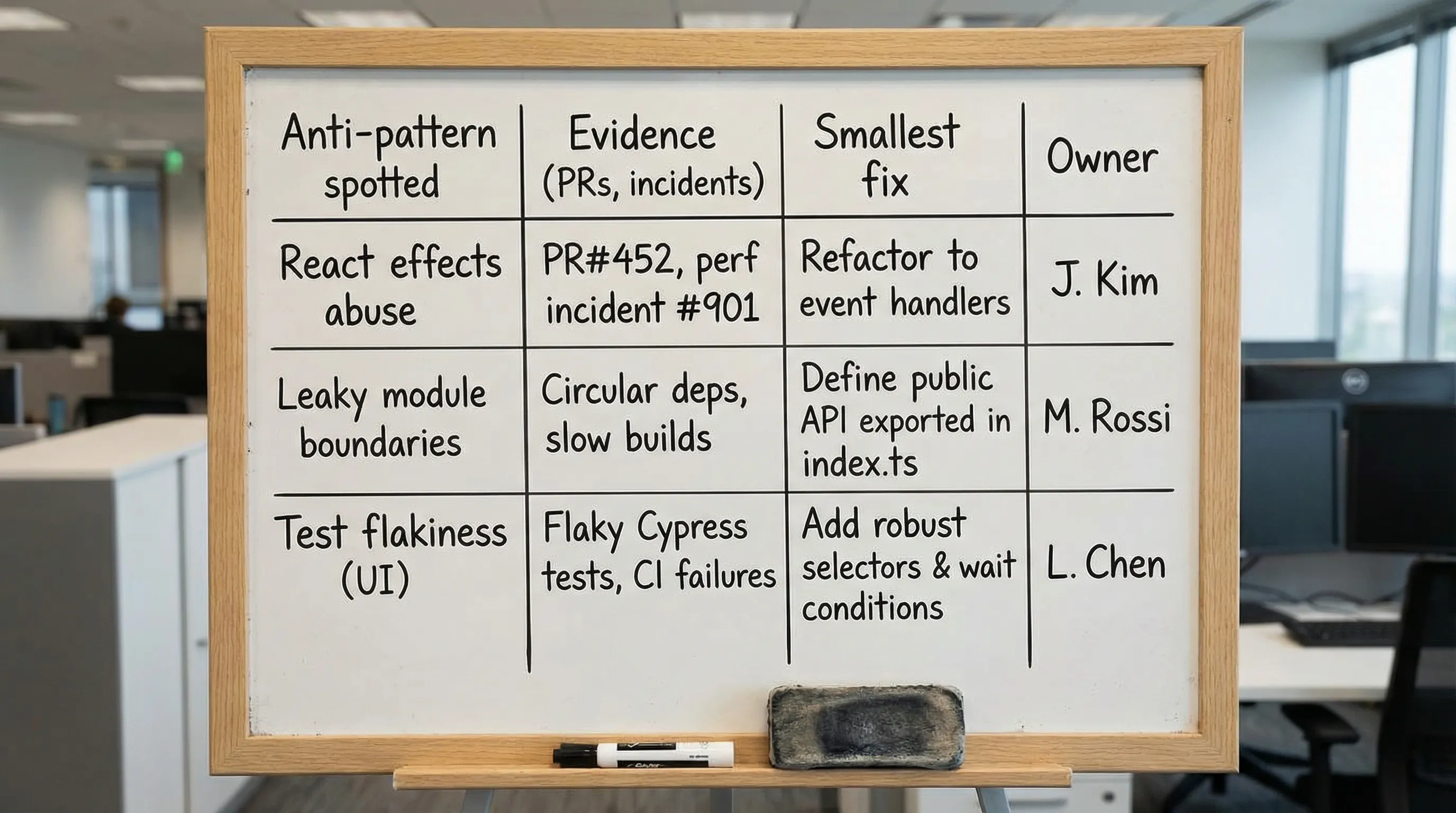
If you want to make this actionable, pick one codebase and answer these questions:
- Are routes/pages acting as orchestration seams, or are business rules spread across random components?
- Do we have a consistent approach for server state (queries, mutations, invalidation, retries)?
- Are hook lint rules enforced, or frequently disabled?
- Can we point to a small set of module boundaries (features) and enforce them?
- Do we validate API boundaries (types plus runtime checks) instead of trusting payloads?
- Is CI fast and trusted, or slow and flaky?
Frequently Asked Questions
What is the biggest React anti-pattern that slows teams down the most? The most common “velocity killer” is the god component (too many concerns in one place). It drives huge PRs, merge conflicts, and fragile changes. Splitting orchestration from UI is usually the highest leverage fix.
Is using useEffect for data fetching always an anti-pattern? Not always, but it becomes one when it is your default app architecture. For anything beyond simple demos, a server-state library plus consistent query conventions prevents duplicated logic, race conditions, and inconsistent error handling.
Is React Context bad practice? No. Context is great for scoped dependencies (theme, locale, a component family). The anti-pattern is using a wide, global context as a general state container for fast-changing values.
Should we rewrite our React app to fix these issues? Usually no. Most teams get better results with incremental refactors: enforce lint rules, define boundaries, standardize server state, and chip away at the worst hotspots while shipping.
How do we prioritize which anti-pattern to tackle first? Start with the one that shows up in measurable pain: largest PRs, most frequent regressions, or the slowest feedback loop (CI flakiness). Pick a small slice, fix it, and turn the fix into a standard.
Need a fast, practical React cleanup plan?
If your React codebase is slowing delivery, the fix is rarely “more React experts” and almost never “a full rewrite.” It is usually a small set of architecture and quality guardrails applied consistently.
Wolf-Tech helps teams modernize and scale JavaScript React codebases through full-stack delivery, code quality consulting, and legacy optimization. If you want an objective assessment (with a prioritized, incremental plan), start a conversation at Wolf-Tech.