
Front End Development Services: Deliverables That Matter

Sandor Farkas
Founder & Lead Developer
Expert in software development and legacy code optimization
LinkedIn
Buying front end development services should not feel like buying “screens” or “a React rewrite.” The work that actually reduces risk and improves outcomes lives in the deliverables you can verify: measurable performance targets, accessible UI behavior, maintainable component architecture, safe release mechanics, and evidence that the UI works with real data and real failures.
This guide outlines the deliverables that matter (and how to review them) so you can evaluate a partner, align expectations in a contract, and avoid the most common front end failure mode: a UI that looks done but is expensive to change.
What “deliverables” means in front end work
In strong front end engagements, deliverables are not just files or Figma links. They are proofs that the UI:
- Supports the user journeys you care about
- Meets non-functional requirements (performance, accessibility, security, reliability)
- Can be evolved safely by your team after handoff
A good way to frame it is: every deliverable should have an acceptance check. If it cannot be checked, it is not a deliverable, it is a promise.
Deliverables by phase (what you should expect, and why it matters)
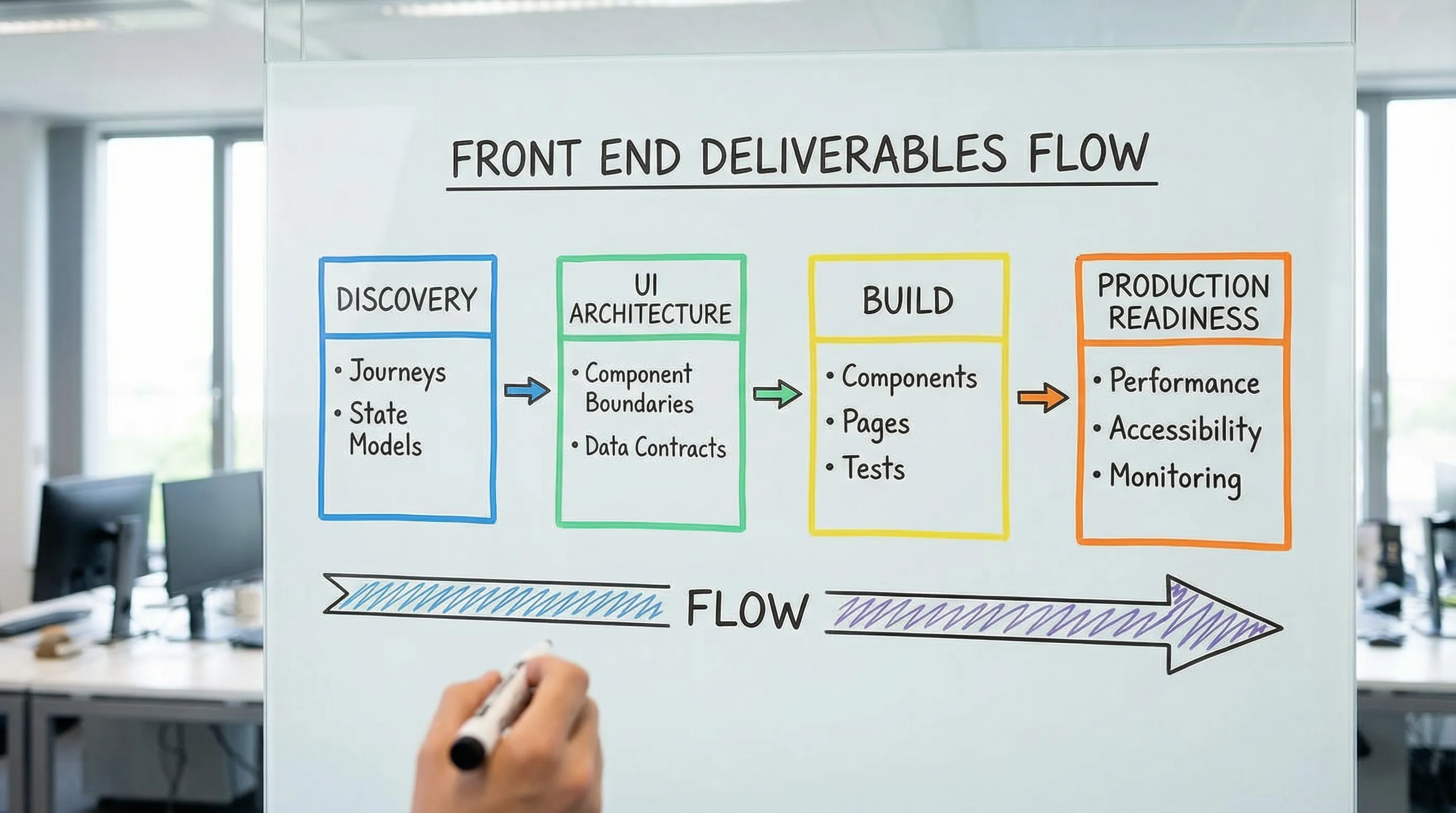
1) Discovery and UI scope: outcome-first, not page-first
Front end scope drifts fastest when teams start from “pages” instead of user tasks and system states. The deliverables you want early are small, specific, and testable.
Deliverables that matter
- UI scope map tied to outcomes: a short list of user journeys and the UI surfaces involved (not a long page inventory). This becomes the backbone for estimation and slicing.
- State model for each critical journey: success, empty, loading, error, partial failure, permission denied, and stale data states. This is where front ends usually break in production.
- Non-functional requirements for the UI: performance targets, accessibility target level, browser support, localization needs, analytics requirements.
If you want a practical cross-functional alignment loop, Wolf-Tech’s “UX to architecture handshake” article explains how UX decisions and architecture constraints must meet early to prevent rework: Web Application Designing: UX to Architecture Handshake.
2) UI architecture baseline: how you avoid an expensive rewrite later
“Front end architecture” sounds abstract until you inherit a codebase where every feature touches every file. A credible provider can explain the architecture in plain language and show it in code.
Deliverables that matter
- Front end architecture note (1 to 3 pages): how the app is structured by feature or domain, how shared components are governed, where state lives, and how data fetching is handled.
- Routing and rendering strategy (when relevant): SSR/SSG/CSR choices, caching model, and the reason for each (especially for SEO or performance-sensitive pages). If you run Next.js, this should be explicit per route.
- API integration contract: what endpoints, payload shapes, error formats, pagination, and auth patterns the UI depends on. Even if backend work is separate, the UI needs contracts.
For teams building on React, Wolf-Tech’s toolkit guide is a useful reference for what “production-ready UI” standards look like: React Tools: The Essential Toolkit for Production UIs.
3) Component system deliverables: design consistency you can ship
Many teams pay twice, first for design, then again to “make it consistent.” The bridge is a component system that is both usable and governed.
Deliverables that matter
- Component inventory: a list of components the product actually uses (inputs, tables, dialogs, navigation, toasts, empty states), with ownership and usage guidance.
- Design tokens (or a token strategy): color, spacing, typography, radii, shadows, and semantic naming. Tokens reduce churn when branding changes.
- Documented component examples: commonly delivered via a component workbench (often Storybook), but the key is not the tool, it is the ability to review variants and states.
- Accessibility baked into components: keyboard navigation, focus management, labels, error messaging, and contrast.
A fast way to validate quality is to ask for one complex component (for example, a table with sorting, filtering, pagination, loading, and empty states) and review it for correctness across states.
4) Front end implementation deliverables: working increments with reviewable proof
You should not accept “big bang UI drops.” Professional front end delivery is incremental, reviewable, and tied to a Definition of Done.
Deliverables that matter
- Working increments in a repo you can access: code in small PRs, readable history, and a consistent review workflow.
- Preview environments per change (or equivalent): a way for stakeholders to validate UI behavior before merging.
- Definition of Done for UI: what “done” means for a user story (tests, a11y, performance, telemetry, error handling).
If you want a broader view of what professional custom software services should include by default (beyond just front end), this is a helpful benchmark: Custom Software Services: What You Should Get by Default.
5) Performance deliverables: budgets, measurements, and regression protection
Performance is not a final-week polish task. It is a set of targets and guardrails.
Deliverables that matter
- Performance budget: limits for key pages, typically including JavaScript bundle cost and Core Web Vitals targets.
- Baseline and repeatable measurement: Lighthouse in CI is useful, but field data is better when available.
- A plan for third-party scripts: tag governance, loading strategy, and justification for each.
For user-perceived performance, Google’s Core Web Vitals remain a practical shared language across product, engineering, and SEO: Web Vitals overview.
If you are on Next.js, Wolf-Tech’s performance tuning guide goes deep on how to measure and prevent regressions: Next.js Development: Performance Tuning Guide.
6) Accessibility deliverables: not “best effort,” but verifiable compliance
Accessibility is a product quality and risk issue. In many organizations it is also a contractual requirement.
Deliverables that matter
- Target standard and scope: for example, WCAG 2.2 AA for key flows, with explicit exclusions if any.
- Audit evidence: what was checked (keyboard, screen reader smoke tests, contrast) and what tooling was used.
- Accessible interaction patterns: focus order, skip links (when relevant), form semantics, error summaries.
WCAG is the most common baseline to anchor expectations and audits: WCAG 2.2.
7) Testing deliverables: confidence that survives the next release
Front ends fail in ways that are easy to miss manually: stale caching, race conditions, broken empty states, and permission edge cases.
Deliverables that matter
- Testing strategy and test pyramid: what is covered by unit tests, integration tests, and end-to-end tests.
- Critical path E2E coverage: login (if applicable), checkout or conversion flow, primary “create/edit” flows.
- Contract assumptions captured: mocked API fixtures aligned with real contracts, not ad hoc JSON.
You do not need perfect coverage. You need coverage where failure is expensive.
8) Security and privacy deliverables: front end responsibilities are real
While most security issues live server-side, front ends have concrete responsibilities: safe auth handling, avoiding data leakage, and preventing common injection risks.
Deliverables that matter
- Security checklist for the UI: CSP considerations, safe handling of tokens (no sensitive storage in localStorage unless explicitly justified), dependency hygiene.
- Dependency and supply chain evidence: lockfiles committed, vulnerability scanning in CI, and update policy.
- Sensitive data handling: what is logged, what is sent to analytics, and how PII is treated.
OWASP’s guidance is a solid reference point for what “secure by design” should mean in web apps: OWASP Top 10.
9) Observability deliverables: the UI should tell you when users struggle
If the UI is a black box, you learn about problems from customer complaints. A modern front end should emit signals.
Deliverables that matter
- Front end telemetry plan: what events matter, naming conventions, and how events connect to business outcomes.
- Error monitoring configured: source maps, environment tagging, release tagging.
- Performance monitoring approach: at minimum, a way to track user-facing latency and Core Web Vitals over time.
This is also where you catch regressions after releases, especially when you ship frequently.
10) Handoff deliverables: if you cannot run it, you do not own it
The handoff is where many “services” engagements quietly fail. You want operational ownership, not just a zip file.
Deliverables that matter
- Runbook for the front end: build and run commands, environment variables, release steps, rollback notes.
- Architecture Decision Records (ADRs) for key choices: state management, routing/rendering, error handling patterns.
- Onboarding notes for new devs: repo layout, conventions, how to add a feature safely.
- Clear ownership transfer: access to repos, CI/CD, domains, and monitoring, plus a final walkthrough.
The buyer’s checklist: front end deliverables you can copy into a contract
Use this as a practical checklist during vendor evaluation, kickoff, and acceptance.
| Area | Deliverable | How you verify it | Why it matters |
|---|---|---|---|
| Scope | Journeys + state models | Review states per flow (loading, error, empty, permissions) | Prevents “looks done” failures |
| Architecture | UI architecture note + repo structure | Walkthrough + code review | Keeps change cost predictable |
| Components | Component inventory + documented variants | Component review across states | Consistency and velocity |
| Accessibility | Target standard + audit evidence | Keyboard and screen reader smoke tests, audit report | Legal and usability risk reduction |
| Performance | Budget + baseline metrics | Lighthouse/CI reports, field data if available | Protects conversion and UX |
| Testing | Strategy + critical E2E coverage | See tests run in CI, review flake rate | Release confidence |
| Security | UI security checklist + dependency scanning | CI outputs, dependency policy | Reduces avoidable exposure |
| Observability | Error monitoring + key events | See dashboards/events in a staging env | Faster debugging, better product decisions |
| Delivery | Preview environments, small PR workflow | Inspect PR sizes, preview links | Early feedback, lower risk |
| Handoff | Runbook + ADRs + access transfer | Dry-run deploy and rollback | True ownership post-engagement |
Red flags that indicate low-value front end delivery
A provider can be talented and still deliver the wrong shape of work. These red flags often predict pain:
- “We’ll optimize performance at the end.” Performance needs budgets and early choices.
- No explicit accessibility target. “We care about a11y” is not a deliverable.
- No story for error states and partial failures. Real apps fail, your UI must degrade safely.
- Large PRs and long-lived branches. Hard to review, hard to test, hard to ship.
- A component library that is undocumented. It will be abandoned as soon as the first deadline hits.
How Wolf-Tech typically helps (without locking you into a single stack)
Wolf-Tech focuses on full-stack delivery and engineering rigor, including front end development, code quality consulting, legacy optimization, and tech stack strategy. If you are evaluating front end development services and want a second opinion, the most useful starting point is usually an evidence-based review of:
- Your UI scope and state models for critical journeys
- Current UI architecture and maintainability risks
- Performance and accessibility baselines, plus the smallest set of changes that move the needle
If you are also selecting a broader partner for building a web application end-to-end, these guides can help you structure the evaluation: How to Choose Companies for Web Development in 2026 and Top Traits of Web Application Development Companies.

A simple way to use this article in your next vendor conversation
Bring the checklist table to your next call and ask the provider to:
- Show one example of each deliverable from a past engagement (sanitized is fine)
- Explain the acceptance check they use for each deliverable
- Describe what they do when a deliverable reveals a constraint (for example, API latency breaks the UX)
You will quickly learn if you are talking to a team that ships UIs, or a team that builds products you can operate and evolve.