
Next JS React 18: Migration Tips and Common Pitfalls

Sandor Farkas
Founder & Lead Developer
Expert in software development and legacy code optimization
LinkedIn
Most Next.js upgrades are “easy” until you combine them with React 18 and run the application in real production conditions: SSR, streaming, authentication, third party UI libraries, analytics scripts, and complex state.
This guide focuses on Next JS React 18 migration for real codebases, with practical tips drawn from production upgrades. The goal is not just to make the build green, but to upgrade safely with predictable behavior, controlled risk, and a rollback path.
What actually changes with React 18 (and why Next.js surfaces it)
React 18 is not “just another version bump.” It introduces concurrent rendering capabilities (used selectively by React and frameworks) and changes several runtime behaviors that show up as:
- UI updates that are batched more often (different timing can expose race conditions).
- Effects and lifecycle-like behavior behaving differently in development under Strict Mode.
- Suspense becoming a first class primitive for coordinating async rendering.
Next.js intensifies these changes because it combines React with SSR, streaming, routing conventions, and (in the App Router) React Server Components.
If you want a quick primary-source refresher, start with the official React 18 upgrade guide and the Next.js upgrade docs.
Before you upgrade: decide your migration target and “blast radius”
A common pitfall is attempting multiple big shifts at once:
- React 18 upgrade
- Next.js major upgrade
- Pages Router to App Router rewrite
- Data fetching redesign
- State management rewrite
You can do all of these, but don’t do them all in the same pull request or without explicit risk controls.
Choose one of these practical upgrade shapes
| Upgrade shape | Best for | What you change | Risk level |
|---|---|---|---|
| React 18 first, minimal Next changes | Large legacy apps | Upgrade React, keep routing/data patterns mostly stable | Medium |
| Next.js major upgrade first, minimal routing changes | Apps stuck on old Next | Upgrade Next, stay on Pages Router initially | Medium |
| App Router incrementally (route-by-route) | Teams ready to adopt RSC | Introduce App Router in slices, keep Pages for the rest | Medium to high |
| Full rewrite to App Router | Small apps or major redesign | Rebuild routing and data patterns | High |
If you are already planning App Router adoption, Wolf-Tech’s production-focused guide on patterns is a good companion: Next JS React: App Router Patterns for Real Products.
Migration checklist (the order matters)
1) Lock a baseline: behavior, performance, and error rates
Treat this as a production change, not a dependency cleanup.
Minimum baseline evidence to capture:
- Current Core Web Vitals trend (at least LCP and CLS) and server TTFB distribution.
- Top runtime errors (client and server), grouped by route.
- A small set of critical user journeys with “definition of done” assertions.
If performance is a concern, review Next-specific tuning points first: Next.js Development: Performance Tuning Guide.
2) Audit dependency compatibility (this is where most migrations stall)
React 18 and Next.js upgrades tend to break (or subtly degrade) apps due to:
- UI component libraries that rely on old lifecycles or legacy context
- Rich text editors
- Drag and drop libraries
- State libraries using subscription patterns
- Test tooling and JSDOM-related assumptions
Practical approach:
- Run
npm ls react react-dom(orpnpm why react) to detect duplicates. - Identify libraries that pin React peer dependencies to 17.
- Check known-problem areas first: SSR support, hydration behavior, and subscription stores.
3) Upgrade React 18 correctly: the root API and Strict Mode expectations
In pure React apps, React 18 requires createRoot. In Next.js, you typically do not call it directly, Next handles the root. Even so, you will feel React 18 through:
- Development Strict Mode behaviors
- Hydration mismatch sensitivity
- Timing changes due to automatic batching
The Strict Mode “double invoke” trap (dev only)
In React 18 development mode, Strict Mode intentionally re-invokes certain functions to surface unsafe side effects. This commonly breaks code that:
- Creates singleton connections inside render (WebSocket, analytics init, timers)
- Mutates module-level variables during render
- Assumes effects run only once
Fix pattern: ensure side effects live in useEffect (or a controlled initializer) and are idempotent.
useEffect(() => {
  const controller = new AbortController()
  fetch('/api/data', { signal: controller.signal })
  return () => controller.abort()
}, [])
If you “fix” this by disabling Strict Mode, you often just hide a production bug that will surface later with concurrency and streaming.
4) Hunt hydration mismatches early (React 18 makes them louder)
Hydration issues are a top Next JS React 18 migration pitfall because React is stricter about the server-rendered HTML matching the client.
Common causes:
- Reading
window,localStorage, ordocumentduring render - Time-dependent rendering (
Date.now(), random IDs) - Locale-dependent formatting differences between server and client
- “Client-only” UI that renders differently on first load
Practical fixes:
- Move browser-only reads into
useEffect. - Use React 18’s
useId()for stable IDs. - Use Next.js dynamic import with
ssr: falsefor truly client-only widgets.
5) If you adopt the App Router: be explicit about server vs client boundaries
The App Router changes the mental model:
- Components are Server Components by default
- Client Components must opt in with
"use client" - Data fetching, secrets, and server-only SDKs belong on the server
The migration pitfall is accidental clientification, where a single "use client" high in the tree forces too much code into the client bundle.
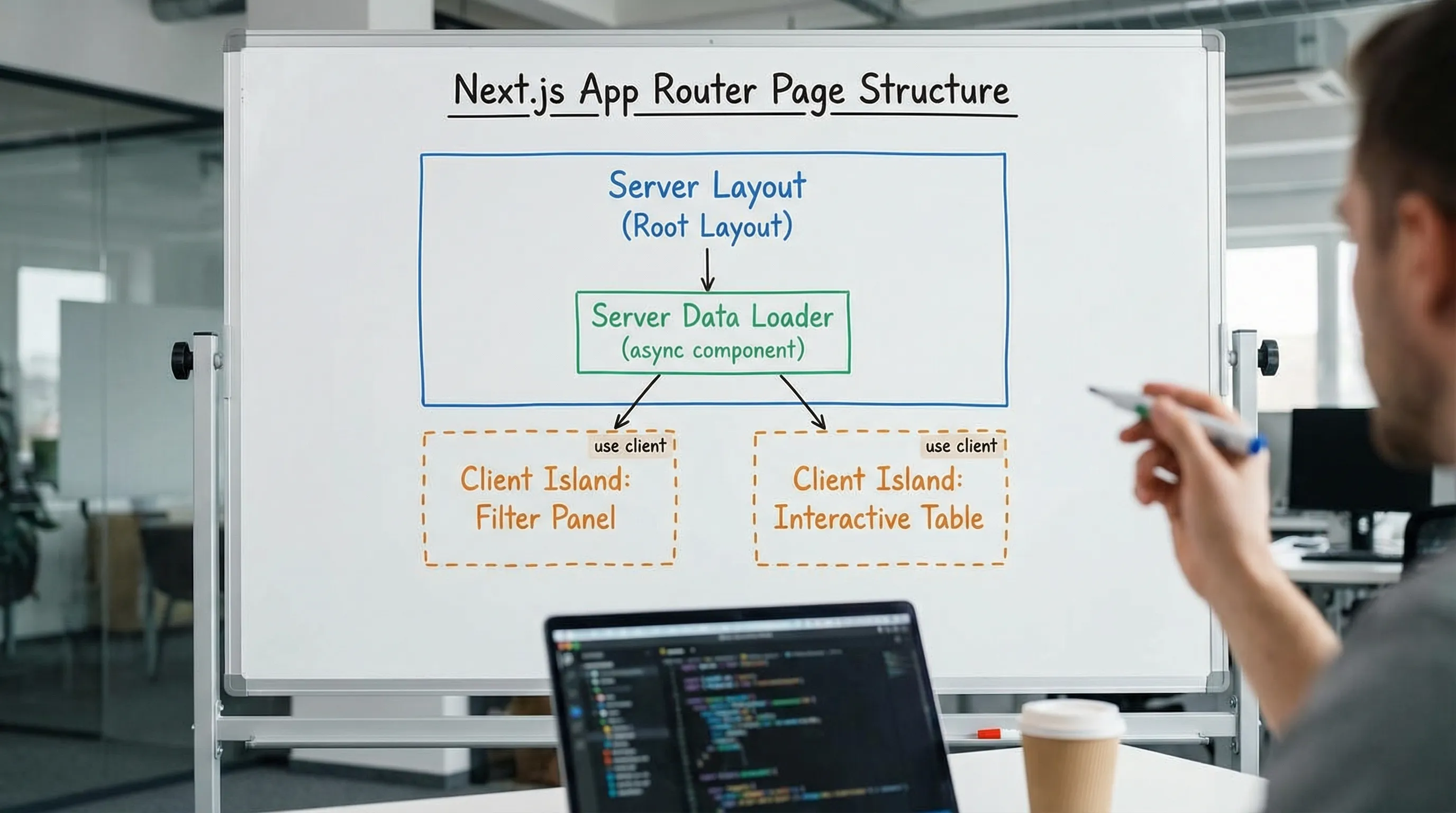
A safe boundary pattern is “server shell with client islands”:
- Keep layout, data loading, and authorization checks on the server.
- Isolate interactive widgets (filters, editors, complex forms) as client components.
For a focused deep dive, see: React Next JS: When to Use Server Components.
6) Watch for React 18 automatic batching changes
React 18 batches state updates more consistently, including in more async contexts. That is generally good for performance, but it can reveal assumptions in code that depended on immediate state flushes.
Symptoms you might see:
- A loading spinner appears later than before
- A validation state lags behind user input
- A toast fires before UI updates (ordering differences)
Safer patterns:
- Use
startTransitionfor non-urgent updates (filtering, list refreshes). - Keep urgent UI updates (typing responsiveness) outside transitions.
import { startTransition, useState } from 'react'

function Search() {
  const [query, setQuery] = useState('')
  const [filter, setFilter] = useState('')

  return (
    <input
      value={query}
      onChange={e => {
        const next = e.target.value
        setQuery(next)
        startTransition(() => setFilter(next))
      }}
    />
  )
}
7) External stores and subscriptions: prefer useSyncExternalStore
If you have custom stores or subscriptions (common in legacy apps), React 18’s concurrency can expose tearing and inconsistent reads.
Signals you need to review store integration:
- You subscribe to a store with
store.subscribeand set state manually - You have homegrown global state outside React
- You rely on event emitters to update UI
React 18’s intended integration point is useSyncExternalStore. Many mature state libraries have already adopted it, but custom wrappers often have not.
8) Data fetching pitfalls: avoid waterfalls and ambiguous caching
React 18 and modern Next encourage more flexibility in when and where data is fetched, but migrations often regress performance via:
- Server-side waterfalls (awaiting sequential requests)
- Re-fetching the same data in multiple components
- Caching assumptions changing between routes
Two practical rules during migration:
- Make the critical data path explicit per route (what must be ready to render above the fold).
- Decide caching per data type (public content vs user-specific vs tenant-specific). Never “accidentally cache” authenticated data.
If you want a broader production baseline, Wolf-Tech’s scaling practices are here: Next.js Best Practices for Scalable Apps.
9) Testing and CI: update your safety nets before refactoring
Migrations fail when teams upgrade dependencies first, then realize their tests were not detecting regressions.
Minimum recommended safety net (especially for SSR apps):
- A small set of Playwright end-to-end tests for top user flows
- Component and hook tests for the most complex UI logic
- A lint rule set that catches unsafe patterns (effects, stale dependencies)
If you need an opinionated testing/tooling baseline, see: React Tools: The Essential Toolkit for Production UIs.
Common pitfalls (with symptoms and fixes)
| Pitfall | What you see | Typical fix |
|---|---|---|
| Strict Mode exposes side effects | Duplicate analytics calls, duplicate API calls in dev | Make effects idempotent, move work out of render |
| Hydration mismatch | Warnings, flicker, broken event handlers on first load | Remove browser-only reads from render, use useId, isolate client-only widgets |
| Duplicate React versions | “Invalid hook call” errors | Deduplicate dependencies, fix monorepo hoisting, align peer deps |
Overusing "use client" | Bigger bundle, slower pages, fewer caching wins | Move "use client" down, keep server composition |
| Store subscription tearing | UI shows inconsistent state under load | Adopt useSyncExternalStore integration |
| Waterfalls introduced during refactor | Higher TTFB, slower navigation | Parallelize requests, consolidate loading at route level |
| Auth or tenant caching mistakes | Users see wrong data, security incident | Separate caching by audience, avoid caching personalized data |
A pragmatic migration plan you can actually execute
Here is a low-drama plan that works well for teams that must keep shipping.
Migration sprint scope (1 to 2 weeks)
- Pick 3 to 5 representative routes (public, authenticated, data-heavy, interactive).
- Upgrade dependencies in a branch, then stabilize those routes first.
- Add targeted instrumentation to compare error rates and performance before and after.
Rollout controls (don’t skip these)
- Feature flags for risky UX and data changes.
- Canary rollout (small percentage of traffic) if your deployment platform supports it.
- A defined rollback procedure (including database and API compatibility expectations).
If this feels like “extra process,” it is cheaper than debugging a migration in production without observability. Wolf-Tech’s broader delivery approach is summarized in Build Stack: A Simple Blueprint for Modern Product Teams.

When to bring in help
You likely do not need external help for a small app with minimal dependencies. You should consider an expert review if you have one or more of these:
- A multi-year codebase with uneven patterns and many third-party UI dependencies
- SSR hydration issues that are hard to reproduce
- Multi-tenant or regulated requirements where caching mistakes are unacceptable
- A planned App Router adoption while keeping release velocity
Wolf-Tech does full-stack development and code quality consulting, including legacy modernization and safe framework migrations. If you want a fast, evidence-based plan, start with an architecture and migration risk review at Wolf-Tech.
Frequently Asked Questions
Do I need to migrate to the App Router to use React 18 in Next.js? No. React 18 can be used without a full App Router migration. Many teams upgrade React and Next first, then adopt App Router incrementally.
Why does React 18 call effects twice in development? In Strict Mode (development), React re-invokes certain logic to surface unsafe side effects. This helps you find bugs that can become real issues under concurrent rendering.
What is the most common Next JS React 18 migration bug in production? Hydration mismatches. They can be intermittent and route-specific, especially when code reads browser-only values during render or produces non-deterministic HTML.
How do I reduce risk if my app has lots of third-party UI libraries? Do a dependency audit first, upgrade and validate the most complex routes in a thin vertical slice, and add end-to-end coverage before deep refactors.
Should we upgrade React 18 and Next.js in one PR? Only if the app is small and your safety net is strong. For most production apps, splitting the work into staged upgrades reduces downtime risk and makes regressions easier to isolate.
Need a safe Next.js and React 18 migration plan?
If you want to upgrade without losing weeks to hydration bugs, bundle regressions, or broken production flows, Wolf-Tech can help you plan and execute a controlled migration. Bring your current repo, your target outcomes (performance, maintainability, shipping speed), and your constraints, and we will map a staged upgrade path with risk controls.
Explore Wolf-Tech’s approach at wolf-tech.io or read the companion guide: Next JS React: App Router Patterns for Real Products.