
Web Development Front End: Deliverables That Prove Quality

Sandor Farkas
Founder & Lead Developer
Expert in software development and legacy code optimization
LinkedIn
Front end work is often judged by how the UI looks in a demo. That is the lowest-signal way to assess quality. A beautiful screen can still ship with fragile state, slow interactions, accessibility gaps, and a release process that breaks every other Friday.
If you want predictable outcomes from web development front end work, ask for deliverables that prove quality through evidence. Evidence is hard to fake. It can be re-run, re-measured, and re-verified by someone other than the original developer.
This article gives you a practical set of “quality proofs” you can require from a team, a vendor, or even your own engineering org, without prescribing a specific framework.
What “quality” means in web development front end (in measurable terms)
Quality is not a vibe. It is a small number of risks that are actively controlled:
- Users cannot complete key tasks (functional correctness).
- The UI is slow or unstable on real devices (performance and Core Web Vitals).
- People are excluded (accessibility).
- Changes cause regressions (change safety).
- Incidents are hard to detect or diagnose (operability).
- The browser becomes an attack surface (security and supply chain).
A useful way to align stakeholders is to map each quality dimension to signals and proof artifacts.
| Quality dimension | What you can measure | Proof deliverables you can request |
|---|---|---|
| Functional correctness | Pass rate of automated checks, defect escape rate | CI test report, minimal E2E smoke suite results, reproducible build |
| Performance | Core Web Vitals, bundle size, route timings | Performance budget, Lighthouse report, Web Vitals/RUM baseline |
| Accessibility | Conformance targets, issues by severity | WCAG-based audit notes, automated scan output, keyboard-only walkthrough |
| Change safety | PR size/latency, flake rate, regression rate | Lint/type gates, test strategy doc, release notes and rollback plan |
| Operability | Front end error rate, alert coverage, MTTR | Error tracking setup, dashboards, runbook for UI incidents |
| Security | Vulnerability age, dependency risk, XSS exposure | Dependency scan output, security headers/CSP evidence, threat notes |
If you only get “source code” and “a deployed URL,” you are missing the evidence that makes quality verifiable.
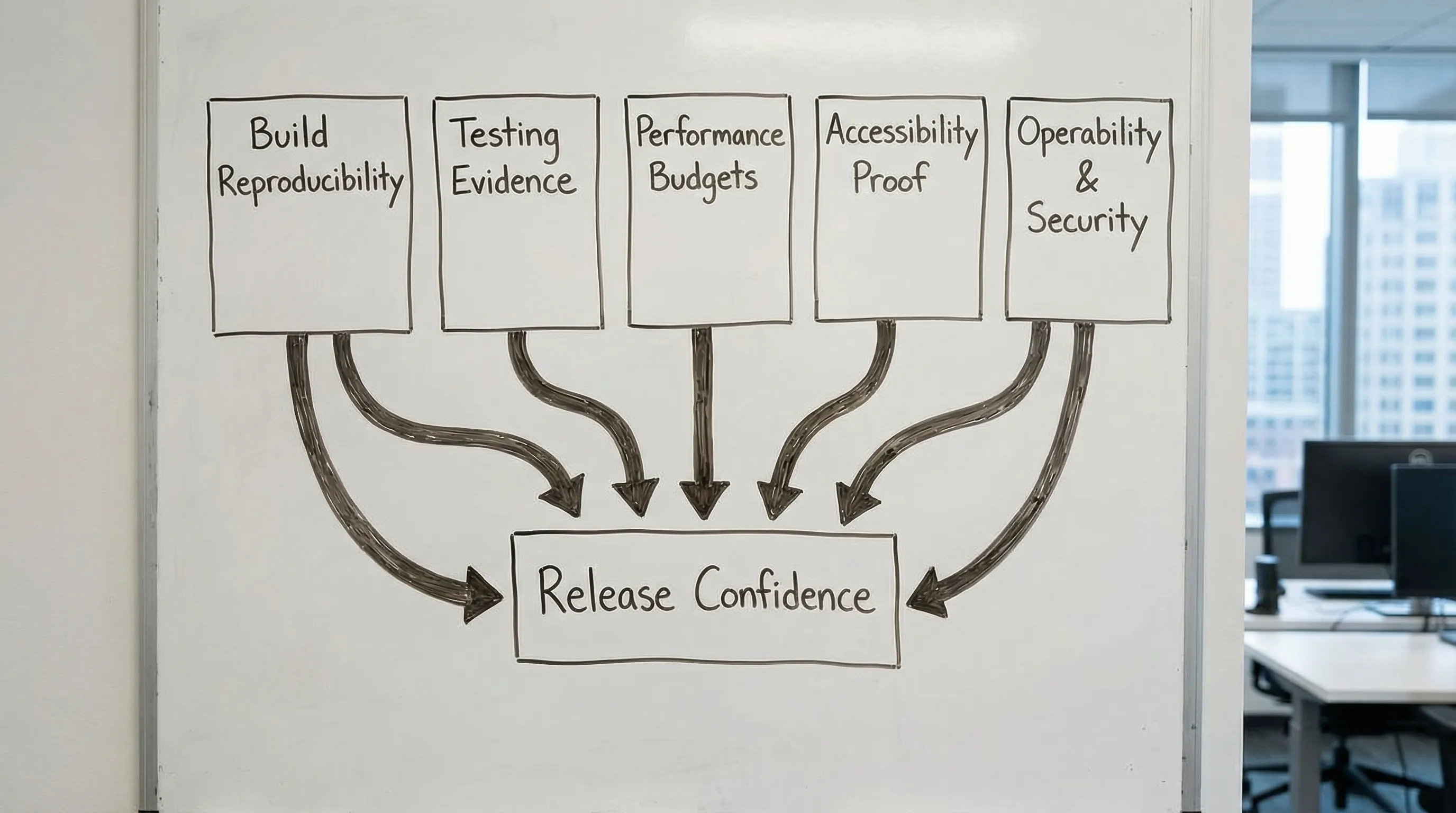
The Front End Quality Evidence Pack (what to ask for)
Think of a Front End Quality Evidence Pack as a lightweight dossier that can be attached to:
- A sprint review
- A release candidate
- A handover to an internal team
- A vendor milestone payment
It does not need to be heavy documentation. It needs to be runnable, checkable artifacts.
1) Reproducible build and “works on a clean machine” proof
A surprising amount of front end risk comes from non-reproducible builds: unpinned dependencies, undocumented environment variables, inconsistent Node versions, and manual release steps.
Ask for these deliverables:
- A repository that builds from a clean checkout in CI (not “on my laptop”).
- A pinned runtime and dependency story (Node version, lockfile, single package manager).
- A short build/run README that includes environment variables and how to run checks.
- A CI pipeline run showing build, lint, typecheck, and tests.
Fast verification you can do: clone the repo, run the documented command(s), and confirm you can produce the same build output. If you cannot, quality is already compromised.
Related Wolf-Tech reading: JS code quality checklist and Dev React setup.
2) UI contract evidence (components, states, and edge cases)
Front ends fail in the cracks: loading states, partial permissions, stale data, offline-ish behavior, and error handling. A UI that only describes “happy path screens” is not production-ready.
Ask for deliverables that make UI behavior explicit:
- A component inventory with defined states (loading, empty, error, permission denied, partial data).
- A documented “UI state model” for critical journeys (for example, checkout, onboarding, invite flow).
- A decision log for key UX-engineering trade-offs (for example, optimistic updates vs server-confirmed, pagination strategy, caching).
This does not require a specific tool, but in practice many teams use Storybook or an equivalent component sandbox because it turns “we built components” into something inspectable.
If you want a broader alignment loop between UX and engineering, Wolf-Tech’s “handshake” concept is useful: Web application designing: UX to architecture handshake.
3) Testing evidence that matches your risk (not just a test folder)
A test suite is only valuable if it answers, “What can break, and how will we know quickly?”
Ask for:
- A one-page test strategy that states what is covered by unit/component tests, what is covered by integration checks, and what is reserved for a minimal E2E smoke suite.
- A CI test report (pass/fail, duration, and trend over time).
- A flake management stance (what is considered flaky, how it is quarantined and fixed).
Avoid the common trap of demanding “100% coverage.” Coverage is a signal, not proof. Better proof is “critical flows are protected by stable automated checks,” plus evidence that checks run on every pull request.
If you are using React, Wolf-Tech’s production-focused patterns can help teams avoid test-hostile architecture: React tutorial: build a production-ready feature slice.
4) Performance budgets with a baseline (so regressions are visible)
Performance is a product requirement, and front ends regress silently without budgets.
Ask for:
- A route-level performance budget (for example, bundle size targets, image policy, and Web Vitals targets).
- A baseline measurement using lab tools (Lighthouse) and ideally field data (Real User Monitoring).
- A regression guardrail in CI (even a simple Lighthouse CI threshold) for key routes.
For Core Web Vitals definitions and measurement guidance, use Google’s documentation on web.dev.
Wolf-Tech’s practical guide for diagnosis and fixes: React website performance: fix LCP, CLS, and TTFB.
5) Accessibility proof tied to a standard
Accessibility is not “we tried.” It is evidence against a recognized standard.
Ask for:
- A target level and scope (commonly WCAG 2.2 AA, depending on industry and legal exposure).
- Automated scan output (for example, axe) plus manual notes for keyboard navigation and screen reader basics.
- A “critical journey accessibility pass” (login, signup, checkout, key dashboard workflows).
WCAG is maintained by W3C, start at the official WCAG overview.
A practical buyer stance: you are not trying to “finish accessibility forever,” you are requiring an evidence trail and repeatable checks that prevent backsliding.
6) Security and dependency risk evidence (front end is an attack surface)
Modern front ends ship a large dependency graph to end users. They also handle tokens, PII-adjacent data, and complex browser behavior.
Ask for deliverables such as:
- Dependency vulnerability scan output (SCA) and a patching policy (how fast critical issues are addressed).
- Evidence of basic browser protections where applicable (CSP, security headers, safe cookie usage, CSRF strategy if relevant).
- A short “front end threat notes” section for high-risk surfaces (auth flows, file upload UI, rich text, third-party scripts).
OWASP’s Top 10 is a good shared vocabulary for risk conversations.
7) Operability: how you detect and debug UI failures in production
A front end is part of production operations. If it breaks, users are stuck. If it becomes slow after a deploy, you need to know quickly.
Ask for:
- Error tracking evidence (tool-agnostic): release tags, environment separation, and actionable grouping.
- A minimal front end dashboard: error rate, route timings or Web Vitals, and deploy markers.
- A runbook snippet for front end incidents: how to roll back, how to turn off risky features (feature flags), where logs live.
This shifts the conversation from “we delivered the UI” to “we can operate the UI.” That is where quality becomes real.
A quick verification table (how to tell if the deliverable is real)
Use this as a practical review checklist in a milestone review.
| Deliverable | Quick verification question | What a good answer looks like |
|---|---|---|
| Reproducible build | Can I build from a clean checkout in CI? | One command, same output, no tribal knowledge |
| Test evidence | Are critical journeys protected by stable checks? | CI report, smoke E2E, clear ownership of flakes |
| Performance budget | Do we have targets and a baseline? | Documented budgets plus Lighthouse/RUM numbers |
| Accessibility proof | Is it aligned to WCAG and re-checkable? | Audit notes, automated scan output, keyboard pass |
| Dependency/security evidence | Do we scan and patch? | Scan output, policy, and remediation cadence |
| Operability | Will we know within minutes if a release broke UX? | Error tracking with release tags, dashboards, runbook |
If a team responds with opinions (“it’s fast,” “it’s accessible,” “we write tests”), redirect to the artifact.
How to turn quality proofs into acceptance criteria (SOW or Definition of Done)
Quality deliverables work best when they are written as acceptance criteria, not aspirations.
| Area | Acceptance criterion example (adapt to your context) |
|---|---|
| Build | CI pipeline runs on every PR, produces an artifact, and fails on lint/type errors |
| Tests | A defined smoke suite covers critical journeys and runs in CI on main branch |
| Performance | A documented budget exists, and key routes meet thresholds in CI and after release |
| Accessibility | Critical journeys pass keyboard navigation checks and are evaluated against WCAG targets |
| Security | Dependency scanning runs in CI, critical vulnerabilities have a defined fix SLA |
| Operability | Front end error tracking is configured with release tags and a rollback path is documented |
Two practical tips:
- Require “proof per increment,” not only at the end. Quality is easiest when baked into every PR.
- Keep criteria testable by a third party. If only the original developer can confirm it, it is not a good acceptance criterion.
Red flags that predict low-quality front end delivery
These patterns tend to correlate with fragile outcomes:
- “We will add tests later” with no concrete plan or CI gate.
- No performance baseline, no budgets, no regression checks.
- Accessibility treated as a final polish step, not an acceptance criterion.
- Releases are manual, undocumented, or depend on one person.
- No evidence of production monitoring for front end errors and regressions.
- A large dependency footprint with no scanning or patch policy.
If you see these early, you can still fix the engagement by shifting from “outputs” to “proof artifacts.”
Where Wolf-Tech fits
Wolf-Tech works across full-stack development and consulting, including front end architecture, code quality, legacy optimization, and delivery systems. If you want an independent review of a vendor’s front end deliverables, or you want to standardize “quality proofs” across teams, a short evidence-based assessment is often the fastest path to clarity.
If you want more tactical checklists that complement this evidence pack approach, these guides are good next steps:
- Front end development checklist for reliable UI releases
- React tools: the essential toolkit for production UIs
- Code quality metrics that matter
Quality becomes predictable when it is provable. The deliverables above are how you make “front end quality” something you can actually buy, review, and operate.