
React for Front End: A Practical Architecture Blueprint

Sandor Farkas
Founder & Lead Developer
Expert in software development and legacy code optimization
LinkedIn
Most React front ends don’t fail because “React can’t scale.” They fail because the codebase never gets an explicit architecture, so everything becomes a one-off: data fetching is inconsistent, state lives in random places, shared components turn into a dependency mess, and performance regressions ship quietly.
This blueprint is a practical way to design (or reset) a production React front end so it stays easy to change as the product, team size, and traffic grow.
What this blueprint is (and is not)
This is a front-end architecture baseline you can apply to:
- a React SPA (commonly Vite + React + a separate backend API)
- a React meta-framework (Next.js, Remix, etc.) where React is still your UI architecture
It is not a replacement for deeper framework-specific guidance (for example, Next.js caching and routing choices). Instead, it defines the seams that keep your front end predictable regardless of tooling.
If you want a deeper dive into state and routing mechanics, see Wolf-Tech’s companion guide: React Application Architecture: State, Data, and Routing.
The core idea: treat the front end like a system with contracts
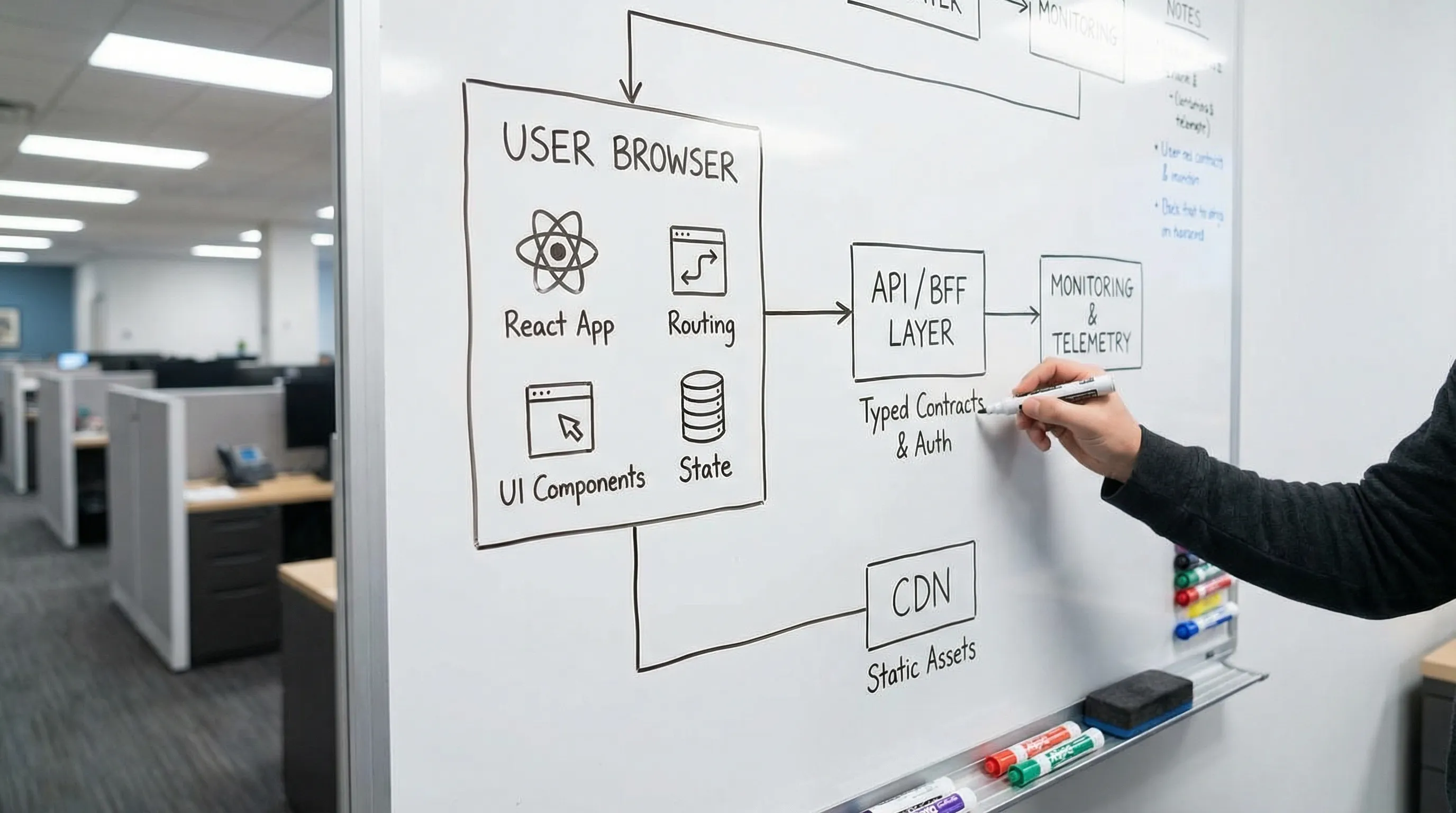
A “React app” in production is not just components. It’s a system that includes:
- contracts with APIs (and auth)
- an internal module graph (boundaries)
- a state model
- error handling and resilience
- performance budgets
- delivery and observability
If you make those explicit early, your team stops debating style and starts shipping.
Blueprint Step 1: draw the boundary line (UI vs business rules)
A reliable default is:
- Frontend owns interaction, composition, presentation, optimistic UI, accessibility, and client-side resilience.
- Backend owns business rules, authorization decisions, data consistency, and auditability.
When that boundary is fuzzy, teams re-implement rules in React (and then spend months fixing inconsistencies).
Make API contracts first-class
Whatever protocol you use (REST, GraphQL, tRPC-style), your front end should consume versioned, typed contracts. In 2026, the practical baseline is:
- TypeScript for compile-time safety
- runtime validation for external inputs (for example, with Zod) so “unknown JSON” does not leak into your UI
| Contract approach | Best when | Watch-outs |
|---|---|---|
| OpenAPI (REST) | Broad tooling support, many consumers, clear caching semantics | Easy to drift without contract tests and changelogs |
| GraphQL | UI needs flexible selection, aggregation, multiple backends | Query cost control, caching complexity, authorization rigor (field-level) |
| Typed RPC (shared types) | Single product org, speed, strong end-to-end typing | Cross-team coupling, versioning discipline needed |
If your API surface is already complex, Wolf-Tech’s GraphQL APIs: Benefits, Pitfalls, and Use Cases is a good fit-focused reference.
Blueprint Step 2: choose a module strategy that prevents “shared folder soup”
The highest-leverage architectural choice in React is your module graph. A scalable default is:
- organize by feature modules (not by file type)
- keep a thin shared layer (UI primitives and cross-cutting utilities)
- enforce dependency direction (features can depend on shared, not the other way around)
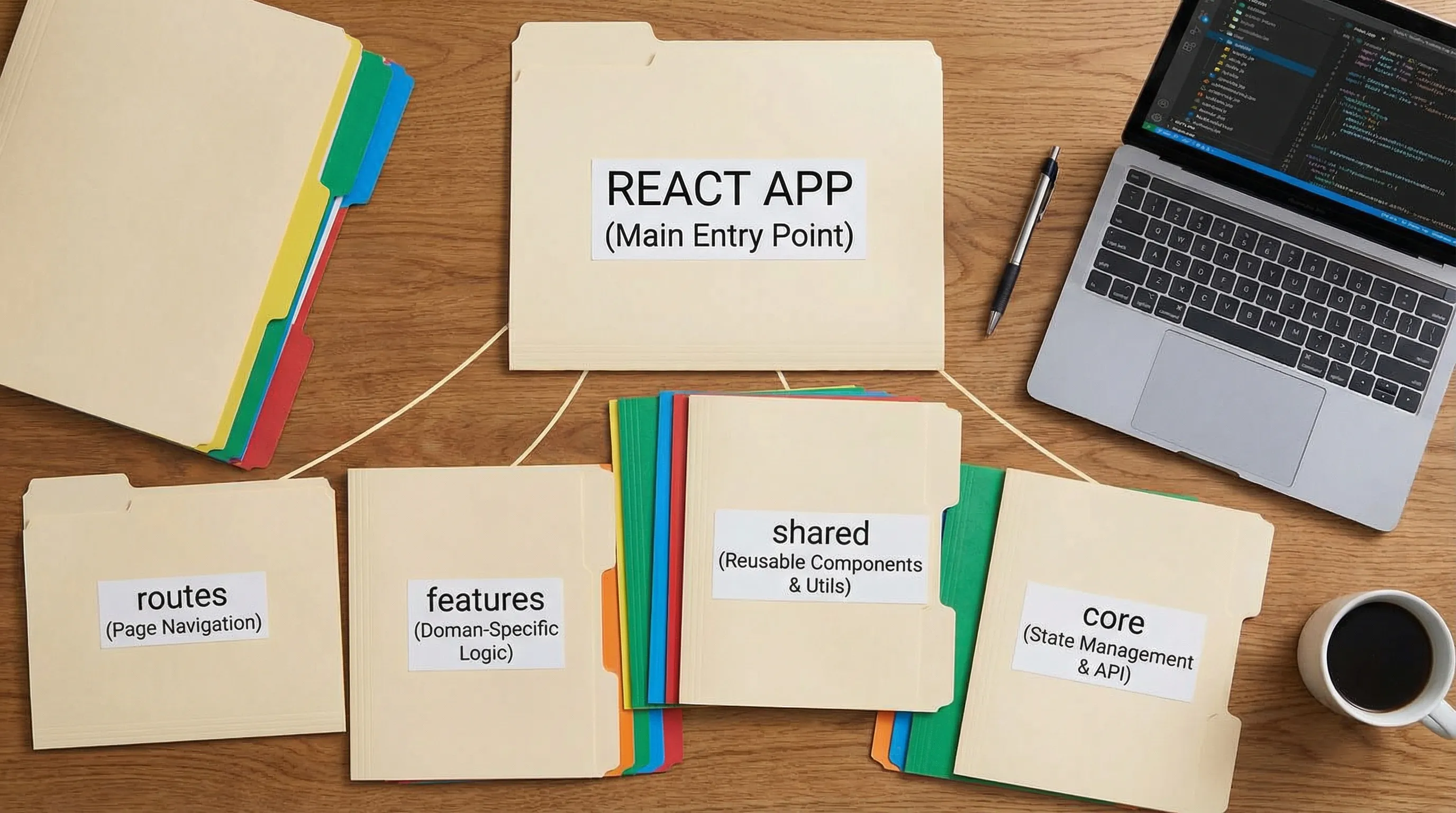
A practical folder layout (works for Vite or most frameworks)
src/
  app/                 # app shell: router, providers, global error boundary
  routes/              # route entries (composition and orchestration)
  features/            # feature modules (each owns UI + hooks + API adapters)
  shared/              # design system components, tokens, small reusable utilities
  core/                # cross-cutting services: auth client, telemetry, http client
This is intentionally boring. The value is that it gives every file a “home” with predictable responsibilities.
Define module responsibilities (and keep routes thin)
Routes should mostly orchestrate: choose a layout, compose feature components, and attach route-level boundaries (auth, error handling, code splitting). Features should do most of the work.
| Layer | Owns | Must not own |
|---|---|---|
routes/ | composition, route-level loaders, route error boundaries | business logic, reusable UI abstractions |
features/<x>/ | domain UI, feature hooks, feature-specific state, API adapters | app-wide globals, other features’ internals |
shared/ | design system primitives, small utilities | product-specific workflows, data fetching |
core/ | auth, http client, telemetry, configuration | feature UI and page composition |
If you already have a messy module graph, Wolf-Tech’s React Front End Architecture for Product Teams goes deeper into incremental cleanup patterns.
Blueprint Step 3: adopt a state model you can explain in 60 seconds
Most React complexity is “state confusion.” Fix that by explicitly recognizing four state types and assigning each a home.
| State type | What it represents | Good default | Common mistake |
|---|---|---|---|
| Server state | remote data, caches, invalidation, retries | TanStack Query (or similar) | storing API responses in useState and re-building caching manually |
| URL state | filters, pagination, sort, selected IDs | Router search params | keeping UI filters only in component state (breaks shareable URLs) |
| Form state | inputs, validation, submission, errors | React Hook Form + schema validation | duplicating validation rules across UI and API |
| UI state | modals, tabs, local view toggles | local state, useReducer, small store when needed | putting everything in a global store “just in case” |
A useful rule: default to local state until you can name why it must be shared.
For practical patterns around effects and data fetching, see: React Using Patterns: State, Effects, and Data Fetching.
Blueprint Step 4: standardize the data-loading lifecycle
In production, “data fetching” is not just fetch(). It is a user experience contract:
- loading state should be intentional (skeleton, spinner, or keep previous data)
- errors must be actionable (retry, support info, correlation ID if you have one)
- empty states should be designed (not accidental)
- cancellation and race conditions must be handled
A simple team standard that pays off is to normalize UI states per screen or widget:
loadingerroremptysuccess
If you use a server-state library, codify when you:
- invalidate vs patch the cache after mutations
- allow stale data vs force refetch
- prefetch likely next screens
This avoids the “every developer invents their own loading rules” problem.
Blueprint Step 5: make component architecture an API design problem
Your component library is an internal product. If you treat it like a random pile of reusable JSX, it becomes the biggest source of coupling in the repo.
Two practical rules:
- Components should have stable, testable contracts. Inputs and outputs should be clear, and accessibility behaviors should be part of the API.
- Prefer composition over configuration. If a component has 30 props, it is often hiding multiple responsibilities.
If your team maintains large shared components (DataGrid, Wizard, AppShell), Wolf-Tech’s guide Front End React Patterns for Large, Shared Components covers concrete patterns (headless core, compound components, controlled/uncontrolled contracts) that reduce long-term pain.
Blueprint Step 6: set performance budgets that the team can enforce
“Optimize later” usually means “ship a slow app and then debate opinions.” A better default is to set small budgets and wire them into development.
At minimum, pick budgets for:
- route bundle size (or a proxy like total JS per route)
- Core Web Vitals targets relevant to your app (LCP, CLS, INP)
Then ensure you have:
- route-level code splitting
- predictable data access (avoid waterfall requests)
- guardrails for expensive components (virtualize large lists, avoid unnecessary rerenders)
For a practical, metric-driven workflow, see: React Website Performance: Fix LCP, CLS, and TTFB.
Blueprint Step 7: bake in “change safety” with a minimal test and quality stack
Front ends break in production for the same reasons back ends do: untested changes, unclear contracts, and missing rollback signals.
A pragmatic baseline is:
- fast unit or component tests for business-critical UI logic
- a small number of end-to-end smoke tests for your most important journeys
- automated gates in CI (typecheck, lint, tests)
To avoid cargo-cult testing, make it outcome-driven: tests should protect revenue flows, permissions, and critical workflows.
Wolf-Tech’s JS Code Quality Checklist: Lint, Types, Tests, CI is a practical “minimum viable gates” reference.
Blueprint Step 8: make operability visible (errors, releases, and user experience)
If your front end has no telemetry, outages look like “random user complaints.” A production baseline typically includes:
- client-side error tracking (with release tags)
- basic front-end performance monitoring (Web Vitals)
- correlation between UI errors and backend incidents (where possible)
Also decide how you will release:
- reversible deployments (roll back fast)
- progressive rollout where risk is high (feature flags, staged exposure)
If you want a broader reliability checklist, Wolf-Tech’s Front End Development Checklist for Reliable UI Releases is a good operational companion.
The “Minimum Viable React Architecture” (MVRA) checklist
If you need a fast baseline (for a new repo, a rewrite avoidance reset, or a team standard), aim to complete the following within your first 1 to 2 sprints.
| Area | What “done” looks like | Proof you can ask for |
|---|---|---|
| Module boundaries | feature-first structure + thin shared layer | dependency rule (lint or convention) and a clear folder map |
| State model | server vs URL vs form vs UI state conventions | examples in 1 to 2 real features, not just docs |
| Contracts | typed API client + runtime validation at the boundary | one feature slice uses schema validation end-to-end |
| Data lifecycle | standard loading/error/empty/success patterns | consistent UX across screens, no bespoke spinners |
| Performance | route-level code splitting + at least one budget | bundle report or budget check in CI |
| Quality gates | lint + typecheck + tests run on every PR | CI pipeline evidence and “red builds block merge” |
| Operability | error tracking wired with release tags | ability to answer: “what broke in the last release?” |
If you prefer a guided, hands-on example, Wolf-Tech’s React Tutorial: Build a Production-Ready Feature Slice demonstrates how these ideas look in a real slice.
Frequently Asked Questions
Do I need Next.js for a production React front end? Not always. If you need SEO, fast public landing pages, or framework-managed data loading, a meta-framework can be a strong default. For authenticated internal apps (dashboards, tools), a React SPA can be simpler to operate. The key is to keep the same architecture seams (modules, state, contracts) either way.
Should we use Redux (or a global store) by default? No. Default to local state plus a server-state library for remote data. Add a global store only when you can name a real sharing need (cross-route UI state, complex workflows, offline queues). Overusing global state is a common coupling trap.
What is the single most important architecture rule for React apps? Enforce a module graph that prevents everything from importing everything. Feature-first modules with a thin shared layer usually deliver the best long-term change safety.
How do we stop the “shared components” folder from becoming a dumping ground? Treat shared UI as a product: stable APIs, deprecation rules, and a clear boundary. If something is only used by one feature, keep it in that feature until it has multiple proven consumers.
How do we adopt this blueprint in an existing codebase without a rewrite? Start with one high-change area, carve out a feature module, standardize its state and data-loading patterns, and add one or two enforcement mechanisms (lint rules, import conventions, CI gates). Then repeat. Architecture improves through migration, not declarations.
Want a second set of eyes on your React front end architecture?
If you’re scaling a React codebase (or inheriting a messy one), a short architecture review often finds the real blockers: unclear boundaries, inconsistent data lifecycle, missing quality gates, and performance regressions that are hard to reproduce.
Wolf-Tech provides full-stack development and consulting across React front ends, code quality, legacy optimization, and delivery systems. If you want help defining a pragmatic baseline or an incremental modernization plan, reach out at wolf-tech.io.